







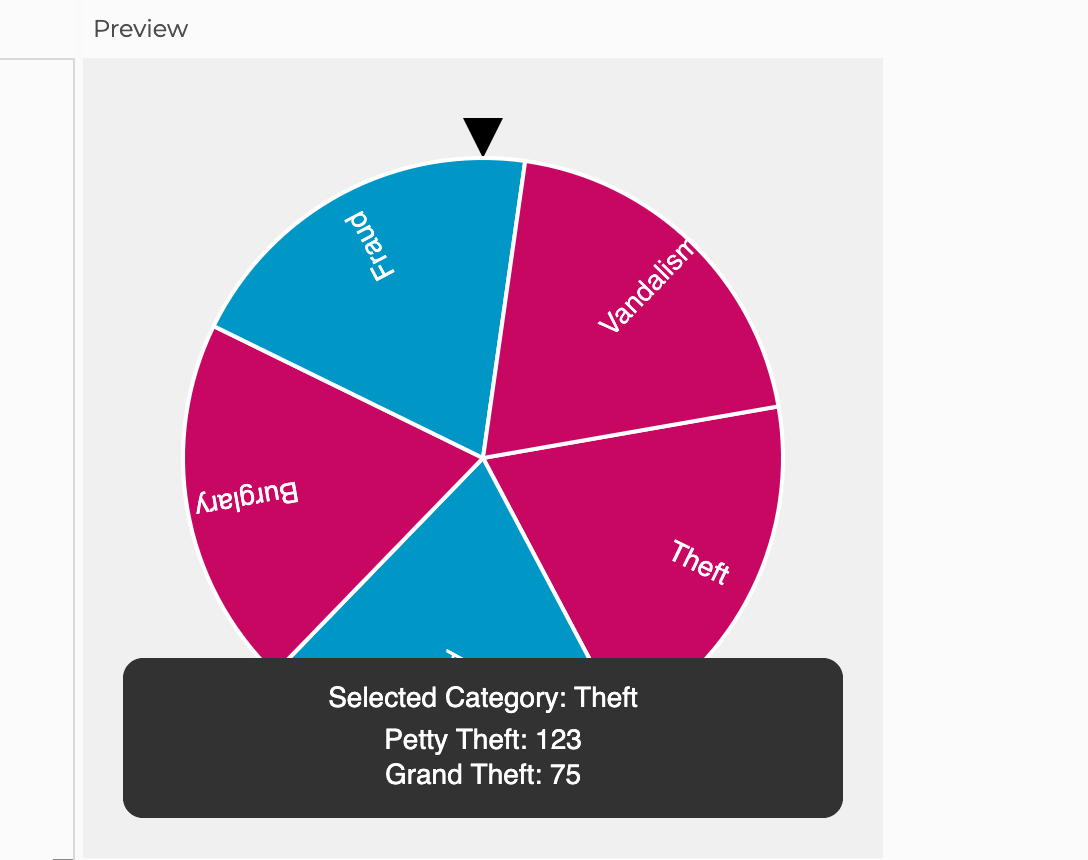
Question: how to i fix my code on p 5 . js so that the blurb that pops up lines up with the type of crime
how to i fix my code on pjs so that the blurb that pops up lines up with the type of crime the pointer lands on in the pic i attached, it shows the pointer landed on fraud but its displaying stats for theft. here is my code:
let angle ; Current angle of the wheel
let targetAngle ; Target angle for stopping
let spinning false; Is the wheel spinning?
let easing ; Deceleration rate
let categories Theft "Assault", "Burglary", "Fraud", "Vandalism";
let data ; Object to store specific crime data
let selectedCategory null;
function preload
Simulated data
dataTheft
type: "Petty Theft", count:
type: "Grand Theft", count:
;
dataAssault
type: "Aggravated Assault", count:
type: "Simple Assault", count:
;
dataBurglary
type: "Residential Burglary", count:
type: "Commercial Burglary", count:
;
dataFraud
type: "Identity Theft", count:
type: "Credit Card Fraud", count:
;
dataVandalism
type: "Graffiti", count:
type: "Property Damage", count:
;
function setup
createCanvas;
angleModeDEGREES;
textAlignCENTER CENTER;
function draw
background;
Draw the stationary pointer
fill;
trianglewidth width width ;
Move to center and rotate the wheel
translatewidth height ;
rotateangle;
Draw the wheel
let segmentAngle categories.length;
for let i ; i categories.length; i
let startAngle i segmentAngle;
let endAngle startAngle segmentAngle;
filli color : color;
stroke;
strokeWeight;
arc startAngle, endAngle, PIE;
push;
rotatestartAngle segmentAngle ;
fill;
noStroke;
textcategoriesi;
pop;
Update angle if spinning
if spinning
let delta targetAngle angle;
angle delta easing;
Stop spinning when close enough
if absdelta
spinning false;
angle targetAngle ;
calculateSelectedCategory;
Reset rotation for overlay
rotateangle;
translatewidth height ;
Display selected category and data
if selectedCategory
displayData;
function keyPressed
if key
if spinning
spinning true;
targetAngle angle random; Random spin between full rotations
else if key r
angle ;
spinning false;
selectedCategory null;
function calculateSelectedCategory
let segmentAngle categories.length;
let normalizedAngle angle ; Normalize to
let index floornormalizedAngle segmentAngle;
selectedCategory categoriesindex;
function displayData
fill;
noStroke;
rect;
fill;
textSize;
textSelected Category: $selectedCategory;
let details dataselectedCategory
mapitem $itemtype: $itemcount
join
;
textdetails;
Preview
Grand Ineit:
Step by Step Solution
There are 3 Steps involved in it
1 Expert Approved Answer
Step: 1 Unlock

Question Has Been Solved by an Expert!
Get step-by-step solutions from verified subject matter experts
Step: 2 Unlock
Step: 3 Unlock
 Study Help