







Question: How to make C++ code work? This is suppose to be a C++ NIM code where you take sticks and you can choose between Computer
How to make C++ code work?
This is suppose to be a C++ NIM code where you take sticks and you can choose between Computer and Player, but for sum reason computer goes no mateter what and Player never can go. Any advise?
#include
char firstplayer; bool validPlayer = false;
bool currentPlayer; int nimsticks; int currentPlayerMove;
bool validHumanMove; int idealmove;
cout
do{ cout > firstplayer;
switch (firstplayer) { case 'p': case 'P': validPlayer = true; currentPlayer = Human_player; break;
case 'c': case 'C': validPlayer = true; currentPlayer = Computer_player; break; default: cout
while (nimsticks != 0) {
cout
validHumanMove = false; do { cout > currentPlayerMove; validHumanMove = (currentPlayerMove >= 1) && (currentPlayerMove
idealmove = (nimsticks % 5);
if (idealmove == 0) { currentPlayerMove = 1; } else { //ideal move currentPlayerMove = idealmove; }
cout
nimsticks -= currentPlayerMove;
if (nimsticks == 0) {
if (currentPlayer == Human_player) { cout
cout
return 0; }
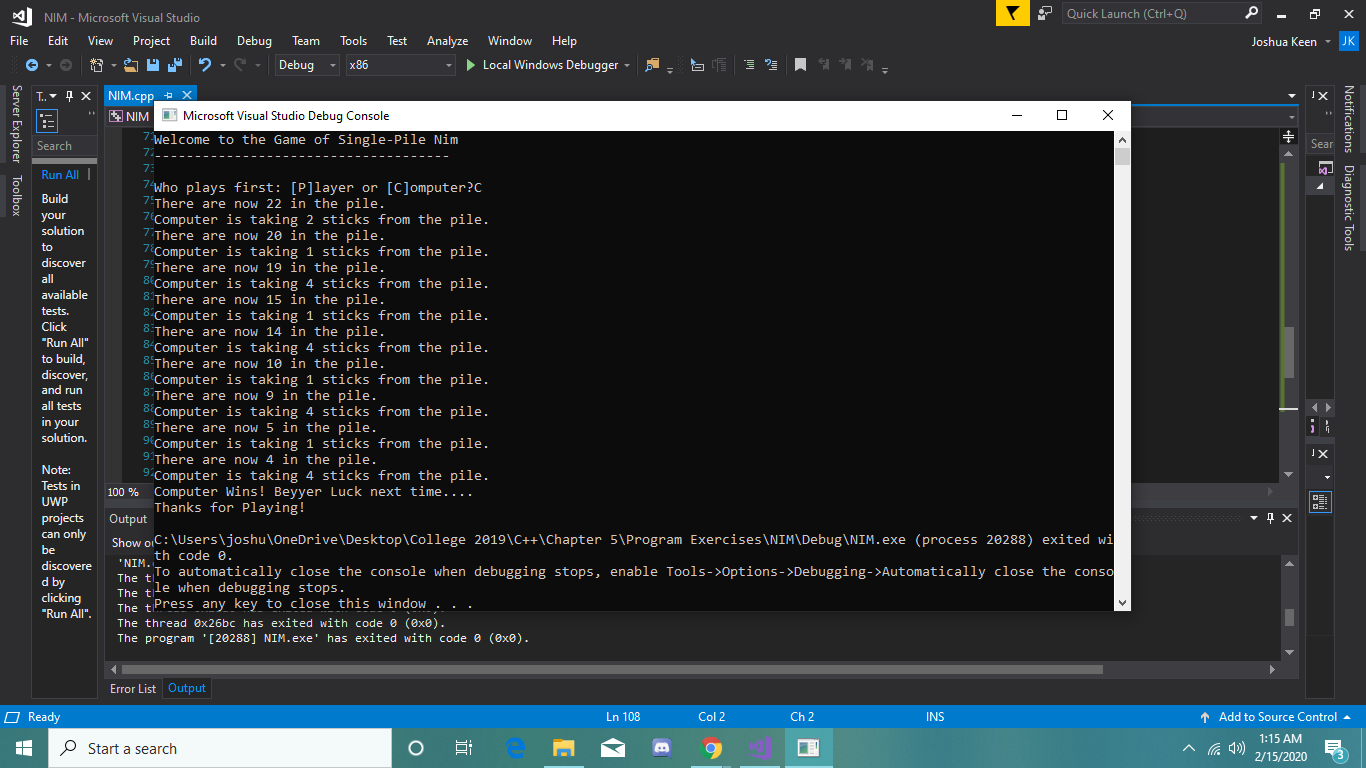
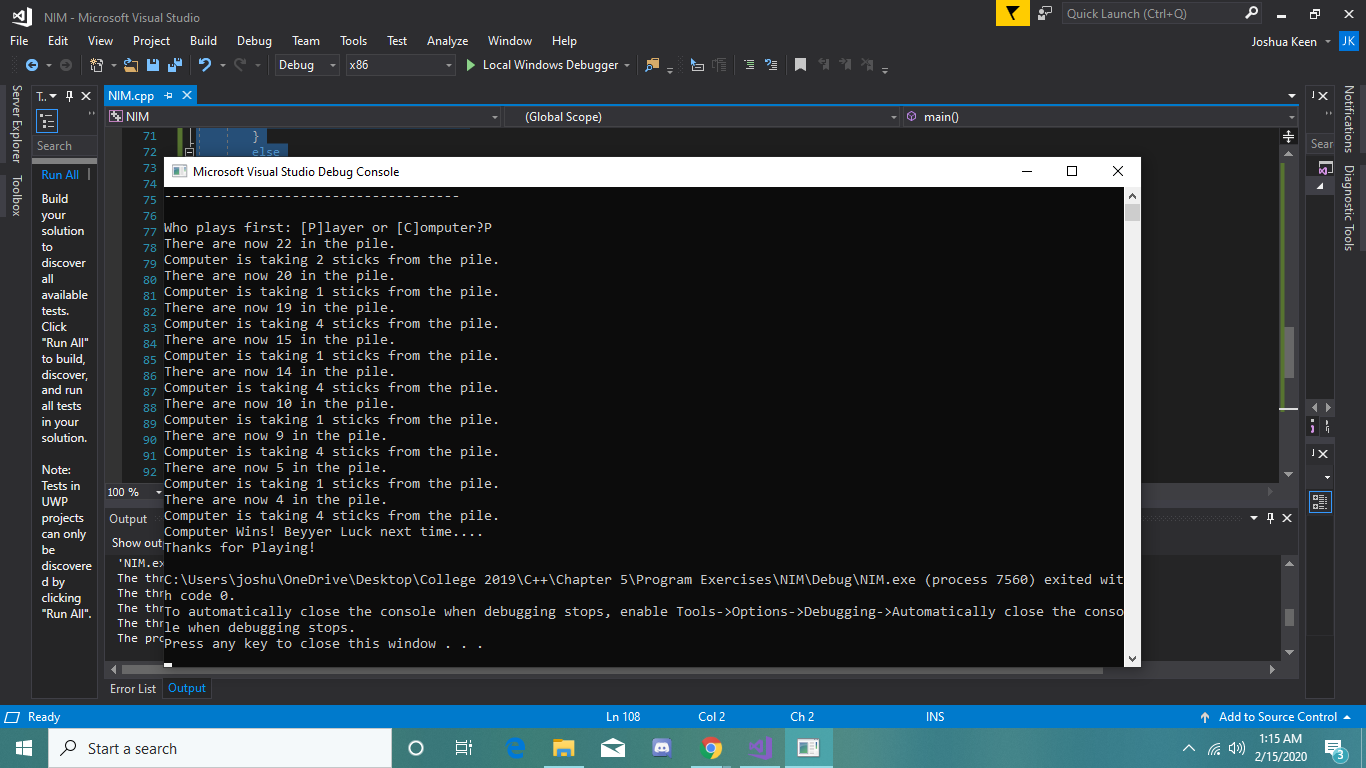
V ? Quick Launch (Ctrl+0) 2 - x Joshua Keen - JK Window Help Local Windows Debugger 1 ? N E A NIM - Microsoft Visual Studio File Edit View Project Build Debug Team Tools Test Analyze 10. 10 . 2-- Debug - x86 - T. x NIM.cpp X = * $ NIM Microsoft Visual Studio Debug Console Search 7 Welcome to the Game of Single-Pile Nim - O X Server Explorer Toolbox 7: Notifications Diagnostic Tools Run All Build your solution discover available tests. Click "Run All" to build discover, and run all tests in your solution. who plays first: [P]layer or [C]omputer?C 7-There are now 22 in the pile. Computer is taking 2 sticks from the pile. There are now 20 in the pile. 7 Computer is taking 1 sticks from the pile. 7 There are now 19 in the pile. * Computer is taking 4 sticks from the pile. 8. There are now 15 in the pile. Computer is taking 1 sticks from the pile. 8. There are now 14 in the pile. Computer is taking 4 sticks from the pile 8-There are now 10 in the pile. Computer is taking 1 sticks from the pile. 8 There are now 9 in the pile. & Computer is taking 4 sticks from the pile. 8. There are now 5 in the pile. 9 Computer is taking 1 sticks from the pile, 9. There are now 4 in the pile. Computer is taking 4 sticks from the pile. 100% Computer Wins! Beyyer Luck next time.... Thanks for playing! Output Show C:\Users ljoshu OneDrive\Desktop\College 2019\C++\Chapter 5\Program Exercises\NIM\Debug\NIM.exe (process 20288) exited wi NIM. th code @. The To automatically close the console when debugging stops, enable Tools->Options->Debugging->Automatically close the conso The tile when debugging stops. The t Press any key to close this window ... The thread @x26bc has exited with code @ (@xe). The program '[20288] NIM.exe' has exited with code @ (@xo). Note: Tests in UWP projects can only discovere d by clicking "Run All". Error List Output O Ready - Ln 108 Col2 Cha INS Add to Source Control - 1:15 AM Alla 1) 2/15/20203 Start a search om 9 o V Quick Launch (Ctrl+0) A NIM - Microsoft Visual Studio File Edit View Project Build Debug Team Tools 10. 10 . 2-- Debug , x86 - x Joshua Keen - JK Test Analyze - Window Help Local Windows Debugger - Si T ? N E T..4 X NIM.cpp + X NIM . (Global Scope) - maino 71 Server Explorer Toolbox Search Microsoft Visual Studio Debug Console Run All - O Notifications Diagnostic Tools X - ------------------------------------ Build your solution discover available tests. Click "Run All" to build discover, and run all tests in your solution. Who plays first: [Pllayer or [Computer?P There are now 22 in the pile. Computer is taking 2 sticks from the pile. There are now 20 in the pile. Computer is taking 1 sticks from the pile. There are now 19 in the pile. 83 Computer is taking 4 sticks from There are now 15 in the pile. Computer is taking 1 sticks from the pile. There are now 14 in the pile. Computer is taking 4 sticks from the pile. There are now 10 in the pile. Computer is taking 1 sticks from the pile. There are now 9 in the pile. Computer is taking 4 sticks from the pile. There are now 5 in the pile. Computer is taking 1 sticks from the pile. 100 % - There are now 4 in the pile. Output Computer is taking 4 sticks from the pile. Computer Wins! Beyyer Luck next time.... Show out Thanks for playing! NIM.ex The thrc:\Users\joshu\OneDrive\Desktop\College 2019\C++\Chapter 5\Program Exercises\NIM\Debug\NIM.exe (process 7560) exited wit The thrh code 0. The thrto automatically close the console when debugging stops, enable Tools->Options ->Debugging->Automatically close the conso The thrle when debugging stops. The Pr Press any key to close this window... Note: Tests in UWP projects can only discovere d by clicking "Run All". Error List Output O Ready - Ln 108 Col2 Cha INS Add to Source Control - 1:15 AM E Alla 1) 2/15/20203 Start a search
Step by Step Solution
There are 3 Steps involved in it

Get step-by-step solutions from verified subject matter experts
 Study Help