







Question: How to make some change in this program to Convert to just circle to concentric circles like this To draw cirlce using Bresenhams MidpointAlgorithm #include
How to make some change in this program to Convert to just circle to concentric circles like this
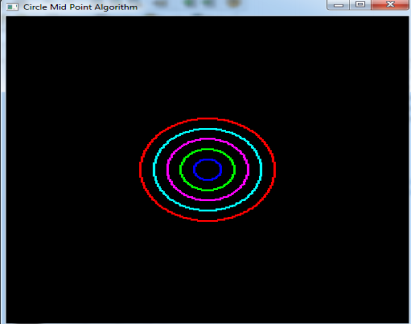
To draw cirlce using Bresenhams MidpointAlgorithm
#include
int pntX1, pntY1, r;
void plot(int x, int y) { glBegin(GL_POINTS); glVertex2i(x+pntX1, y+pntY1); glEnd(); }
void myInit (void) { glClearColor(1.0, 1.0, 1.0, 0.0); glColor3f(0.0f, 0.0f, 0.0f); glPointSize(4.0); glMatrixMode(GL_PROJECTION); glLoadIdentity(); gluOrtho2D(0.0, 640.0, 0.0, 480.0); }
void midPointCircleAlgo() { int x = 0; int y = r; float decision = 5/4 - r; plot(x, y);
while (y > x) { if (decision
}
void myDisplay(void) { glClear (GL_COLOR_BUFFER_BIT); glColor3f (0.0, 0.0, 0.0); glPointSize(1.0);
midPointCircleAlgo();
glFlush (); }
int main(int argc, char** argv) { cout
cout > pntX1; cout > pntY1; cout > r;
glutInit(&argc, argv); glutInitDisplayMode (GLUT_SINGLE | GLUT_RGB); glutInitWindowSize (640, 480); glutInitWindowPosition (100, 150); glutCreateWindow ("Line Drawing Alogrithms"); glutDisplayFunc(myDisplay); myInit (); glutMainLoop();
}
X Circle Mid Point Algorithm
Step by Step Solution
There are 3 Steps involved in it

Get step-by-step solutions from verified subject matter experts
 Study Help