







Question: How to put in AutoCAD (w/ X 1.4 Practice Assignment 2: Coordi X + tructure.com/courses/146918/assignments/4668222 1. Using AutoCAD, draw EX2-1 below. You will start with
How to put in AutoCAD
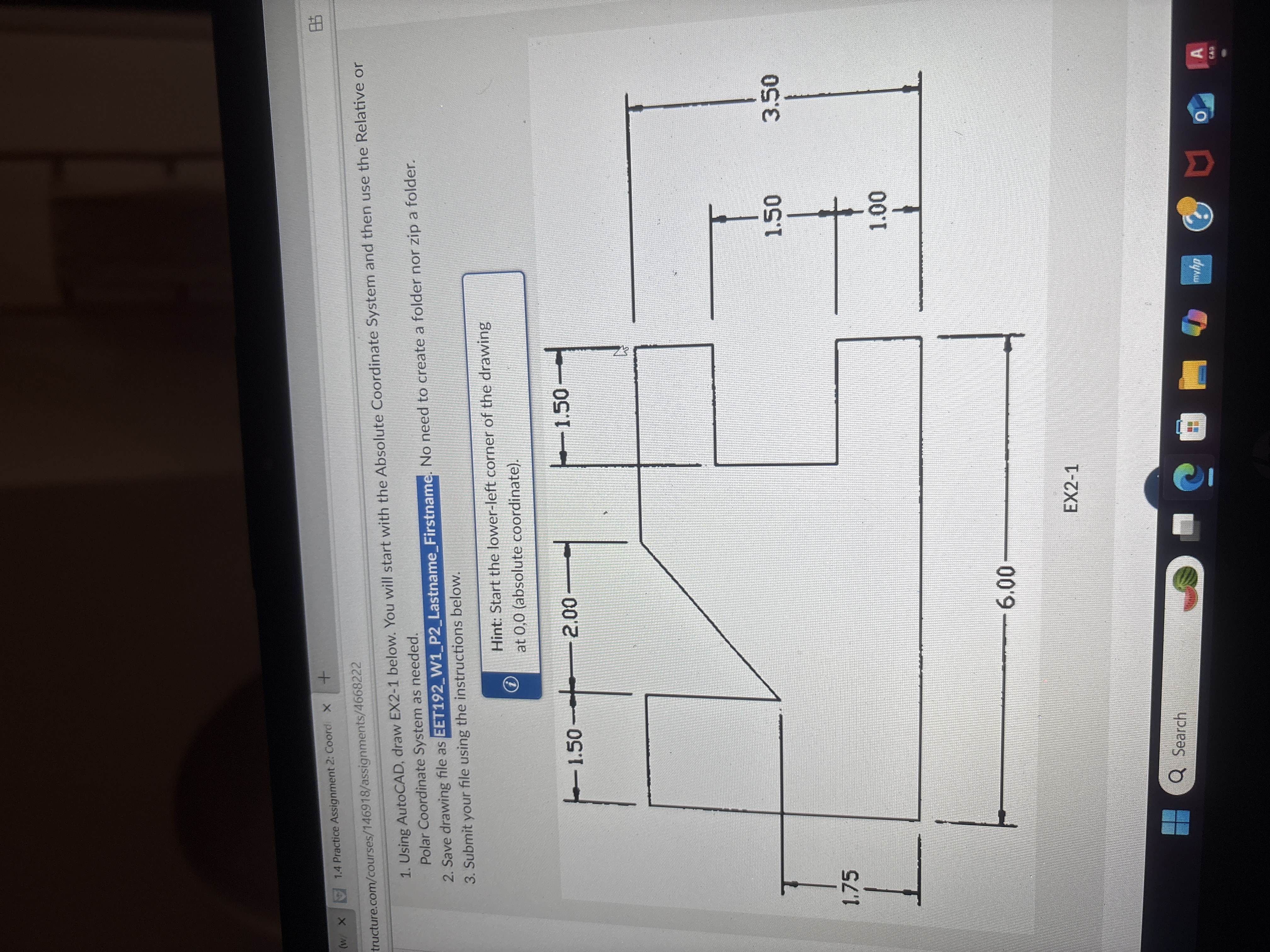 (w/ X 1.4 Practice Assignment 2: Coordi X + tructure.com/courses/146918/assignments/4668222 1. Using AutoCAD, draw EX2-1 below. You will start with the Absolute Coordinate System and then use the Relative or Polar Coordinate System as needed. 2. Save drawing file as EET192_W1_P2_Lastname_Firstname. No need to create a folder nor zip a folder. 3. Submit your file using the instructions below. Hint: Start the lower-left corner of the drawing at 0,0 (absolute coordinate). - 1.50 - 2.00 - 1.50 1.50 3.50 1.75 1.00 6.00 EX2-1 Q Search
Step by Step Solution
There are 3 Steps involved in it
1 Expert Approved Answer
Step: 1 Unlock

Question Has Been Solved by an Expert!
Get step-by-step solutions from verified subject matter experts
Step: 2 Unlock
Step: 3 Unlock
 Study Help