







Question: How to submit the assignment? Deliver 1 file for each of the tasks, also the partial tasks in task 4 . Everything is delivered at
How to submit the assignment? Deliver file for each of the tasks, also the partial tasks in task Everything is delivered at codegrade. The tasks are progressionbased. This means that you must use the file you got from task and continue with it in task The most practical thing is perhaps to make a copy of task when you have finished and then work on task from it And so on Issued code In this assignment, you will be given code that simulates a simple file system. Run mainpy to generate the file system with some example files. The file system as a whole is stored in a file myfilesystem.fs and is divided into blocks. The first block has header information about the file system, and the rest are blocks used for file content. Read comments and documentation in the code to understand the code better. It is also possible to open the file system as raw data by using command xxd myfilesystem.fs in terminal. You will then see an overview of the file system in hexadecimal format. In main.py some tests have been added that you can run after each task to check if your code works as expected. ATTENTION: Keep as much of the original structure as possible, ie do not delete or change functions and function names. When working on the task, you must also think about the effect of your changes on the functionality of the file system as a whole. For example, changing one function can have effects on another.
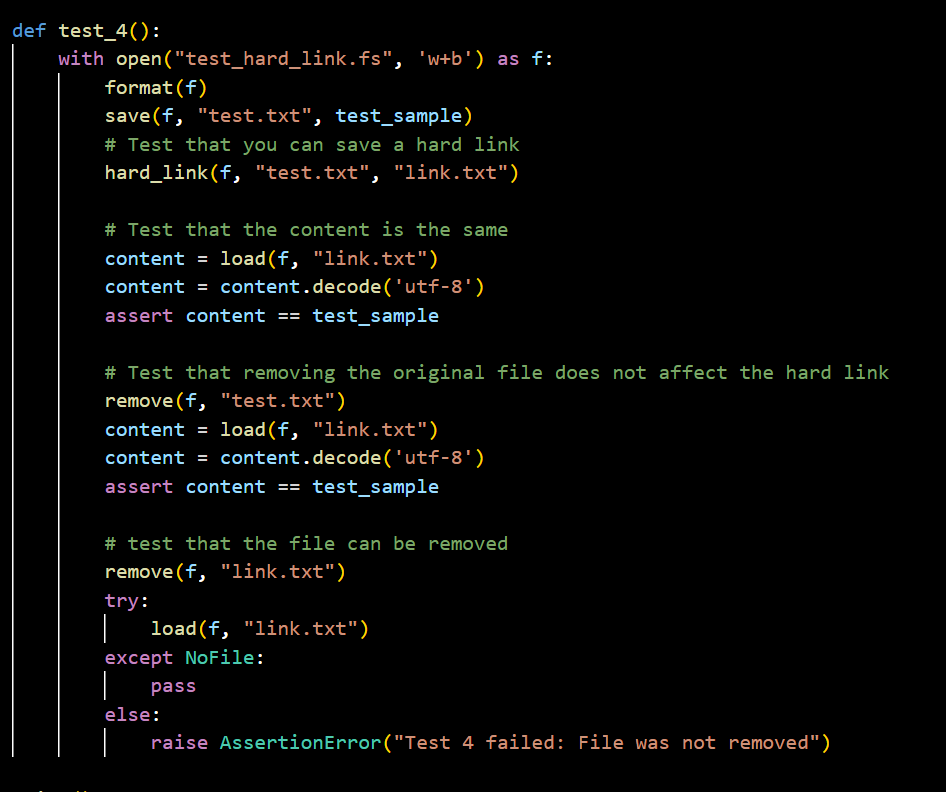
I need help with this: Exercise : hardlink We have given the file system a whole block for header information. The file names and sizes of the files are stored there. But we don't have enough blocks to fill it completely with file entries. With the remaining space, we will allow creating hard links to existing files. So a hard link should only be placed as an entry under the maximum number of files in the header. Part A live file: myfsApy Implement hardlinkf existingfile, linkedfile The function should create a new file entry that points to an existing file. In other words, the function should create a hard link. As part of the released code, the file system has a counter to keep track of how many files the file system has. You will now use the next available space in the system's header to count how many hard links the file system has. This is what getnumlinkedfiles and setnumlinkedfiles are for, so implement those functions. Also update load so that it can read the content from a hard link. You may also need to update findfileno again depending on how you have implemented the rest of the task. Hint: The file size is not needed for a hard link since the existing file already has it You can use this space for something else to implement hardlink. Part B live file: myfsBpy Update remove like this: If remove is called for a file, the file's original file entry should be replaced by the topmost hard link pointing to the file. If no such hard links exist, the file should be deleted. If remove is called for a hard link, the hard link must be deleted. Remember to use NoFile as an exception when the file name does not exist either as a file or as a link.
Step by Step Solution
There are 3 Steps involved in it
1 Expert Approved Answer
Step: 1 Unlock

Question Has Been Solved by an Expert!
Get step-by-step solutions from verified subject matter experts
Step: 2 Unlock
Step: 3 Unlock
 Study Help