







Question: How to use Python to write a program like following: 1- The program starts by printing the message: Starting Secret Number Guessing Game [and print
How to use Python to write a program like following:
1- The program starts by printing the message: Starting Secret Number Guessing Game [and print empty line]
2- The computer generates a random number between 1 and 100
3- The program asks the user to make a guess.
4- If the user provides a guess that is smaller than the secret number then the program should print Your guess is lower than the secret number and then ask the user to make another guess
5- If the user provides a guess that is larger than the secret number , then the program should print: Your guess is higher than the secret number and then ask the user to make another guess
6- If the user provides the right guess, then the program should print: Congratulations! You guessed the secret number
7- If the user enters -1 at anytime, the program closes
8- If the user attempts reaches 10 guesses with successfully guessing the number, then the program should print: You lost!
9- Whenever the program closes, the program prints: [empty line] Closing Secret Number Guessing Game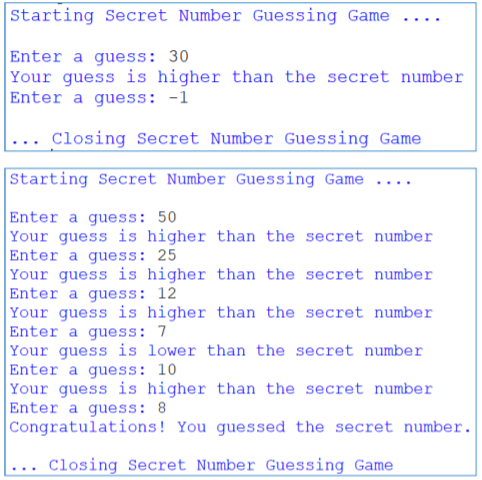
Starting Secret Number Guessing Game. Enter a guess: 30 Your guess is higher than the secret number Enter a guess: -1 Closing Secret Number Guessing Game Starting Secret Number Guessing Game Enter a guess: 50 Your guess is higher than the secret number Enter a guess: 25 Your guess is higher than the secret number Enter a guess: 12 Your guess is higher than the secret number Enter a guess: 7 Your guess is lower than the secret number Enter a guess: 10 rour guezas is higher than the secret number Enter a guess:8 Congratulations! You guessed the secret number. ...Closing Secret Number Guessing Game
Step by Step Solution
There are 3 Steps involved in it

Get step-by-step solutions from verified subject matter experts
 Study Help