





Question: how would i go about fixing this code? the error message i get is included trols in this nto this text olbox. Busing System; using
how would i go about fixing this code? the error message i get is included
how would i go about fixing this code? the error message i
get is included trols in this nto this text olbox. Busing System;
using System.Collections.Generic; using System.Linq; using System.Text; using System.Threading.Tasks; using System.IO; namespace CharacterCounterArray
{ 2 references public class CharacterFrequency { private chan ch; private int

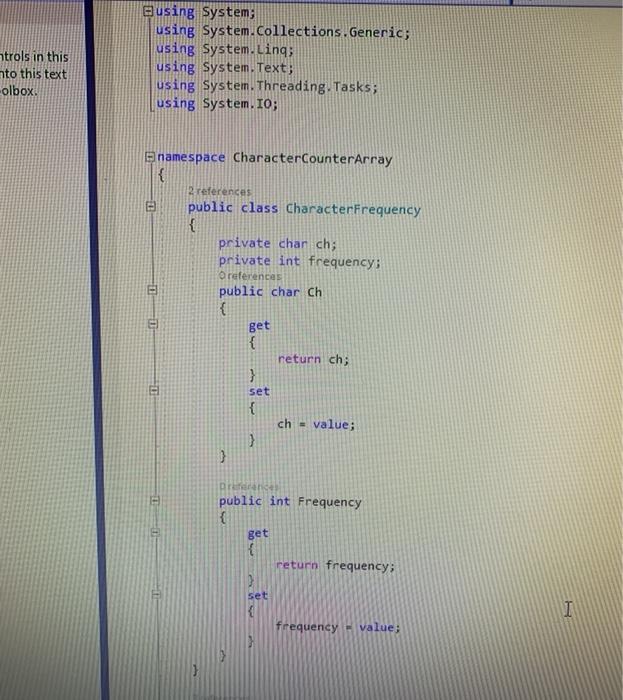
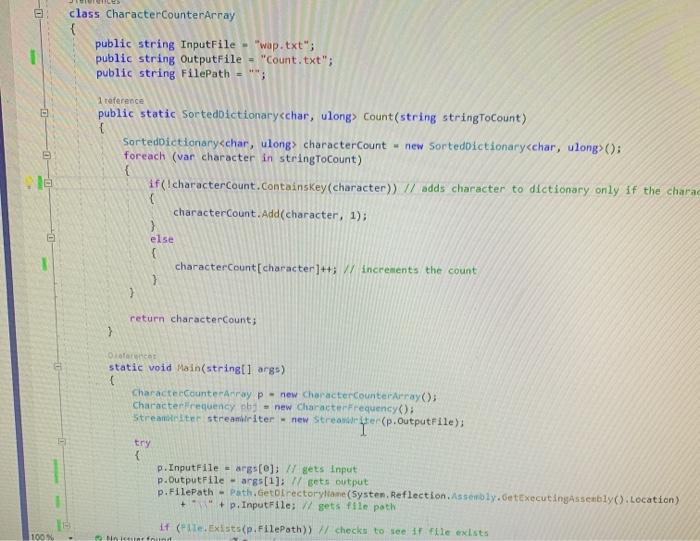
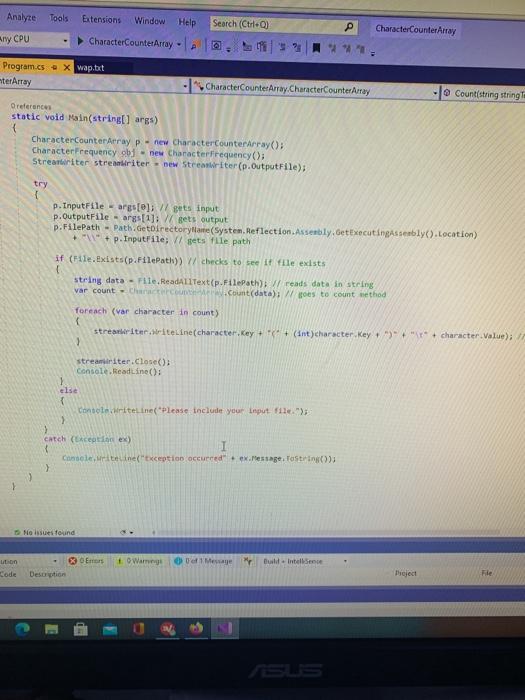
trols in this nto this text olbox. Busing System; using System.Collections.Generic; using System.Linq; using System.Text; using System.Threading.Tasks; using System.IO; namespace CharacterCounterArray { 2 references public class CharacterFrequency { private chan ch; private int frequency: O references public char Ch { Bet { return ch; EU } set { ch - value; } 3 Die public int Frequency { get { return frequency: set I frequency value; - class CharacterCounterArray { public string InputFile wap.txt"; public string OutputFile - "Count.txt"; public string FilePath = ***; 1 reference public static SortedDictionary char, ulong> Count(string stringToCount) { SortedDictionary characterCount = new SortedDictionary(); foreach (var character in stringToCount) if (IcharacterCount.containskey(character)) // adds character to dictionary only if the charac characterCount.Add(character, 1); } else le characterCount(character]++; // increments the count } > return characterCount; } Danas static void Main(string[] args) CharacterCounterArray p - new characterCounterArray(); Character Frequency by - new Character Frequency: Streamtite streamleiter - new Strefter "T" (p. OutputFile); try { p. InputFile = args(); I gets Input p.OutputFile - args[1]; I gets output p.FilePath - Path.GetDirectorytame (System.Reflection. Assembly.GetExecutingAssembly(). Location) " + p. InputFile; / gets file path if (e. Exists(p.FilePath>> checks to see if File exists 100 Ministrin Analyze Tools Extensions Window Help Search (Ctrl.) CharacterCounter Array Any CPU CharacterCountetArray Program.cs . x wap.tit terArray - "CharacterCounterArtay. CharacterCounter Array - Count(string string Oreferences static void Main(string] args) CharacterCounterArray p - new CharacterCounterArray(); Character Frequency obj - new Characterfrequency(); Streambriter streanriter - new Streanriter (p.Output File); try p. InputFile - args[]} // gets input p.OutputFile - args[1]; // gets output p.FilePath - Path.GetDirectorytime(System.Reflection. Assembly, GetxecutingAssembly). Location) * + p.InputFile; / gets file path if (FileExists(p.FilePath)) // checks to see If file exists string data - File. ReadAllText(p.Filepath); reads data in string var count Chance Count(data); oes to count method foreach (var character in count) strearter WriteLine(character, Key + + (int) character Key + )"+""+character Value); streamiriter.Close(); Console.ReadLine(): 1 else 1 Consoleriteline Please include your input file > > catch (Exception ex) I Consoleteine("ception occurred.ex.Message.ToString(); > No issues found Em ution Code 1. Warning Message Build Intel Sense Description Project File SLS CA Microsoft Visual Studio Debug Console Exception occurredIndex was outside the bounds of the array

Step by Step Solution

There are 3 Steps involved in it

1 Expert Approved Answer
Step: 1 Unlock blur-text-image
Question Has Been Solved by an Expert!

Get step-by-step solutions from verified subject matter experts

Step: 2 Unlock
Step: 3 Unlock

Students Have Also Explored These Related Databases Questions!