







Question: how would i save this to my computer on Mac. i want to save it as a file but i cant figure out how without
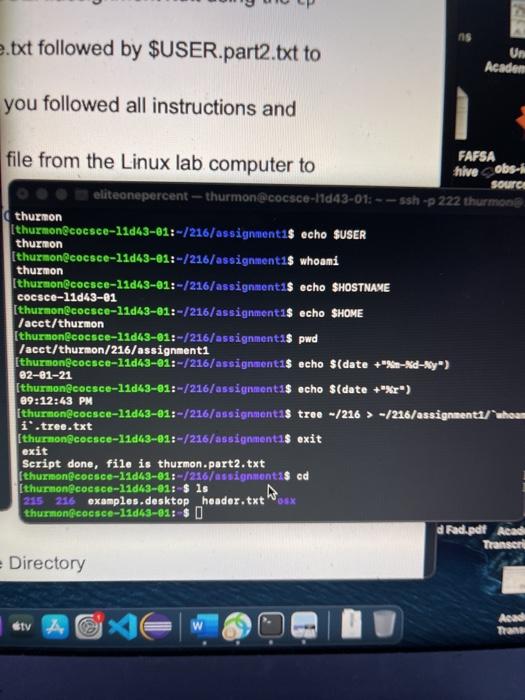 how would i save this to my computer on Mac. i want to save it as a file but i cant figure out how without getting a "no such file or directory"
AS e.txt followed by $USER.part2.txt to Un Academ you followed all instructions and hive obs- file from the Linux lab computer to FAFSA soura eliteonepercent - thurmon@cocsce-11d43-01: --- ssh-222 thurmone thurmon Ithurnoncosce-11d43-01:-/216/assignmenta$ echo $USER thurnon [thurmon@cocsce-11d43-01:-/216/assignment1$ whoami thurmon Ithurmon@cocsce-11d43-01:-/216/assignment1 echo SHOSTNAME CocSce-11d43-81 [thurmon@cocace-11d43-01:-/216/assignment 1$ echo SHOME /acct/thurmon (thurnon@cocace-11d43-01:-/216/assignment is pwd /acct/thurmon/216/assignment1 [thurmon@cocaco-11043-91:-/216/assignment 1$ echo $(date +"%m-d-Wy") 02-01-21 (thurnoncocsce-11d43-01:-/216/assignment is echo $(date +"%Y") 09:12:43 PM ithurmon@cocsce-11063-01:-/216/assigntent as tree - /216 > -/216/assignments/show i'.tree.txt [thurnon@cocsce-12d43-01:-/216/assignment 1$ exit exit Script done, file is thurmon.part2.txt (thurmonecosce-11d43-01:-/216/assignmenta$ ad Ithurnon@cocSce-11d63-61: $ ls 215 216 examples.desktop header.txt sx thurmonicosce-11d63-61: $ d Rad.pdf Acad Transer Directory W Acad Trans AS e.txt followed by $USER.part2.txt to Un Academ you followed all instructions and hive obs- file from the Linux lab computer to FAFSA soura eliteonepercent - thurmon@cocsce-11d43-01: --- ssh-222 thurmone thurmon Ithurnoncosce-11d43-01:-/216/assignmenta$ echo $USER thurnon [thurmon@cocsce-11d43-01:-/216/assignment1$ whoami thurmon Ithurmon@cocsce-11d43-01:-/216/assignment1 echo SHOSTNAME CocSce-11d43-81 [thurmon@cocace-11d43-01:-/216/assignment 1$ echo SHOME /acct/thurmon (thurnon@cocace-11d43-01:-/216/assignment is pwd /acct/thurmon/216/assignment1 [thurmon@cocaco-11043-91:-/216/assignment 1$ echo $(date +"%m-d-Wy") 02-01-21 (thurnoncocsce-11d43-01:-/216/assignment is echo $(date +"%Y") 09:12:43 PM ithurmon@cocsce-11063-01:-/216/assigntent as tree - /216 > -/216/assignments/show i'.tree.txt [thurnon@cocsce-12d43-01:-/216/assignment 1$ exit exit Script done, file is thurmon.part2.txt (thurmonecosce-11d43-01:-/216/assignmenta$ ad Ithurnon@cocSce-11d63-61: $ ls 215 216 examples.desktop header.txt sx thurmonicosce-11d63-61: $ d Rad.pdf Acad Transer Directory W Acad Trans
Step by Step Solution
There are 3 Steps involved in it

Get step-by-step solutions from verified subject matter experts
 Study Help