







Question: How would you solve this problem in python? Write a python script that will read in the attached file (input.txt),swap the two columns, and print
How would you solve this problem in python?
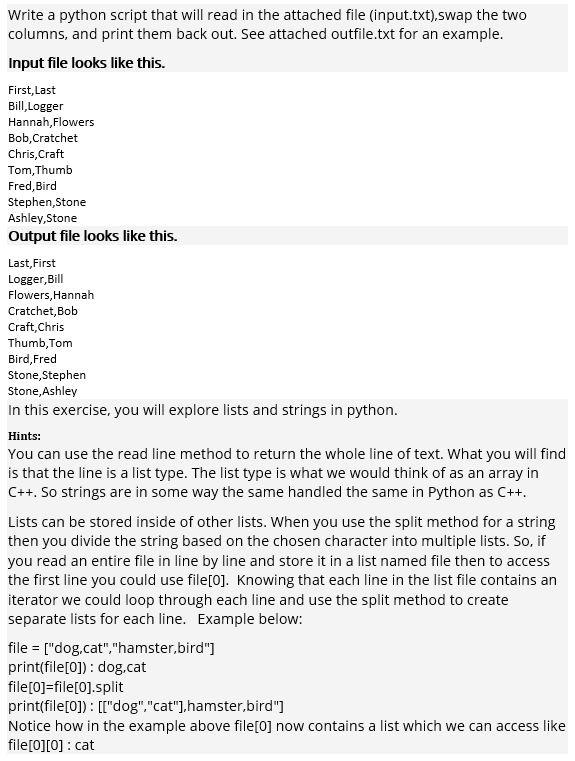
Write a python script that will read in the attached file (input.txt),swap the two columns, and print them back out. See attached outfile.txt for an example. Input file looks like this. First, Last Bill,Logger Hannah, Flowers Bob, Cratchet Chris, Craft Tom,Thumb Fred, Bird Stephen Stone Ashley,Stone Output file looks like this. Last,First Logger, Bill Flowers, Hannah Cratchet, Bob Craft, Chris Thumb, Tom Bird, Fred Stone, Stephen Stone, Ashley In this exercise, you will explore lists and strings in python. Hints: You can use the read line method to return the whole line of text. What you will find is that the line is a list type. The list type is what we would think of as an array in C++. So strings are in some way the same handled the same in Python as C++. Lists can be stored inside of other lists. When you use the split method for a string then you divide the string based on the chosen character into multiple lists. So, if you read an entire file in line by line and store it in a list named file then to access the first line you could use file[o]. Knowing that each line in the list file contains an iterator we could loop through each line and use the split method to create separate lists for each line. Example below: file = ["dog.cat","hamster,bird"] print(file[0]): dog.cat file [0]=file[0].split print(file[0]): [["dog","cat"),hamster,bird"] Notice how in the example above file[O] now contains a list which we can access like file[0][0] : cat
Step by Step Solution
There are 3 Steps involved in it

Get step-by-step solutions from verified subject matter experts
 Study Help