







Question: How you do the below directory on Thinlinc On Thinlinc click Menu at the top-left and then System Tools and then Mate Terminal to start
How you do the below directory on Thinlinc
On Thinlinc click Menu at the top-left and then System Tools and then "Mate Terminal" to start it
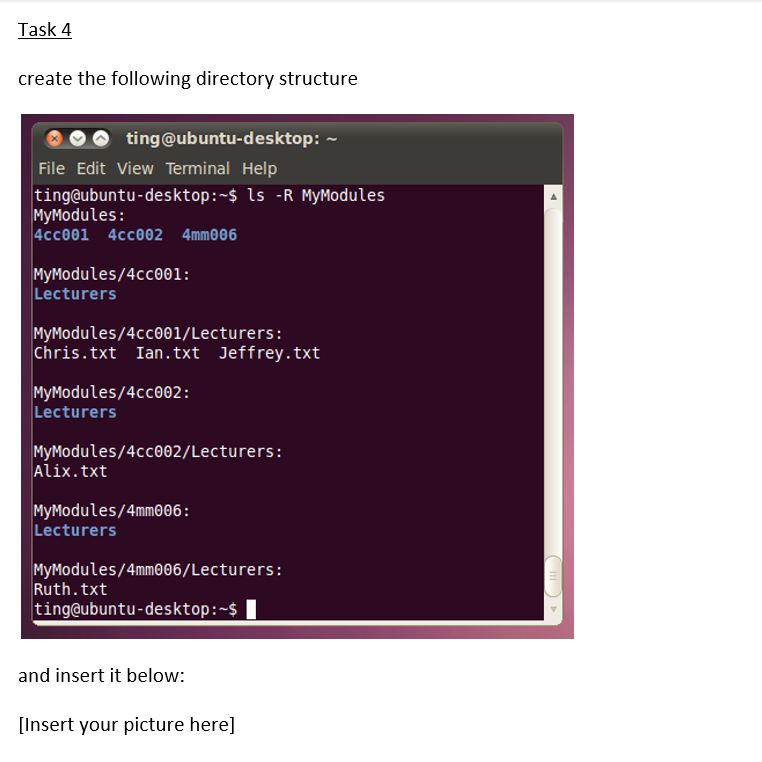
create the following directory structure ting@ubuntu-desktop: File Edit View Terminal Help ting@ubuntu-desktop: \$ ls -R MyModules MyModules: 4cc001 4cc002 4mm06 MyModules/4cc001: Lecturers MyModules/4cc001/Lecturers: Chris.txt Ian.txt Jeffrey.txt MyModules/4cc002: Lecturers MyModules/4cc002/Lecturers: Alix.txt MyModules/4mm006: Lecturers MyModules/4mm006/Lecturers: Ruth.txt ting@ubuntu-desktop: \$
Step by Step Solution
There are 3 Steps involved in it
1 Expert Approved Answer
Step: 1 Unlock

Question Has Been Solved by an Expert!
Get step-by-step solutions from verified subject matter experts
Step: 2 Unlock
Step: 3 Unlock
 Study Help