





Question: HTML 5 Forms 1. Requires Previous HTML Form assignment to modify. 2. After validating and making sure it submits and clicking labels selects the inputs,
 HTML 5 Forms 1. Requires Previous HTML Form assignment to modify.2. After validating and making sure it submits and clicking labels selects

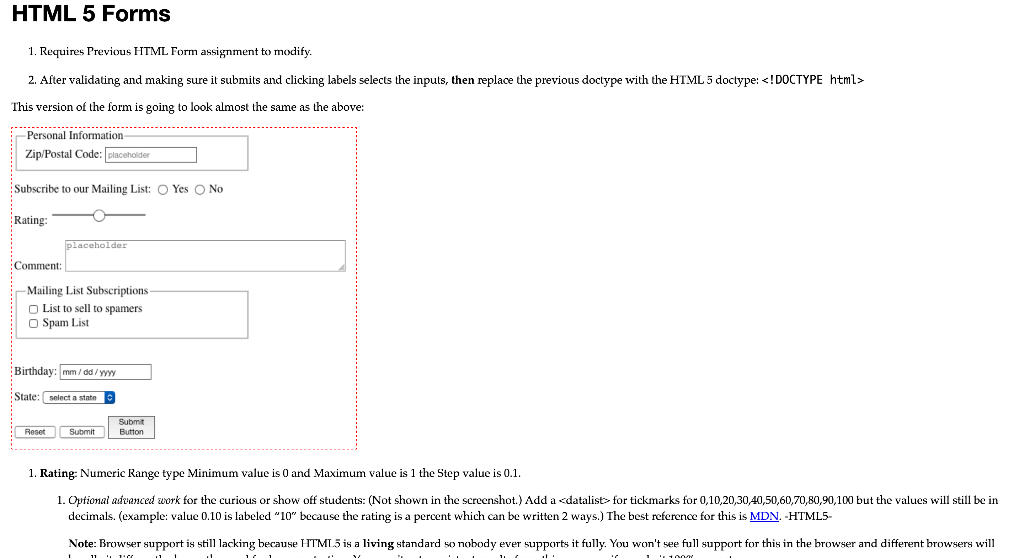
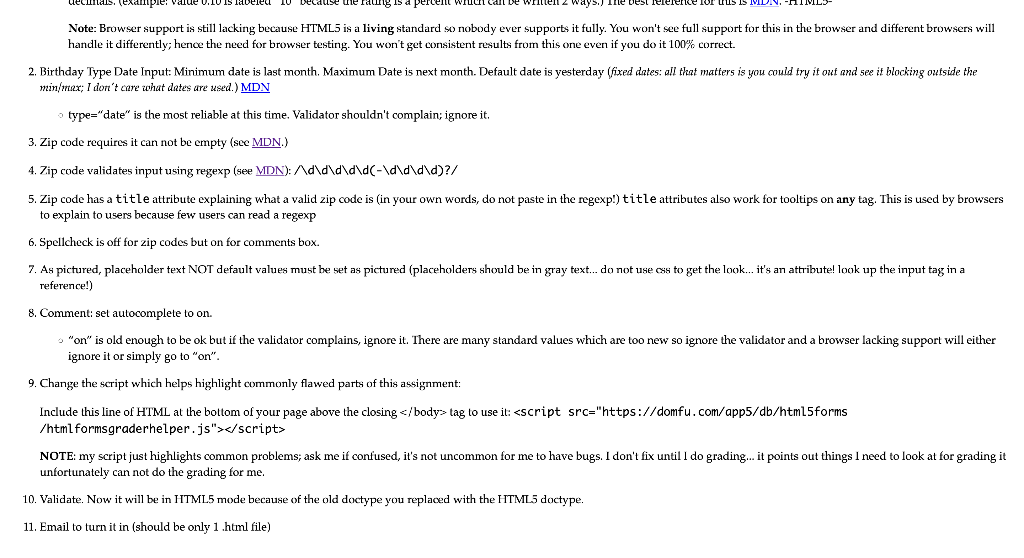
HTML 5 Forms 1. Requires Previous HTML Form assignment to modify. 2. After validating and making sure it submits and clicking labels selects the inputs, then replace the previous doctype with the HTML 5 doctype: This version of the form is going to look almost the same as the above Personal Information Zip/Postal Code: placeholder Subscribe to our Mailing List: Yes No Rating: placeholder Comment: - Mailing List Subscriptions List to sell to spamers O Spam List Birthday: mm/dd/y State: select a state Reset Submit Submit Button 1. Rating: Numeric Range type Minimum value is O and Maximum value is 1 the Step value is 0.1. 1. Optional advanced work for the curious or show off students: (Not shown in the screenshot.) Add a tag to use it: NOTE: my script just highlights common problems; ask me if confused, it's not uncommon for me to have bugs. I don't fix until I do grading... it points out things I need to look at for grading it unfortunately can not do the grading for me. 10. Validate. Now it will be in HTML5 mode because of the old doctype you replaced with the HTML5 doctype. 11. Email to turn it in (should be only 1.html file) HTML 5 Forms 1. Requires Previous HTML Form assignment to modify. 2. After validating and making sure it submits and clicking labels selects the inputs, then replace the previous doctype with the HTML 5 doctype: This version of the form is going to look almost the same as the above Personal Information Zip/Postal Code: placeholder Subscribe to our Mailing List: Yes No Rating: placeholder Comment: - Mailing List Subscriptions List to sell to spamers O Spam List Birthday: mm/dd/y State: select a state Reset Submit Submit Button 1. Rating: Numeric Range type Minimum value is O and Maximum value is 1 the Step value is 0.1. 1. Optional advanced work for the curious or show off students: (Not shown in the screenshot.) Add a tag to use it: NOTE: my script just highlights common problems; ask me if confused, it's not uncommon for me to have bugs. I don't fix until I do grading... it points out things I need to look at for grading it unfortunately can not do the grading for me. 10. Validate. Now it will be in HTML5 mode because of the old doctype you replaced with the HTML5 doctype. 11. Email to turn it in (should be only 1.html file)

Step by Step Solution

There are 3 Steps involved in it

1 Expert Approved Answer
Step: 1 Unlock blur-text-image
Question Has Been Solved by an Expert!

Get step-by-step solutions from verified subject matter experts

Step: 2 Unlock
Step: 3 Unlock

Students Have Also Explored These Related Databases Questions!