







Question: HTML create the following layout RO USE AN EMBEDDED CSS (Not Part 1 - Create HTML/CSS For This Page External File) R1 - Put logo
HTML create the following layout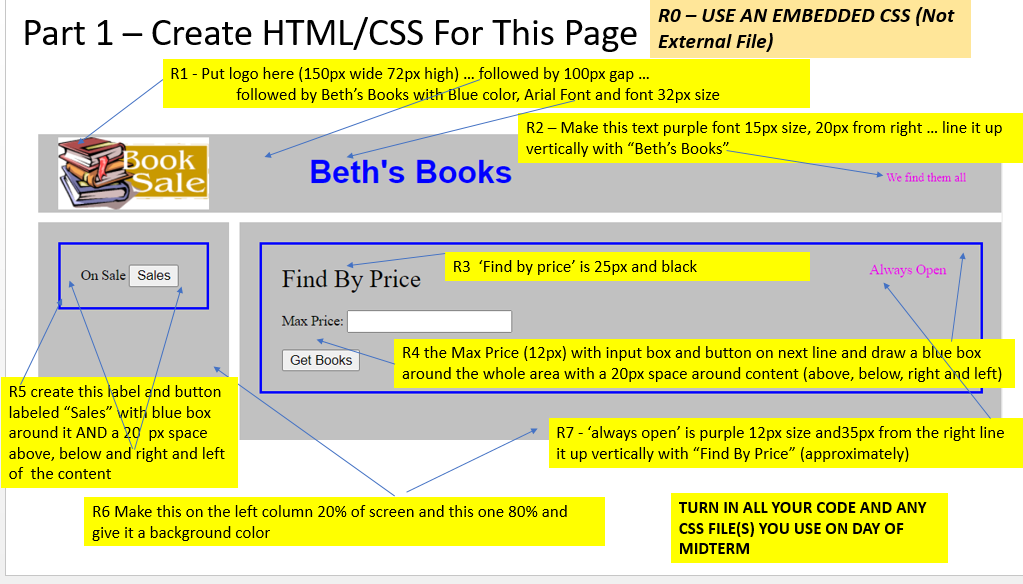
RO USE AN EMBEDDED CSS (Not Part 1 - Create HTML/CSS For This Page External File) R1 - Put logo here (150px wide 72px high) ... followed by 100px gap ... followed by Beth's Books with Blue color, Arial Font and font 32px size R2 Make this text purple font 15px size, 20px from right ... line it up vertically with "Beth's Books" Sale Beth's Books We find them all Book R3 'Find by price' is 25px and black On Sale Sales Always Open Find By Price Max Price: Get Books R4 the Max Price (12px) with input box and button on next line and draw a blue box around the whole area with a 20px space around content (above, below, right and left) R5 create this label and button labeled "Sales" with blue box around it AND a 20 px space above, below and right and left of the content R7 - 'always open' is purple 12px size and35px from the right line it up vertically with "Find By Price" (approximately) R6 Make this on the left column 20% of screen and this one 80% and give it a background color TURN IN ALL YOUR CODE AND ANY CSS FILE(S) YOU USE ON DAY OF MIDTERM
Step by Step Solution
There are 3 Steps involved in it

Get step-by-step solutions from verified subject matter experts
 Study Help