







Question: HTML file: Ch09 Task Manager Task Manager Task List Task CSS: body { font-family: Verdana, Arial, Helvetica, sans-serif; font-size: 100%; background-color: white; width: 700px; margin:
HTML file:
Task Manager
CSS:
body {
font-family: Verdana, Arial, Helvetica, sans-serif;
font-size: 100%;
background-color: white;
width: 700px;
margin: 0 auto;
border: 3px solid blue;
padding: 0 2em 1em;
}
h1 {
font-size: 150%;
color: blue;
margin-bottom: .5em;
}
label {
float: left;
width: 8em;
}
input {
width: 22em;
margin-right: 1em;
margin-bottom: 1em;
}
#tasks {
margin-top: 0;
float: right;
}
Javascript file:
"use strict"; var $ = function(id) { return document.getElementById(id); };
var tasks = [];
var displayTaskList = function() { var list = ""; // if there are no tasks in tasks array, check storage if (tasks.length === 0) { // get tasks from storage or empty string if nothing in storage var storage = localStorage.getItem("tasks") || "";
// if not empty, convert to array and store in global tasks variable if (storage.length > 0) { tasks = storage.split("|"); } } // if there are tasks in array, sort and create tasks string if (tasks.length > 0) { tasks.sort(); list = tasks.join(" "); } // display tasks string and set focus on task text box $("task_list").value = list; $("task").focus(); };
var addToTaskList = function() { var task = $("task"); if (task.value === "") { alert("Please enter a task."); } else { // add task to array and local storage tasks.push(task.value); localStorage.tasks = tasks.join("|");
// clear task text box and re-display tasks task.value = ""; displayTaskList(); } };
var clearTaskList = function() { tasks.length = 0; localStorage.tasks = ""; $("task_list").value = ""; $("task").focus(); };
window.onload = function() { $("add_task").onclick = addToTaskList; $("clear_tasks").onclick = clearTaskList; displayTaskList(); };
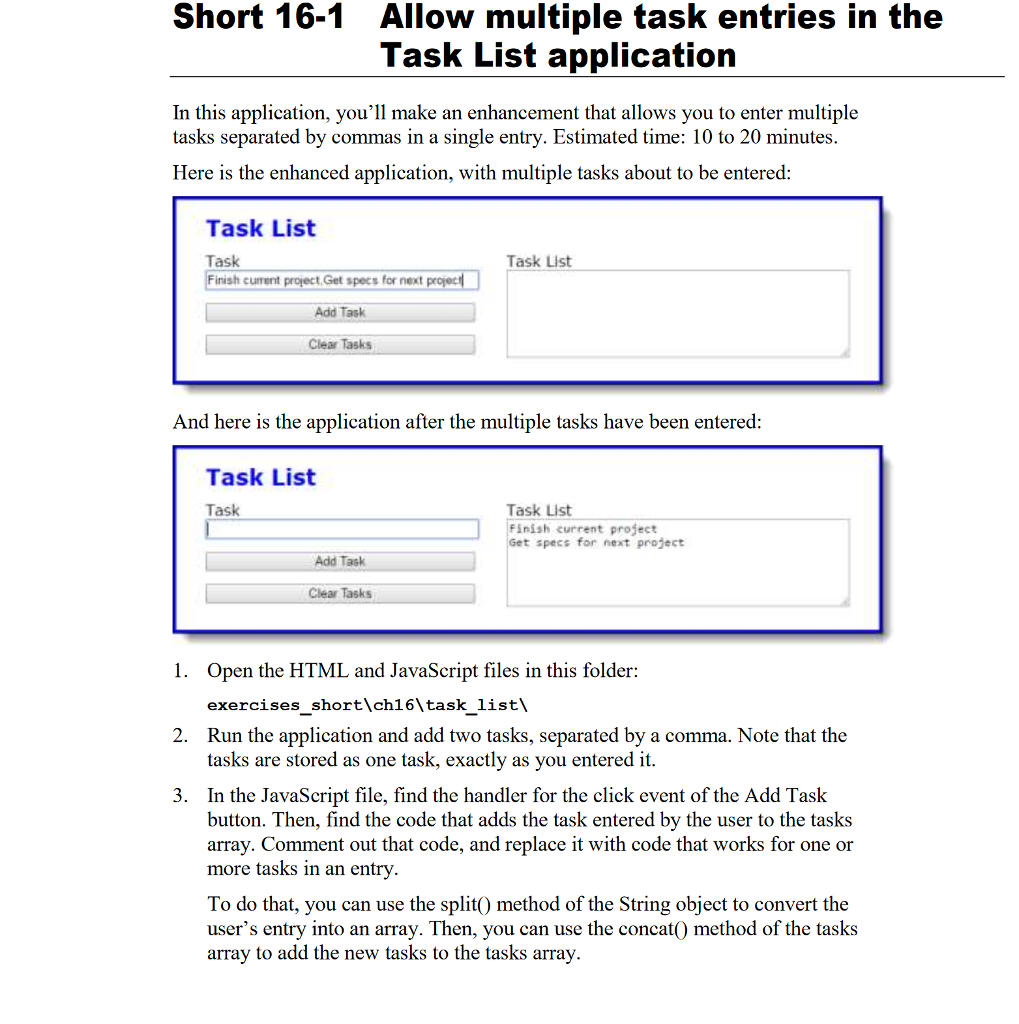
Short 16-1 Allow multiple task entries in the Task List application In this application, you'll make an enhancement that allows you to enter multiple tasks separated by commas in a single entry. Estimated time: 10 to 20 minutes Here is the enhanced application, with multiple tasks about to be entered Task List Task Finish current project,Get specs for next projec Task List Add Task Clear Tasks And here is the application after the multiple tasks have been entered Task List Task Task List Finish current project Get specs for next project Add Task Clear Tasks 1. Open the HTML and JavaScript files in this folder: exercises short\ch16 task list' 2. Run the application and add two tasks, separated by a comma. Note that the tasks are stored as one task, exactly as you entered it 3. In the JavaScript file, find the handler for the click event of the Add Task button. Then, find the code that adds the task entered by the user to the tasks array. Comment out that code, and replace it with code that works for one or more tasks in an entry To do that, you can use the split0 method of the String object to convert the user's entry into an array. Then, you can use the concat() method of the tasks arrav to add the new tasks to the tasks array
Step by Step Solution
There are 3 Steps involved in it

Get step-by-step solutions from verified subject matter experts
 Study Help