







Question: HTML help 1. Construct the basic HTML5 page as follows: January 2017 S M T W T F S 2 3 4 5 6 7
HTML help
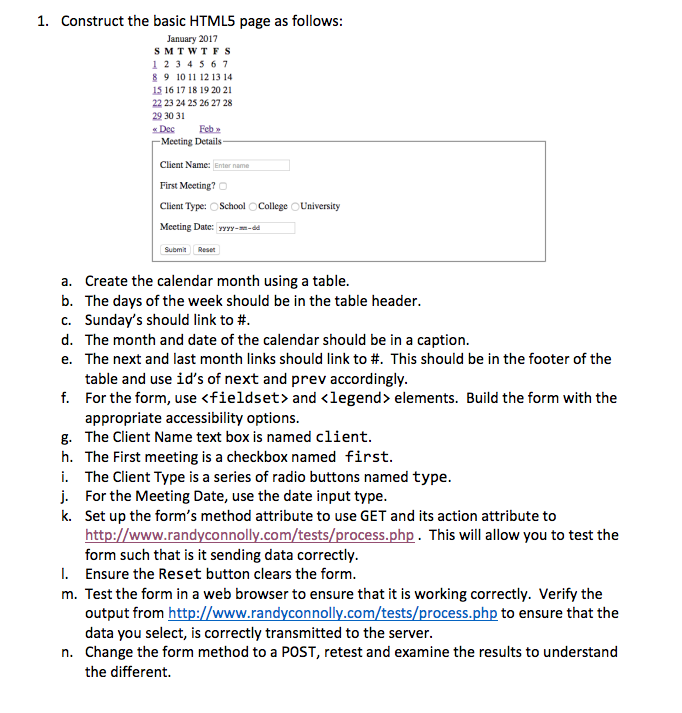
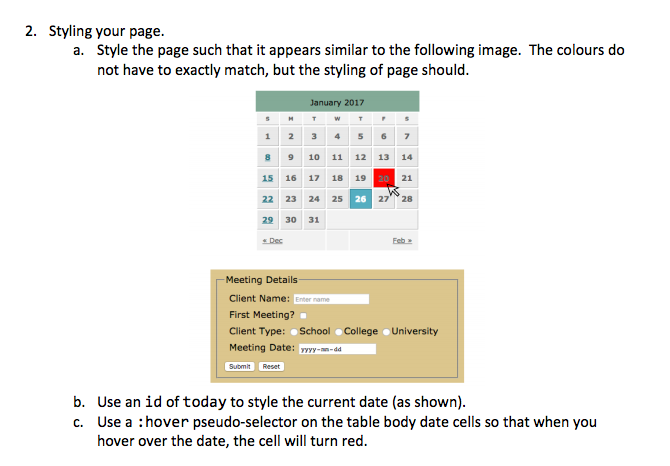
1. Construct the basic HTML5 page as follows: January 2017 S M T W T F S 2 3 4 5 6 7 8 9 1011 12 1314 15 1617 1819 2021 29 30 31 Dec Eeb Meeting Details Client Name: Enter name First Meeting? O Client Type: School OCollege OUniversity Meeting Date: yyyy-m-dea a. Create the calendar month using a table. b. The days of the week should be in the table header. c. Sunday's should link to d. The month and date of the calendar should be in a caption. e. The next and last month links should link to This should be in the footer of the table and use id's of next and prev accordingly. f. For the form, use
Step by Step Solution
There are 3 Steps involved in it
1 Expert Approved Answer
Step: 1 Unlock

Question Has Been Solved by an Expert!
Get step-by-step solutions from verified subject matter experts
Step: 2 Unlock
Step: 3 Unlock
 Study Help