







Question: *************************** HTML I have written ********************************** Convert Temperatures Convert temperatures Fahrenheit to Celsius Celsius to Fahrenheit Enter F degrees: Degrees Celsius: ********************* CSS ************************************* body
*************************** HTML I have written **********************************
Convert temperatures
Fahrenheit to Celsius
Celsius to Fahrenheit
********************* CSS *************************************
body {
font-family: Arial, Helvetica, sans-serif;
background-color: white;
margin: 0 auto;
width: 450px;
border: 3px solid blue;
}
h1 {
color: blue;
margin: 0 0 .5em;
}
main {
padding: 1em 2em;
}
label {
float: left;
width: 10em;
margin-right: 1em;
}
input {
margin-bottom: .5em;
}
#convert {
width: 10em;
}
************************** JavaScript (Not Working) Need Help here **********************************
"use strict";
var $ = function(id) { return document.getElementById(id); };
var processEntries= function(){
var isValid=true;
//get all values from user
var degrees = $("degrees_entered").value;
var degreesComputed = $("degrees_computed").value;
var degree_label_1 = $("degree_label_1").value;
var degree_label_2 = $("degree_label_2").value;
var msg = "Please Review Input - Entry Invalid";
var toCelsius = function(){
if ($("to_celsius").checked) {
$("degree_label_1").value ("Enter Degrees Celsius:");
$("degree_label_2").value("Degrees Celsius:");
clearTextBoxes();
}
};
var toFahrenheit = function(){
if ($("to_fahrenheit").checked) {
$("degree_label_1").value("Enter Degrees Fahrenheit:");
$("degree_label_2").value("Degrees Fahrenheit:");
clearTextBoxes();
}
};
};
var clearTextBoxes = function() {
$("degrees_entered").value = "";
$("degrees_computed").value = "";
};
var convertTemp = function(isValid) {
if ($("to_celsius").checked) {
degrees_computed = ((degrees * 9) /5) + 32 ;
}
if ($("to_fahrenheit").checked) {
degrees_computed = ((degrees - 32) * 5) /9 ;
}
};
window.onload = function() {
$("convert").onclick = convertTemp;
$("to_celsius").onclick = toCelsius;
$("to_fahrenheit").onclick = toFahrenheit;
$("degrees_entered").focus();
};
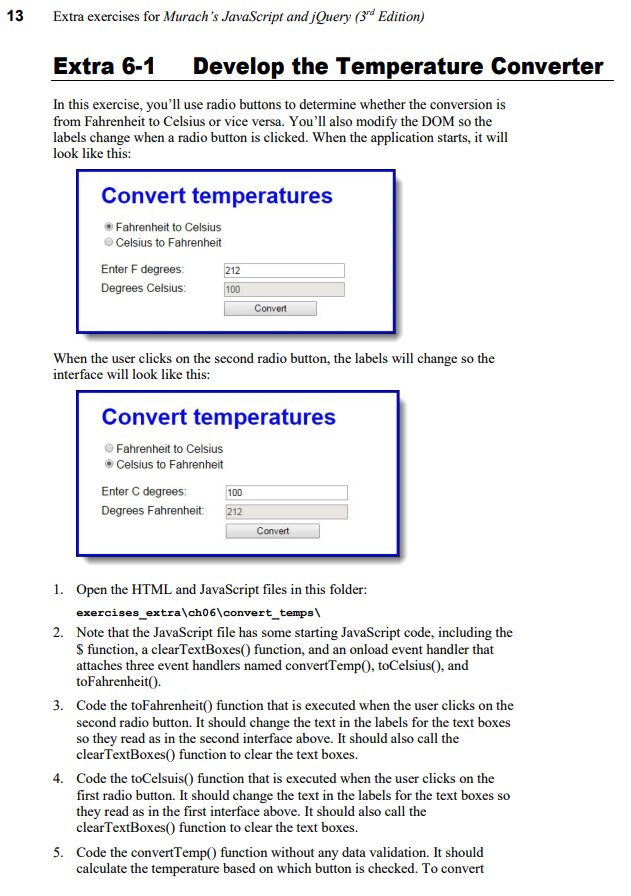
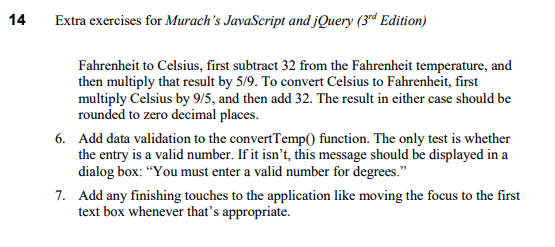
13 Extra exercises for Murach's JavaScript and jQuery (3rd Edition) Extra 6-1 Develop the Temperature Converter In this exercise, you'll use radio buttons to determine whether the conversion is from Fahrenheit to Celsius or vice versa. You'll also modify the DOM so the labels change when a radio button is clicked. When the application starts, it will look like this: Convert temperatures Fahrenheit to Celsius O Celsius to Fahrenheit Enter F degrees: Degrees Celsius 212 100 Convert When the user clicks on the second radio button, the labels will change so the interface will look like this: Convert temperatures Fahrenheit to Celsius Celsius to Fahrenheit Enter C degrees 100 Degrees Fahrenheit: 212 Convert 1. Open the HTML and JavaScript files in this folder: exercises_extralch061convert temps Note that the JavaScript file has some starting JavaScript code, including the S function, a clearTextBoxes) function, and an onload event handler that attaches three event handlers named convertTempO, toCelsius), and toFahrenheit0. 2. 3. Code the toFahrenheit0 function that is executed when the user clicks on the second radio button. It should change the text in the labels for the text boxes so they read as in the second interface above. It should also call the clearTextBoxes0 function to clear the text boxes. 4. Code the toCelsuis0 function that is executed when the user clicks on the first radio button. It should change the text in the labels for the text boxes so they read as in the first interface above. It should also call the clearTextBoxes0 function to clear the text boxes. 5. Code the convertTemp) function without any data validation. It should calculate the temperature based on which button is checked. To convert
Step by Step Solution
There are 3 Steps involved in it

Get step-by-step solutions from verified subject matter experts
 Study Help