







Question: HTML Lab - Thank you for helping me with this code! I will like your answer, thank you appreciative of your help! ASSIGNMENT: 1. Create
HTML Lab - Thank you for helping me with this code! I will like your answer, thank you appreciative of your help!
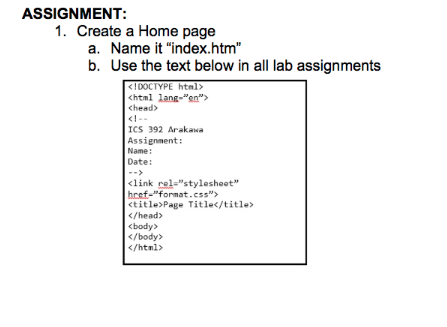
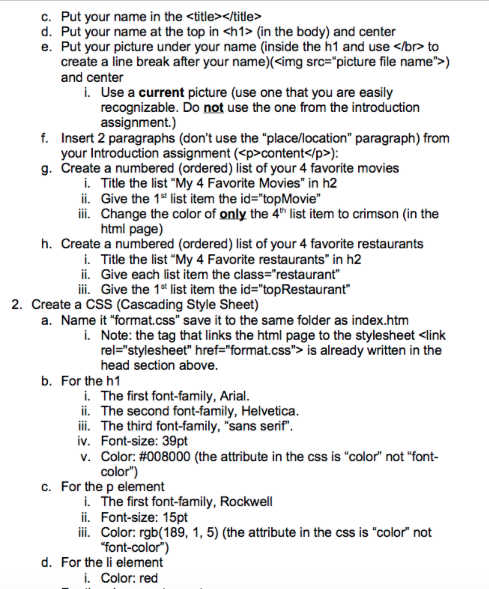
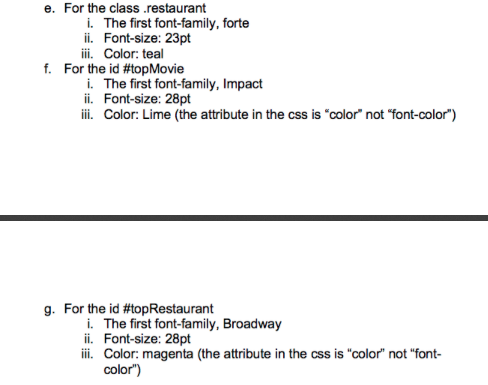
ASSIGNMENT: 1. Create a Home page a. Name it "index.htm" b. Use the text below in all lab assignments (in the body) and center e. Put your picture under your name (inside the h1 and use ) and center i. Use a current picture (use one that you are easily recognizable. Do not use the one from the introduction assignment.) f. Insert 2 paragraphs (don't use the "place/location" paragraph) from your Introduction assignment (pcontent /p>): g. Create a numbered (ordered) list of your 4 favorite movies i. Title the list "My 4 Favorite Movies" in h2 ii. Give the 1st list item the id-topMovie" ii. Change the color of only the 4h list item to crimson (in the html page) h. Create a numbered (ordered) list of your 4 favorite restaurants i. Title the list "My 4 Favorite restaurants" in h2 ii. Give each list item the class-"restaurant" i. Give the 1t list item the id-topRestaurant 2. Create a CSS (Cascading Style Sheet) a. Name it "format.css" save it to the same folder as index.htm i. Note: the tag that links the html page to the stylesheet clink rel-"stylesheet" href "format.css"> is already written in the head section above b. For the h1 i. The first font-family, Arial ii. The second font-family, Helvetica i The third font-family, "sans serif iv. Font-size: 39pt V. Color: #008000 (the attribute in the css is "color" not "font- color) c. For the p element i. The first font-family, Rockwell ii. Font-size: 15pt Color rgb(189, 1, 5) (the attribute in the css is "color" not "font-color) d. For the li element i. Color: red e. For the class .restaurant i. The first font-family, forte ii. Font-size: 23pt f. For the id #topMovie i. The first font-family, Impact ii. Font-size: 28pt ii. Color: Lime (the attribute in the css is "color" not "font-color") g. For the id #topRestaurant i. The first font-family, Broadway ii. Font-size: 28pt ii Color: magenta (the attribute in the css is "color" not "font- color)
Step by Step Solution
There are 3 Steps involved in it

Get step-by-step solutions from verified subject matter experts
 Study Help