







Question: https://drive.google.com/drive/u/2/my-drive this the link of CVS file https://docs.google.com/spreadsheets/d/1EYpPR-6Rb5fvjXus1kslUlDDkqvBSqz2-EQFEhpCFuc/edit#gid=1803620591 Python: Read File Assignment Name your function fileread.py with one input of the file name. 1. Import
https://drive.google.com/drive/u/2/my-drive
this the link of CVS file
https://docs.google.com/spreadsheets/d/1EYpPR-6Rb5fvjXus1kslUlDDkqvBSqz2-EQFEhpCFuc/edit#gid=1803620591
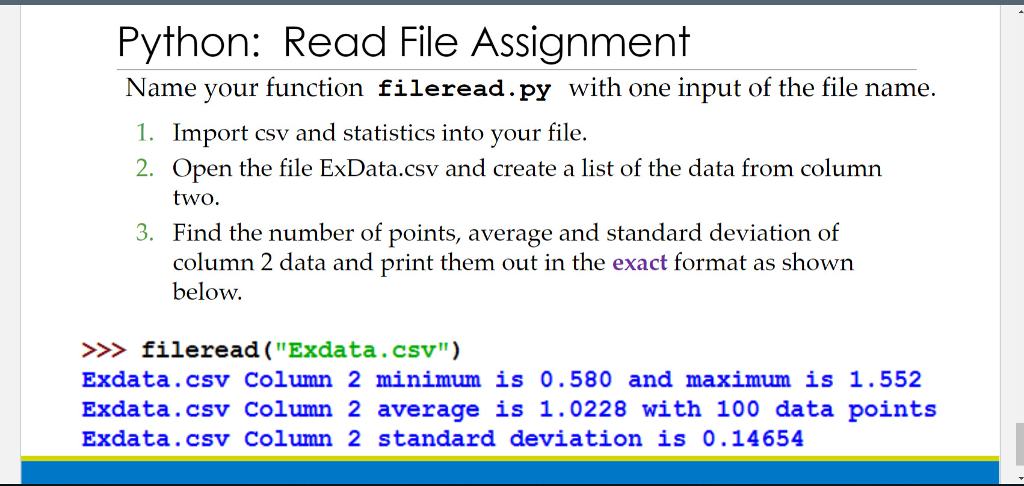
Python: Read File Assignment Name your function fileread.py with one input of the file name. 1. Import csv and statistics into your file. 2. Open the file ExData.csv and create a list of the data from column two. 3. Find the number of points, average and standard deviation of column 2 data and print them out in the exact format as shown below. ileread ("Exdata.csv") Exdata.csv Column 2 minimum is 0.580 and maximum is 1.552 Exdata.csv column 2 average is 1.0228 with 100 data points Exdata.csv Column 2 standard deviation is 0.14654
Step by Step Solution
There are 3 Steps involved in it

Get step-by-step solutions from verified subject matter experts
 Study Help