







Question: https://github.com/COGS108/Assignments/blob/master/A5/A5_NaturalLanguageProcessing.ipynb PYTHON PANDAS from sklearn.svm import SVC from sklearn.feature_extraction.text import CountVectorizer, TfidfVectorizer from sklearn.metrics import classification_report, precision_recall_fscore_support 1i) SVM Define a function called train SVM
https://github.com/COGS108/Assignments/blob/master/A5/A5_NaturalLanguageProcessing.ipynb
PYTHON PANDAS
from sklearn.svm import SVC from sklearn.feature_extraction.text import CountVectorizer, TfidfVectorizer from sklearn.metrics import classification_report, precision_recall_fscore_support
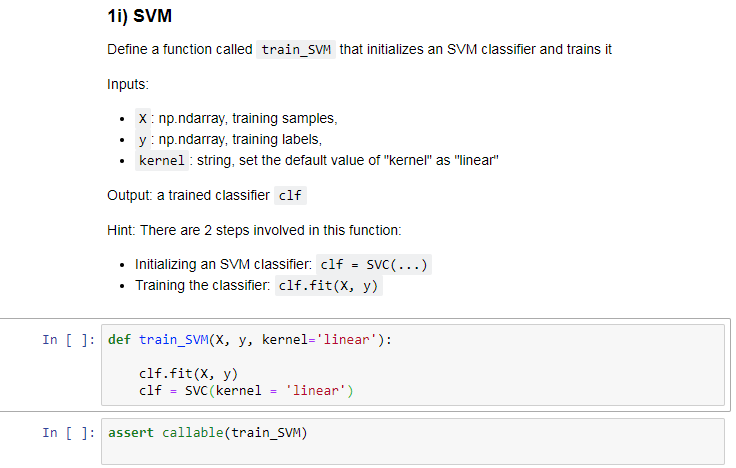
1i) SVM Define a function called train SVM that initializes an SVM classifier and trains it . X np.ndarray, training samples, y np.ndarray, training labels, . kernel string, set the default value of "kernel" as "linear" Output a trained classif er clf Hint: There are 2 steps involved in this function: . Initializing an SVM classifier: clf SVC(...) Training the classifier. clf.fit(X, y) In [1 def train SVM(X, y ker-'linear'): clf.fit(X, y) c1f = SVC ( kernel linear. ) In I 1: assert callable(train_svM) 1i) SVM Define a function called train SVM that initializes an SVM classifier and trains it . X np.ndarray, training samples, y np.ndarray, training labels, . kernel string, set the default value of "kernel" as "linear" Output a trained classif er clf Hint: There are 2 steps involved in this function: . Initializing an SVM classifier: clf SVC(...) Training the classifier. clf.fit(X, y) In [1 def train SVM(X, y ker-'linear'): clf.fit(X, y) c1f = SVC ( kernel linear. ) In I 1: assert callable(train_svM)
Step by Step Solution
There are 3 Steps involved in it

Get step-by-step solutions from verified subject matter experts
 Study Help