







Question: https://phet.colorado.edu/sims/html/charges-and-fields/latest/charges-and-fields_en.htmlThis is the link for this. B. Point Charges. Hit the lower right reset, and set up + and - point charges exactly as in
https://phet.colorado.edu/sims/html/charges-and-fields/latest/charges-and-fields_en.htmlThis is the link for this.
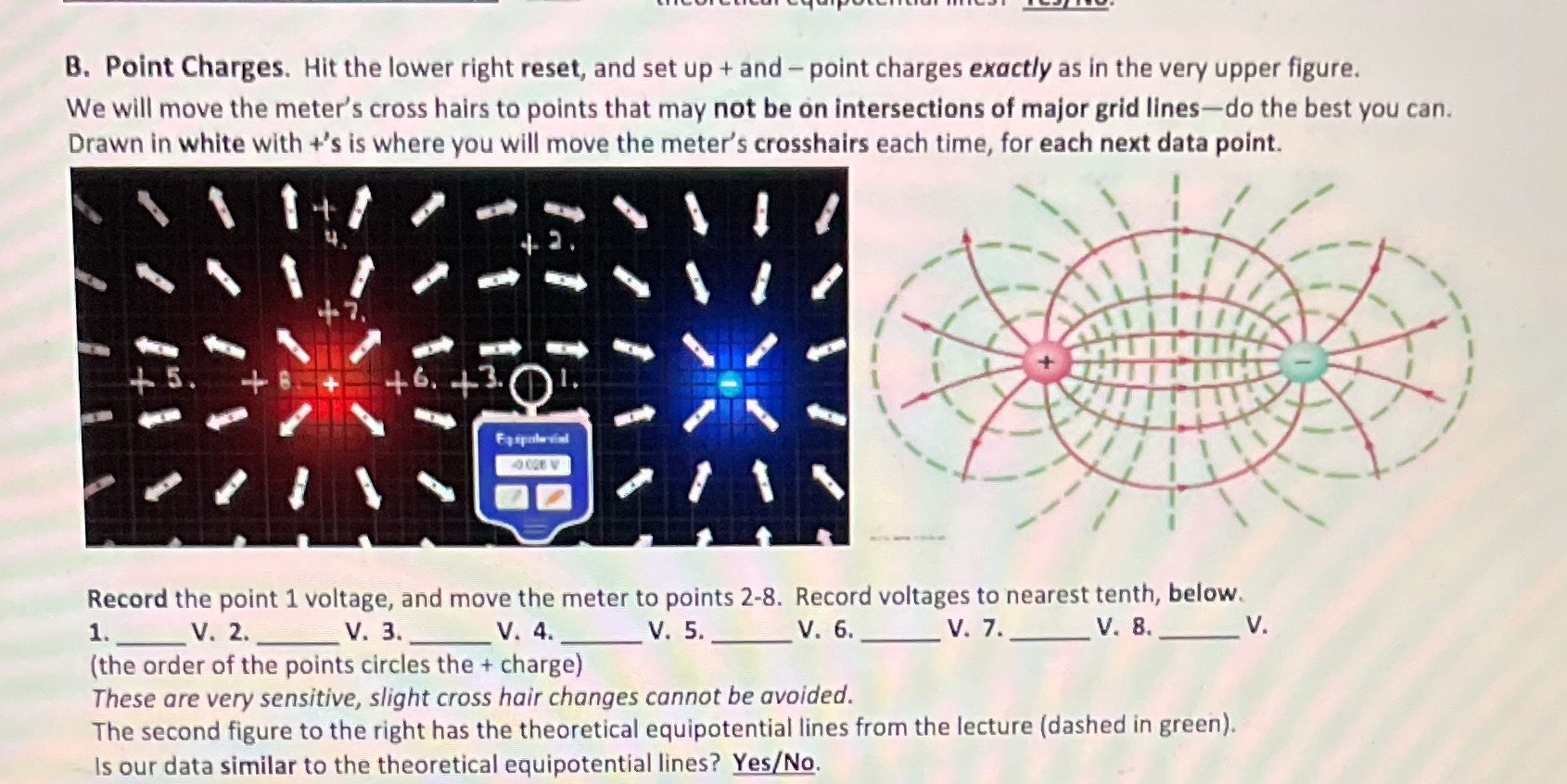
B. Point Charges. Hit the lower right reset, and set up + and - point charges exactly as in the very upper figure. We will move the meter's cross hairs to points that may not be on intersections of major grid lines-do the best you can. Drawn in white with +'s is where you will move the meter's crosshairs each time, for each next data point. 5 46. 43. Record the point 1 voltage, and move the meter to points 2-8. Record voltages to nearest tenth, below. 1. V. 2. V. 3. V. 4. V. 5. V. 6. V. 7. V. 8. V. (the order of the points circles the + charge) These are very sensitive, slight cross hair changes cannot be avoided. The second figure to the right has the theoretical equipotential lines from the lecture (dashed in green). Is our data similar to the theoretical equipotential lines? Yes/No
Step by Step Solution
There are 3 Steps involved in it

Get step-by-step solutions from verified subject matter experts
 Study Help