







Question: HW 6d-Write a struct object to a binary file 1.) Create a new C++ project and name it as: Cats 2.) Create a driver.cpp file.
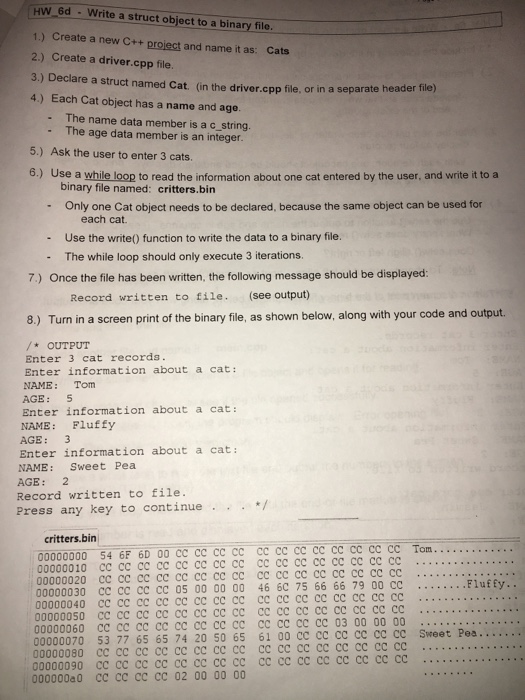
HW 6d-Write a struct object to a binary file 1.) Create a new C++ project and name it as: Cats 2.) Create a driver.cpp file. 3.) Declare a struct named Cat. (in the driver.cpp file, or in 4.) Each Cat object has a name and age. a separate header file) - The name data member is a c string. - The age data member is an integer. 5.) Ask the user to enter 3 cats 6.) Use a while loop to read the information about one cat entered by the user, and write it to a binary file named: critters.bin - Only one Cat object needs to be declared, because the same object can be used for - Use the write() function to write the data to a binary file. - The while loop should only execute 3 iterations. each cat. 7.) Once the file has been written, the following message should be displayed: Record written to file. (see output) 8.) Turn in a screen print of the binary file, as shown below, along with your code and output OUTPUT Enter 3 cat records. Enter information about a cat: NAME: Tom AGE: 5 Enter information about a cat: NAME: Pluffy AGE: 3 Enter information about a cat: NAME: Sweet Pea AGE: 2 Record written t file. Press any key to continue/ critters.bin 00000000 54 6F 6D 00 CC CC CC CC CC CC cc cc cc CC cc cc Tom 00000010 cc cc cc cc cc cc cc cc cc cc cc cc cc cc cc cc 00000020 cc cc cc 00000030 cc cc cc cC 05 00 00 00 46 6C 75 66 66 79 00 cc 00000040 cc cc cc cc cc cc cc cc cc cc . .. .. .. 00000060 cc cc cc cc cc cc cc cc cc cc cc cc 03 00 00 00 .. . 00000070 53 77 65 65 74 20 50 65 61 00 CC cC cC cc cC CC Sweet Pea..... 00000080 cc cc cc cc cc cc cc cc cc cc cc cc cc cc cc cc .. . . 00000090 CC cC Cc cc co ce C C cc cc cC cc cc cc cccc
Step by Step Solution
There are 3 Steps involved in it

Get step-by-step solutions from verified subject matter experts
 Study Help