







Question: HW:Arrays How would I change this code so it doesn't output 0.00 0.000 (for time, velocity array), so that the printed output looks like the
HW:Arrays
How would I change this code so it doesn't output 0.00 0.000 (for time, velocity array), so that the printed output looks like the example shown below?
import java.io.BufferedWriter; import java.io.FileWriter; import java.io.IOException; import java.io.PrintWriter; import java.io.Writer; import java.util.Scanner;
public class TerminalVelocity { public static double calculateVelocity(double mass, double crossSecArea,double dragCoeff, double time, double span, double velocityEarlier) { // v(t) = v(t-t)+(g- ((dragCoefficient*crossSectionArea*airDensity)/(2*mass))*v(t-t)2)t return velocityEarlier + (9.81 - ((dragCoeff*crossSecArea*1.14)/(2*mass)) * velocityEarlier * velocityEarlier) * span; }
public static void main(String a[]) { Scanner input = new Scanner(System.in); int drive = 'y'; PrintWriter consoleWriter = new PrintWriter(System.out); // keep looping till choice is y while (drive == 'y' || drive == 'Y') { // capture input values System.out.print("Enter the mass of the skydiver (kg): "); double mass = input.nextDouble(); System.out.print("Enter the cross-sectional area of the skydiver (m2): "); double crossSecArea = input.nextDouble(); System.out.print("Enter the drag coefficient of the skydiver: "); double dragCoeff = input.nextDouble(); System.out.print("Enter the ending time (sec): "); double endTime = input.nextDouble(); System.out.print("Enter the time step (sec): "); double timeStep = input.nextDouble(); input.nextLine(); // Consume newline left-over System.out.print("Enter the output filename: "); String filename = input.nextLine(); // determine size of required arrays int size = (int)(endTime/timeStep) + 1; // creating the appropriate size arrays double velocity[] = new double[size]; double time[] = new double[size]; time[0] = 0.0; velocity[0] = 0.0; int i=1; // calculate velocity at time t for each of the time durations for(double t=timeStep; t time.length) ? time.length : velocity.length; printDetails(velocity, time, fileWriter, outputSize); // writing to output file
if(outputSize > 10) outputSize = 10; printDetails(velocity, time, consoleWriter, outputSize); // writing to console.. you can comment it if you want as mentioned in the question consoleWriter.flush(); fileWriter.close(); } catch (IOException e1) { e1.printStackTrace(); } System.out.print("Enter another dive? (y/[n]):"); drive = input.next().charAt(0); } // close the resources input.close(); consoleWriter.close(); } // function to print the details public static void printDetails(double velocity[], double time[], Writer writer, int size) throws IOException { writer.append("Time, Velocity "); for(int i=0; i writer.append(String.format("%.2f", time[i]) + ", "); writer.append(String.format("%.4f", velocity[i]) + " "); } } }
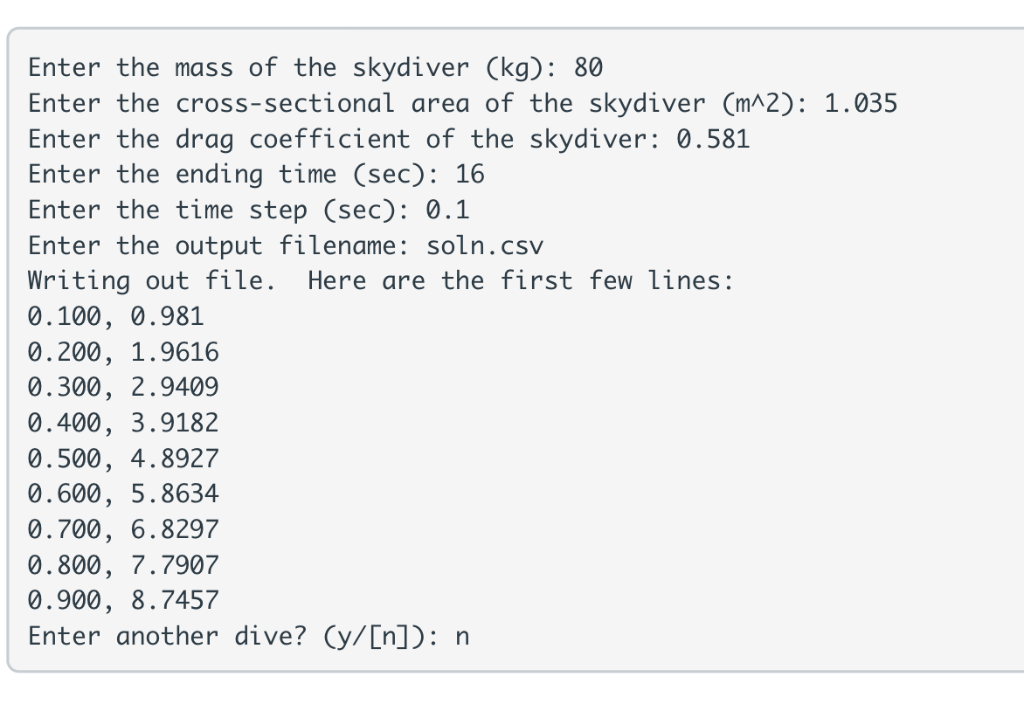
Enter the mass of the skydiver (kg): 80 Enter the cross-sectional area of the skydiver (mA2): 1.035 Enter the drag coefficient of the skydiver: 0.581 Enter the ending time (sec): 16 Enter the time step (sec): 0.1 Enter the output filename: soln.csv Writing out file. Here are the first few lines 0.100, 0.981 0.200, 1.9616 0.300, 2.9409 0.400, 3.9182 0.500, 4.8927 0.600, 5.8634 0.700, 6.8297 0.800, 7.7907 0.900, 8.7457 Enter another dive? (y/[n]): n
Step by Step Solution
There are 3 Steps involved in it

Get step-by-step solutions from verified subject matter experts
 Study Help