







Question: I always have a problem with my scanner output. The problem: Design a class named Person with fields for holding a person's name, address, and
I always have a problem with my scanner output.
The problem:
Design a class named Person with fields for holding a person's name, address, and telephone number (all as Strings). Write a constructor that initializes all of these values, and mutator and accessor methods for every field. Next, design a class named Customer, which inherits from the Person class. The Customer class should have a String field for the customer number and a boolean field indicating whether the customer wishes to be on a mailing list. Write a constructor that initializes these values and the appropriate mutator and accessor methods for the class's fields. Demonstrate the Customer class in a program that prompts the user to enter values for the customer's name, address, phone number, and customer number, and then asks the user whether or not the customer wants to recieve mail. Use this information to create a customer object and then print its information. Put all of your classes in the same file. To do this, do not declare them public. Instead, simply write: class Person { ... } class Customer { ... }
The code:
import java.util.Scanner;
import java.io.*;
class Person {
private String name; private String address; private String telephoneNo; public Person(String name, String address, String telephoneNo) { super(); this.name = name; this.address = address; this.telephoneNo = telephoneNo; } @Override public String toString() { return "[name=" + name + ", address=" + address + ", telephoneNo=" + telephoneNo + "]"; }
public String getName() { return name; } public void setName(String name) { this.name = name; } public String getAddress() { return address; } public void setAddress(String address) { this.address = address; } public String getTelephoneNo() { return telephoneNo; } public void setTelephoneNo(String telephoneNo) { this.telephoneNo = telephoneNo; } }
class Customer extends Person { private String customerNo; private boolean custWish; public Customer(String name, String address, String telephoneNo,String customerNo,boolean custWish) { super(name, address, telephoneNo); this.customerNo=customerNo; this.custWish=custWish; } public String getCustomerNo() { return customerNo; } @Override public String toString() { return "Customer [customerNo=" + customerNo + ", custWish=" + custWish + "]" + super.toString(); } public void setCustomerNo(String customerNo) { this.customerNo = customerNo; } public boolean isCustWish() { return custWish; } public void setCustWish(boolean custWish) { this.custWish = custWish; } }
class test {
public static void main(String args[]) throws IOException { Scanner s = new Scanner(System.in); System.out.println(" enter customer name : "); String name = s.nextLine(); System.out.println(" enter customer address : "); String address = s.nextLine(); System.out.println(" enter customer phone number : "); String phoneNo = s.nextLine(); System.out.println(" enter customer number : "); String custNo = s.nextLine();
System.out.println(" enter yeso -- customer wants to receive mail ? : "); String flag = s.nextLine(); boolean wish; if(flag.contains("y")) wish =true; else wish=false; Customer customer = new Customer(name,address,phoneNo,custNo,wish); System.out.println(customer.toString()); } }
The error message:
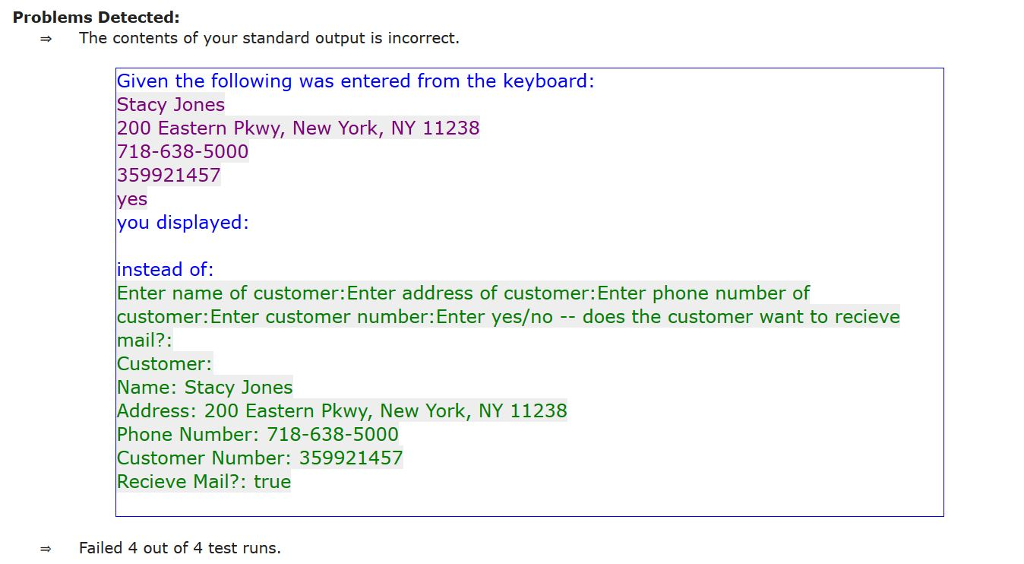
What am I doing wrong?
Problems Detected: The contents of your standard output is incorrect. Given the following was entered from the keyboard: Stacy Jones 200 Eastern Pkwy, New York, NY 11238 718-638-5000 359921457 yes you displayed: instead of: Enter name of customer:Enter address of customer: Enter phone number of customer: Enter customer number: Enter yeso -does the customer want to recieve mail?: Customer: Name: Stacy Jones Address: 200 Eastern Pkwy, New York, NY 11238 Phone Number: 718-638-5000 Customer Number: 359921457 Recieve Mail?: true Failed 4 out of 4 test runs
Step by Step Solution
There are 3 Steps involved in it

Get step-by-step solutions from verified subject matter experts
 Study Help