







Question: I am a bit confused on these two questions, do not know not exactly what they are asking Use matrix multiplication to first shift the
I am a bit confused on these two questions, do not know not exactly what they are asking

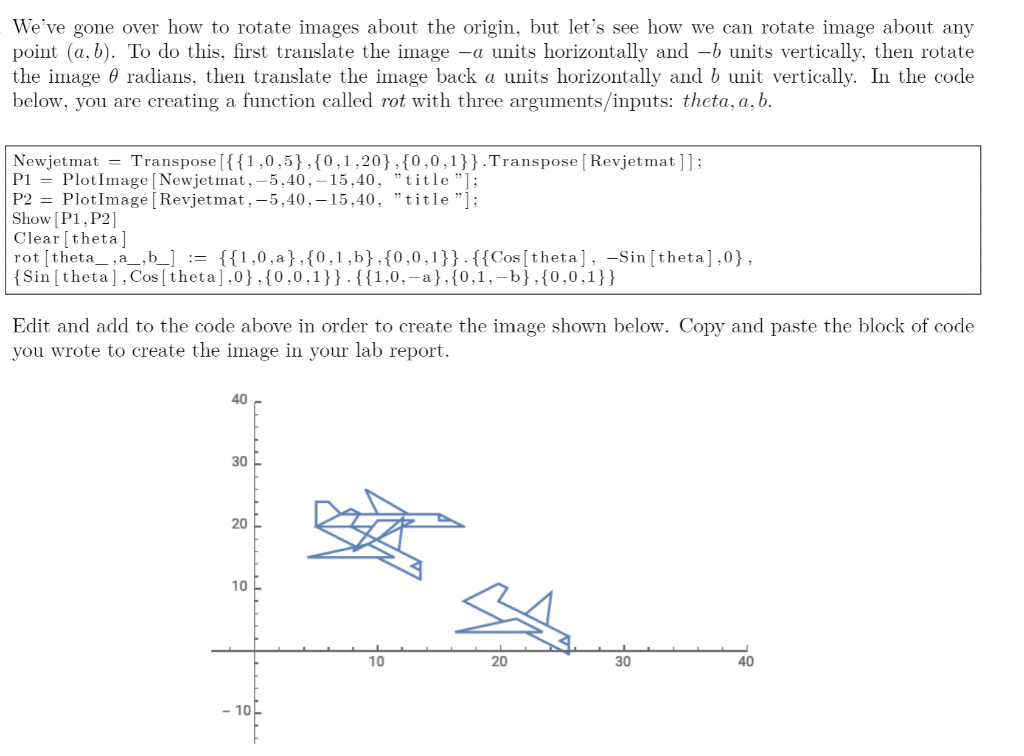
Use matrix multiplication to first shift the jet image 1 unit to the right and 1 unit down, then rotate 45 degrees counterclockwise, then scaled 2 units horizontally and units vertically. Include an image of your scaled jet in your report. We've gone over how to rotate images about the origin, but let's see how we can rotate image about any point (a, b). To do this, first translate the image -a units horizontally and -b units vertically, then rotate the image 0 radians, then translate the image back a units horizontally and b unit vertically. In the code below, you are creating a function called rot with three arguments/inputs: theta, a, b. Newjetmat = Transpose[{{1,0,5},{0,1,20},{0,0,1}}.Transpose (Revjetmat ]]; P1 = PlotImage [Newjet mat, -5,40,- 15,40,"title"); P2 = PlotImage (Revjetmat, -5,40, -15,40, "title"]; Show [P1, P2] Clear theta] rot[theta_,_,b_] := {{1,0,a},{0,1,b},{0,0,1}}-{{Cos[theta], -Sin (theta],0}, {Sin (theta], Cos[theta],0},{0,0,1}}-{{1,0,-a},{0,1,-b},{0,0,1}} Edit and add to the code above in order to create the image shown below. Copy and paste the block of code you wrote to create the image in your lab report. 40 30 20 10 10 20 30 40 - 10 Use matrix multiplication to first shift the jet image 1 unit to the right and 1 unit down, then rotate 45 degrees counterclockwise, then scaled 2 units horizontally and units vertically. Include an image of your scaled jet in your report. We've gone over how to rotate images about the origin, but let's see how we can rotate image about any point (a, b). To do this, first translate the image -a units horizontally and -b units vertically, then rotate the image 0 radians, then translate the image back a units horizontally and b unit vertically. In the code below, you are creating a function called rot with three arguments/inputs: theta, a, b. Newjetmat = Transpose[{{1,0,5},{0,1,20},{0,0,1}}.Transpose (Revjetmat ]]; P1 = PlotImage [Newjet mat, -5,40,- 15,40,"title"); P2 = PlotImage (Revjetmat, -5,40, -15,40, "title"]; Show [P1, P2] Clear theta] rot[theta_,_,b_] := {{1,0,a},{0,1,b},{0,0,1}}-{{Cos[theta], -Sin (theta],0}, {Sin (theta], Cos[theta],0},{0,0,1}}-{{1,0,-a},{0,1,-b},{0,0,1}} Edit and add to the code above in order to create the image shown below. Copy and paste the block of code you wrote to create the image in your lab report. 40 30 20 10 10 20 30 40 - 10
Step by Step Solution
There are 3 Steps involved in it

Get step-by-step solutions from verified subject matter experts
 Study Help