







Question: I am currently stuck on this lab problem. Any help would be awesome! -VUJU UPIS 0-0 Lab #2 In this lab we will using segments
I am currently stuck on this lab problem. Any help would be awesome!
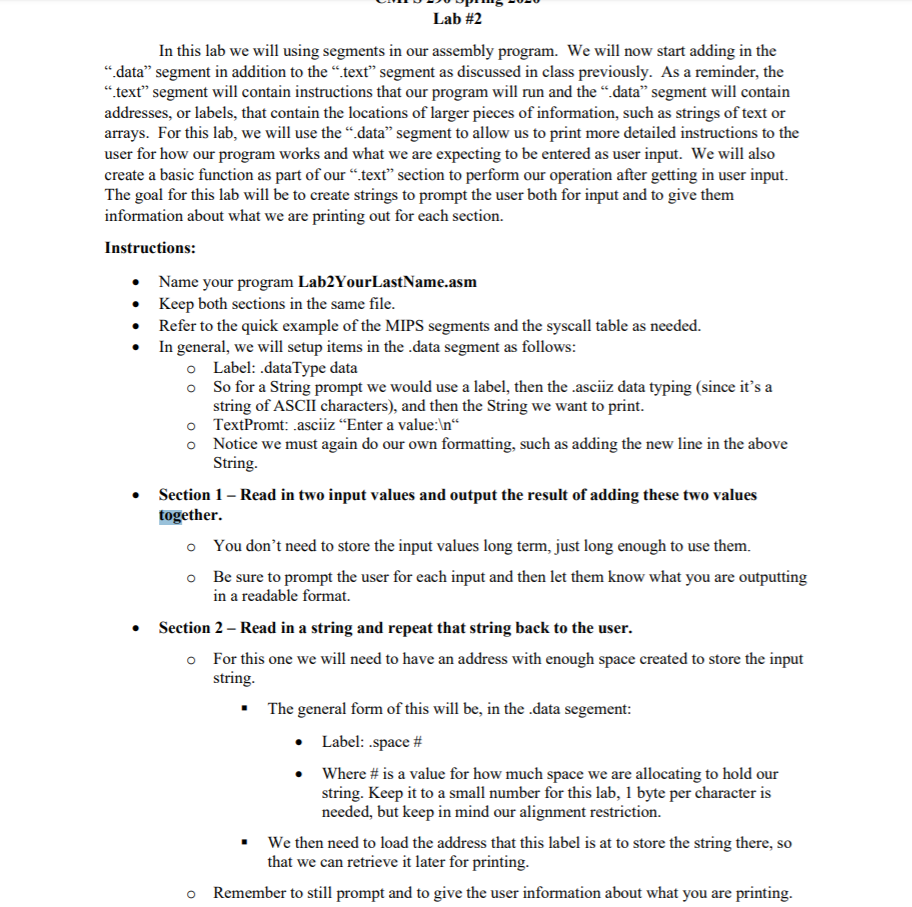
-VUJU UPIS 0-0 Lab #2 In this lab we will using segments in our assembly program. We will now start adding in the "data" segment in addition to the "text" segment as discussed in class previously. As a reminder, the "text" segment will contain instructions that our program will run and the data" segment will contain addresses, or labels, that contain the locations of larger pieces of information, such as strings of text or arrays. For this lab, we will use the "data" segment to allow us to print more detailed instructions to the user for how our program works and what we are expecting to be entered as user input. We will also create a basic function as part of our "text" section to perform our operation after getting in user input. The goal for this lab will be to create strings to prompt the user both for input and to give them information about what we are printing out for each section. Instructions: Name your program Lab2YourLastName.asm Keep both sections in the same file. Refer to the quick example of the MIPS segments and the syscall table as needed. In general, we will setup items in the data segment as follows: O Label: dataType data o So for a String prompt we would use a label, then the asciz data typing (since it's a string of ASCII characters), and then the String we want to print. o TextPromt: asciiz Enter a value: 'n o Notice we must again do our own formatting, such as adding the new line in the above String. Section 1 - Read in two input values and output the result of adding these two values together. o You don't need to store the input values long term, just long enough to use them. o Be sure to prompt the user for each input and then let them know what you are outputting in a readable format. Section 2 - Read in a string and repeat that string back to the user. o For this one we will need to have an address with enough space created to store the input string. . The general form of this will be, in the data segement: Label: space # Where # is a value for how much space we are allocating to hold our string. Keep it to a small number for this lab, 1 byte per character is needed, but keep in mind our alignment restriction. . We then need to load the address that this label is at to store the string there, so that we can retrieve it later for printing. o Remember to still prompt and to give the user information about what you are printing. -VUJU UPIS 0-0 Lab #2 In this lab we will using segments in our assembly program. We will now start adding in the "data" segment in addition to the "text" segment as discussed in class previously. As a reminder, the "text" segment will contain instructions that our program will run and the data" segment will contain addresses, or labels, that contain the locations of larger pieces of information, such as strings of text or arrays. For this lab, we will use the "data" segment to allow us to print more detailed instructions to the user for how our program works and what we are expecting to be entered as user input. We will also create a basic function as part of our "text" section to perform our operation after getting in user input. The goal for this lab will be to create strings to prompt the user both for input and to give them information about what we are printing out for each section. Instructions: Name your program Lab2YourLastName.asm Keep both sections in the same file. Refer to the quick example of the MIPS segments and the syscall table as needed. In general, we will setup items in the data segment as follows: O Label: dataType data o So for a String prompt we would use a label, then the asciz data typing (since it's a string of ASCII characters), and then the String we want to print. o TextPromt: asciiz Enter a value: 'n o Notice we must again do our own formatting, such as adding the new line in the above String. Section 1 - Read in two input values and output the result of adding these two values together. o You don't need to store the input values long term, just long enough to use them. o Be sure to prompt the user for each input and then let them know what you are outputting in a readable format. Section 2 - Read in a string and repeat that string back to the user. o For this one we will need to have an address with enough space created to store the input string. . The general form of this will be, in the data segement: Label: space # Where # is a value for how much space we are allocating to hold our string. Keep it to a small number for this lab, 1 byte per character is needed, but keep in mind our alignment restriction. . We then need to load the address that this label is at to store the string there, so that we can retrieve it later for printing. o Remember to still prompt and to give the user information about what you are printing
Step by Step Solution
There are 3 Steps involved in it

Get step-by-step solutions from verified subject matter experts
 Study Help