







Question: I am doing a project for my c programming class, and was hoping I could get some help. The Project: Dynamic Arrays and File I/O
I am doing a project for my c programming class, and was hoping I could get some help.
The Project:
Dynamic Arrays and File I/O with Matrix Operations
In this program we will create a program that performs matrix calculations on two matrices that are either read infrom a file, or randomly generated. If you were not in class when we did all these matrix calculations, the notes are posted online. Also these operations are very common then there are numerous resources to explain them online: https://web.stanford.edu/~wfsharpe/mia/mat/mia_mat2.htm
Step 1:
Create three pointers that will hold the three dynamically generated arrays used in the program. a and b are the arrays on which we will do operations, and c is the results array. Initialize these arrays to NULL.
int** a; int** b; int** c;
Also create integer variables to hold the row and column dimensions of these three arrays
int N_a, M_a, N_b, M_b, N_c, M_c;
Step 2: Create the menu given in the executable. It contains the following error checks:
-If the user selects a character not given in the list print:
printf("Error -- Invalid choice! Please select again... ");
-If choices a, b, c, d, e or w are chosen before choices f or r print the error message:
printf("Error -- no data inputted. Please enter data... ");
Step 3: Add the following function to your code. It releases memory from a dynamic array when you are done using it
void FreeArray(int** arr, int N)
{
int i;
if(arr == NULL) return;
if(arr != NULL)
{
for(i = 0; i { if(arr[i] != Null) free(arr[i]); free(arr); } } Step 4: Create a print function that will print any array given its pointer and dimensions void PrintArray(int** arr, int N, int M); Step 5: For option R, ask the user to enter a value N from which we will create and allocate two NxN arrays filled with random integers between 0-10. The pseudocode looks like this: Set a flag variable dataReadSuccess to false/0. If array a is not equal to NULL, free the memory of a (use the given function FreeArray) If array b is not equal to NULL, free the memory of b (use the given function FreeArray) Repeatedly ask the user to enter a size N until they give a value greater or equal to 2. When they give a value less than 2, print error printf("Error -- enter a positive size greater than 2."); Assume they give you numerical values. Set N_a, M_a, N_b and M_b all equal to N Set a flag variable errorInAlloc = 0 Allocate the row dimension of a to the size of N_a (for the following instructions for allocation it should look just like the book example we did in class). If this allocation was not successful set errorInAlloc = 1 If this was successful, allocate all the individual rows of a to size M_a. For each of these rows, fill the values with random integers between 0 - 10 If any of these row allocations are not successful, set errorInAlloc to 1. If no error in allocation occurred when setting a (errorInAlloc ==0) print a and repeat the exact same steps to fill b. If at any point in the above steps errorInAlloc got set to 1 print the error message at the end of the steps printf("Error -- Unable to allocate arrays "); Otherwise set dataReadSuccess to true/1 (you can use this in your checks for whether data has been entered prior to calling a,b,c,d,e or w). Step 6: Create a function to add together two arrays (a, b) and save their result in array c. void MatrixAddition(int** a, int** b, int** result, int N, int M) Step 7: In your menu for choice a, call the function MatrixAddition as follows. You can only do matrix addition between a and b if their dimensions are the same. Understand this code fragment well, as the steps will be very similar for all the other options else if(choice == 'a' || choice == 'A') //addition { if(N_a == N_b && M_a == M_b) { if(c != NULL) FreeArray(c, N_c); N_c = N_a; M_c = M_a; c = (int**) calloc(N_c, sizeof(int*)); for(i = 0; i sizeof(int)); MatrixAddition(a,b,c, N_a, M_a); printf("A + B = "); PrintArray(c, N_c, M_c); } else { printf("Error -- Size mismatch between array 1 and array 2 "); } } Step 8: Create a function MatrixSubtraction that subtracts two matrices from one another. Call this function from the menu choice b. You can only do subtraction if arrays a and b are the same size. void MatrixSubtraction(int** a, int** b, int** result, int N, int M); Step 9: Create a function MatrixTranspose that returns the transpose of a matrix. Call this function from choice d. void MatrixTranspose(int** a, int** result, int N, int M); Step 11: Create a function MatrixMultiplication that multiples arrays a and b together. Call this function from choice e. You can only multiply a and b together if the number of columns in a are equal to the number of rows in b. The resulting matrix will have a size equal to (the number of rows of a) x (the number of columns b). void MatrixMultiplication(int** a, int** b, int** result, int N_a,int M_a, int N_b, int M_b); Step 12: When choice w is selected write the values currently stored in w to a file named resultMatrix.txt. To do this you will follow the below steps: If c is NULL print an error message printf("Error -- results array not allocated "); Otherwise, open a file resultMatrix.txt with the intent to write to the file (w). If the file was not able to be opened print out error message printf("Error -- unable to open write file! "); Otherwise, on the first line of the file print the number of rows in c, and then the number of columns. \ Next print out the matrix one row at a time Close the file Print out the success message Step 13: Create two text files and fill them with the following information: the first row will contain the number of rows and then the number of columns in a matrix separated by one space. The next rows of the file will contain all the elements in the matrix. We are going to assume that these files are always properly formatted in exactly this way (although this is rarely the case with input files!). Here is a picture of a sample file: Sample outp[ut of sample file: 2 5 7 7 0 4 5 1 20 1 4 7 Step 14: For choice f, we are going to read in matrices to a and b from files given by the users. The outline of this will be very similar to the psuedocode given for step 5 (the random filled matrices), expect that now the values are coming from the file. To store the users given filename we need a string variable char fname[128]; And we will fill this variable in the following way: printf("Enter file name for matrix 1: "); scanf("%s",fname); The user has to type in the extension of the file as well when they enter .txt You can now open this file by trying FILE *inputf; if((inputf=fopen(fname,"r")) == NULL) //error occured If the file cannot be opened print printf("Error -- Unable to openfile! "); Otherwise read the sizes of the matrices from line 1 of the file, and then allocate the arrays to the appropriate size, filling each row as you go by reading from the file. Dont forget to close the file when you are done. You must include the following functions for full credit: void PrintArray(int** arr, int N, int M); void MatrixAddition(int** a, int** b, int** result, int N, int M); void MatrixSubtraction(int** a, int** b, int** result, int N, int M); void ScalarMultiplication(int scalar, int** a, int** result, int N,int M); void MatrixMultiplication(int** a, int** b, int** result, int N_a, int M_a, int N_b, int M_b); void MatrixTranspose(int** a, int** result, int N, int M); void FreeArray(int** arr, int N); Feel free to add another other functions that you find helpful, but be careful! Remember that memory allocated locally inside a functions can be garbage collected after your code leaves the function. So you may want to keep any parts of your code that allocate memory in the main. ALLE PROGRAMMING MUST GBE IN THE C PROGRAMMING LANGUAGE 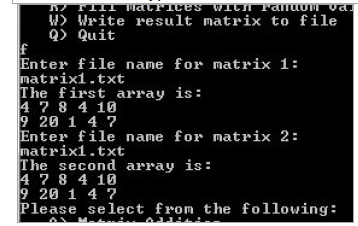
Step by Step Solution
There are 3 Steps involved in it

Get step-by-step solutions from verified subject matter experts
 Study Help