







Question: I am doing a trivia project. It is phyton assignment. The photo that I have attached is part of my coding. I used random.choice to
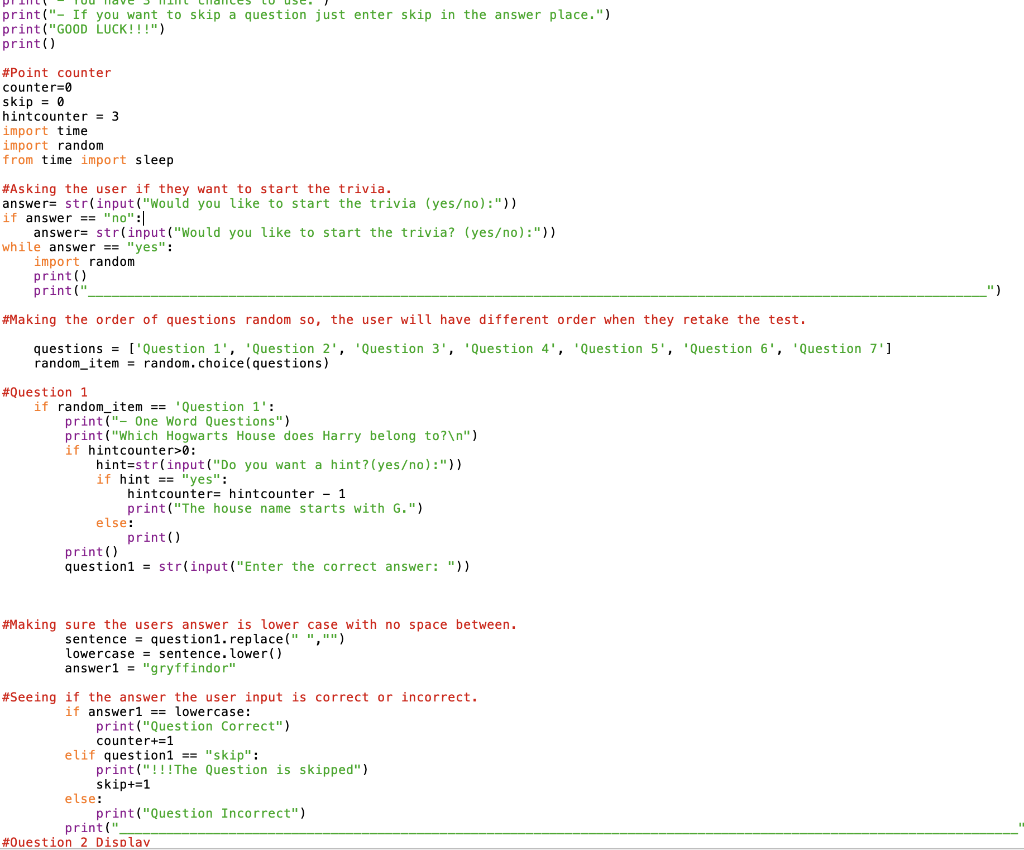
I am doing a trivia project. It is phyton assignment. The photo that I have attached is part of my coding. I used random.choice to display the questions randomly but the problem is sometimes it displays the same question twice or more. What code should I use so the questions will be displayed once?
print("- If you want to skip a question just enter skip in the answer place.") print("GOOD LUCK!!!") print() #Point counter counter=0 skip = 0 hintcounter = 3 import time import random from time import sleep #Asking the user if they want to start the trivia. answer= str(input("Would you like to start the trivia (yeso):")) if answer == "no":/ answer= str(input("Would you like to start the trivia? (yeso) :") while answer == "yes": import random print() print(" ") #Making the order of questions random so, the user will have different order when they retake the test. questions = ['Question 1', 'Question 2', 'Question 3', 'Question 4', 'Question 5', 'Question 6', 'Question 7'] random_item = random. choice (questions) #Question 1 if random_item == 'Question 1': print("- One Word Questions") print("Which Hogwarts House does Harry belong to? ") if hintcounter> : hint=str(input("Do you want a hint? (yeso):")) if hint == "yes": hintcounter= hintcounter - 1 print("The house name starts with G.") else: print() print() question1 = str(input("Enter the correct answer: ")) #Making sure the users answer is lower case with no space between. sentence = question 1. replace("","") lowercase = sentence. lower() answer1 = "gryffindor" #Seeing if the answer the user input is correct or incorrect. if answerl == lowercase: print("Question Correct") counter+=1 elif question1 == "skip": print("!!!The Question is skipped") skip+=1 else: print("Question Incorrect") print(" #Ouestion 2 Display
Step by Step Solution
There are 3 Steps involved in it

Get step-by-step solutions from verified subject matter experts
 Study Help