







Question: I am doing an OPIM assignment on a computer program called DB Browser. Help me answer the highlighted question. The other photos are for context
I am doing an OPIM assignment on a computer program called DB Browser. Help me answer the highlighted question. The other photos are for context of what the Data that is already in there is. Feel free to post questions for clarification. I need the written sql commands to type in the blank space shown below on image 3 to execute the function asked by the question.
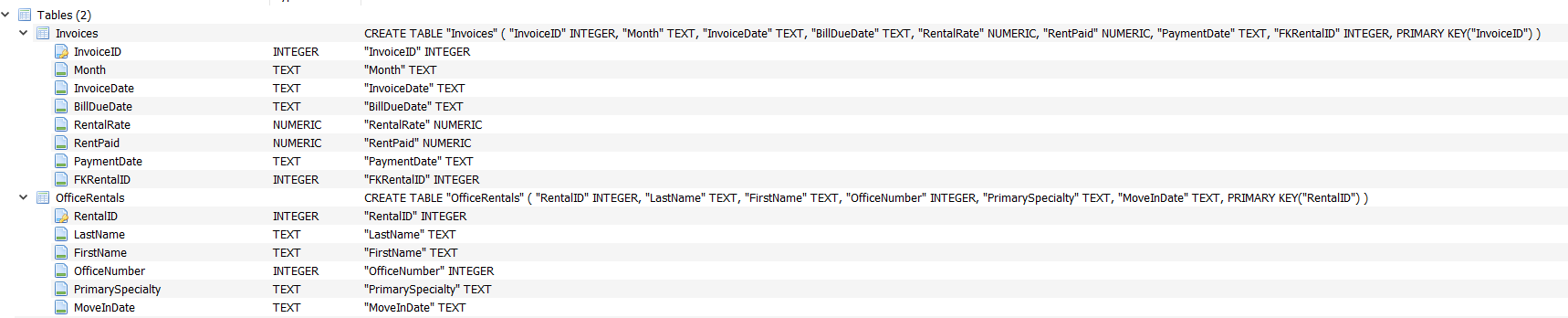
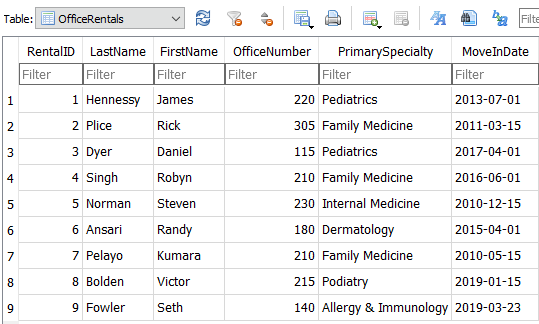
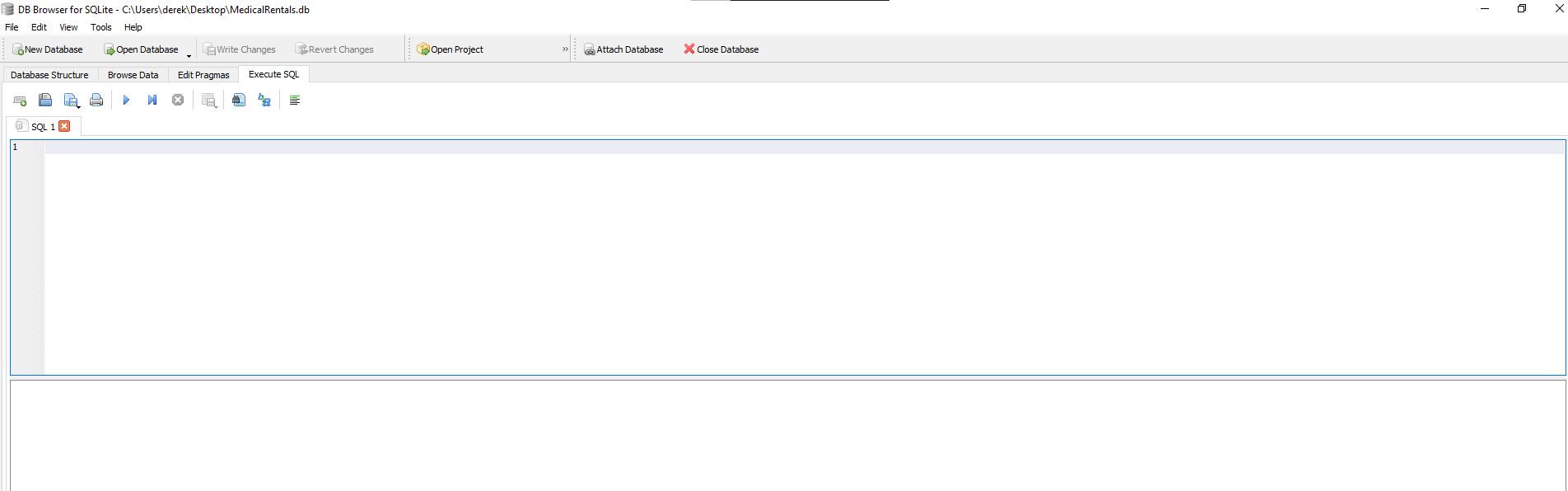
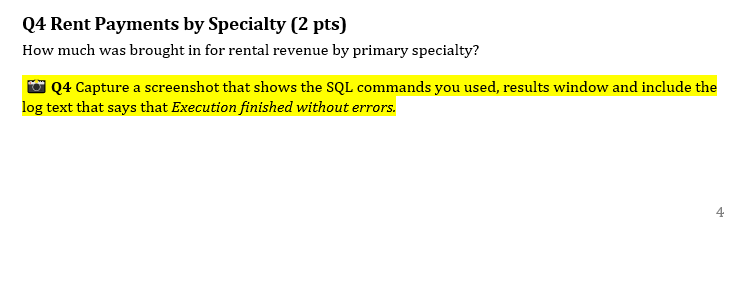
Table: OfficeRentals \begin{tabular}{|c|c|c|c|c|c|c|} \hline & RentalID & LastName & FirstName & OfficeNumber & PrimarySpecialty & MoveInDate \\ \hline & Filter & Filter & Filter & Filter & Filter & Filter \\ \hline 1 & 1 & Hennessy & James & 220 & Pediatrics & 2013-07-01 \\ \hline 2 & 2 & Plice & Rick & 305 & Family Medicine & 2011-03-15 \\ \hline 3 & 3 & Dyer & Daniel & 115 & Pediatrics & 2017-04-01 \\ \hline 4 & 4 & Singh & Robyn & 210 & Family Medicine & 20160601 \\ \hline 5 & 5 & Norman & Steven & 230 & Internal Medicine & 20101215 \\ \hline 6 & 6 & Ansari & Randy & 180 & Dermatology & 2015-04-01 \\ \hline 7 & 7 & Pelayo & Kumara & 210 & Family Medicine & 20100515 \\ \hline 8 & 8 & Bolden & Victor & 215 & Podiatry & 2019-01-15 \\ \hline 9 & 9 & Fowler & Seth & 140 & Allergy \& Immunology & 20190323 \\ \hline \end{tabular} \begin{tabular}{|c|c|c|} \hline Invoices & & CREATE TABLE "Invoices" ( "InvoiceID" INTEGER, "Month" TEXT, "InvoiceDate" TEXT, "BillDueDate" TEXT, "RentalRate" NUMERIC, "RentPaid" NUMERIC, "PaymentDate" TEXT, "FKRentalID" INTEGER, PRIMARY KEY("InvoiceID") ) \\ \hline InvoiceID & INTEGER & "InvoiceID" INTEGER \\ \hline Month & TEXT & "Month" TEXT \\ \hline InvoiceDate & TEXT & "InvoiceDate" TEXT \\ \hline BillDueDate & TEXT & "BillDueDate" TEXT \\ \hline DentalRate & NUMERIC & "RentalRate" NUMERIC \\ \hlineD RentPaid & NUMERIC & "RentPaid" NUMERIC \\ \hline PaymentDate & TEXT & "PaymentDate" TEXT \\ \hline FKRentaliD & INTEGER & "FKRentalID" INTEGER \\ \hline OfficeRentals & & CREATE TABLE "OfficeRentals" ( "RentalID" INTEGER, "LastName" TEXT, "FirstName" TEXT, "OfficeNumber" INTEGER, "PrimarySpecialty" TEXT, "MoveInDate" TEXT, PRIMARY KEY("RentalID") ) \\ \hline RentalID & INTEGER & "RentalID" INTEGER \\ \hline DastName & TEXT & "LastName" TEXT \\ \hline FirstName & TEXT & "FirstName" TEXT \\ \hline officenumber & INTEGER & "OfficeNumber" INTEGER \\ \hline Primaryspecialty & TEXT & "PrimarySpecialty" TEXT \\ \hline MoveInDate & TEXT & "MoveInDate" TEXT \\ \hline \end{tabular} Q4 Rent Payments by Specialty (2 pts) How much was brought in for rental revenue by primary specialty? Q4 Capture a screenshot that shows the SQL commands you used, results window and include the log text that says that Execution finished without errors. DB Browser for SQLite - Ci\Users\derek\Desktop\MedicalRentals.db File Tools Help Open Project (8) Attach Database Close Database Database Structure Browse Data - GWrite Changes Revert Changes Execute SQL (1) SQL 1 1 Table: OfficeRentals \begin{tabular}{|c|c|c|c|c|c|c|} \hline & RentalID & LastName & FirstName & OfficeNumber & PrimarySpecialty & MoveInDate \\ \hline & Filter & Filter & Filter & Filter & Filter & Filter \\ \hline 1 & 1 & Hennessy & James & 220 & Pediatrics & 2013-07-01 \\ \hline 2 & 2 & Plice & Rick & 305 & Family Medicine & 2011-03-15 \\ \hline 3 & 3 & Dyer & Daniel & 115 & Pediatrics & 2017-04-01 \\ \hline 4 & 4 & Singh & Robyn & 210 & Family Medicine & 20160601 \\ \hline 5 & 5 & Norman & Steven & 230 & Internal Medicine & 20101215 \\ \hline 6 & 6 & Ansari & Randy & 180 & Dermatology & 2015-04-01 \\ \hline 7 & 7 & Pelayo & Kumara & 210 & Family Medicine & 20100515 \\ \hline 8 & 8 & Bolden & Victor & 215 & Podiatry & 2019-01-15 \\ \hline 9 & 9 & Fowler & Seth & 140 & Allergy \& Immunology & 20190323 \\ \hline \end{tabular} \begin{tabular}{|c|c|c|} \hline Invoices & & CREATE TABLE "Invoices" ( "InvoiceID" INTEGER, "Month" TEXT, "InvoiceDate" TEXT, "BillDueDate" TEXT, "RentalRate" NUMERIC, "RentPaid" NUMERIC, "PaymentDate" TEXT, "FKRentalID" INTEGER, PRIMARY KEY("InvoiceID") ) \\ \hline InvoiceID & INTEGER & "InvoiceID" INTEGER \\ \hline Month & TEXT & "Month" TEXT \\ \hline InvoiceDate & TEXT & "InvoiceDate" TEXT \\ \hline BillDueDate & TEXT & "BillDueDate" TEXT \\ \hline DentalRate & NUMERIC & "RentalRate" NUMERIC \\ \hlineD RentPaid & NUMERIC & "RentPaid" NUMERIC \\ \hline PaymentDate & TEXT & "PaymentDate" TEXT \\ \hline FKRentaliD & INTEGER & "FKRentalID" INTEGER \\ \hline OfficeRentals & & CREATE TABLE "OfficeRentals" ( "RentalID" INTEGER, "LastName" TEXT, "FirstName" TEXT, "OfficeNumber" INTEGER, "PrimarySpecialty" TEXT, "MoveInDate" TEXT, PRIMARY KEY("RentalID") ) \\ \hline RentalID & INTEGER & "RentalID" INTEGER \\ \hline DastName & TEXT & "LastName" TEXT \\ \hline FirstName & TEXT & "FirstName" TEXT \\ \hline officenumber & INTEGER & "OfficeNumber" INTEGER \\ \hline Primaryspecialty & TEXT & "PrimarySpecialty" TEXT \\ \hline MoveInDate & TEXT & "MoveInDate" TEXT \\ \hline \end{tabular} Q4 Rent Payments by Specialty (2 pts) How much was brought in for rental revenue by primary specialty? Q4 Capture a screenshot that shows the SQL commands you used, results window and include the log text that says that Execution finished without errors. DB Browser for SQLite - Ci\Users\derek\Desktop\MedicalRentals.db File Tools Help Open Project (8) Attach Database Close Database Database Structure Browse Data - GWrite Changes Revert Changes Execute SQL (1) SQL 1 1
Step by Step Solution
There are 3 Steps involved in it

Get step-by-step solutions from verified subject matter experts
 Study Help