







Question: I am having a little trouble with my Python3 code today, I am not sure what I am doing wrong. Here are the instructions: and
I am having a little trouble with my Python3 code today, I am not sure what I am doing wrong. Here are the instructions:
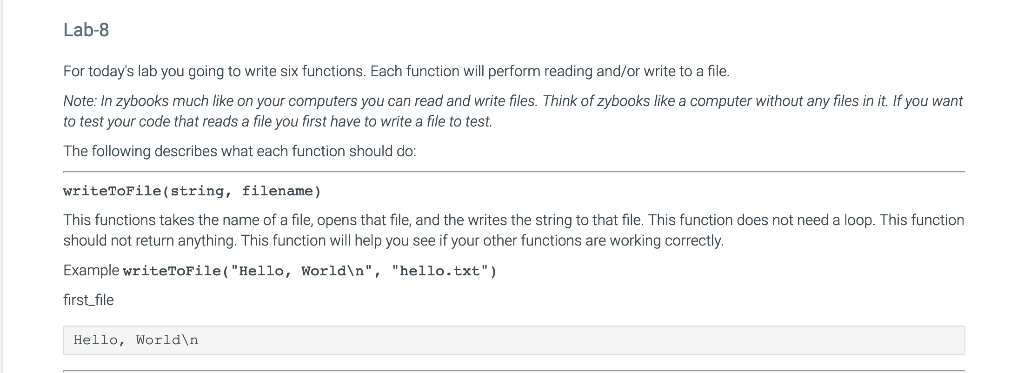
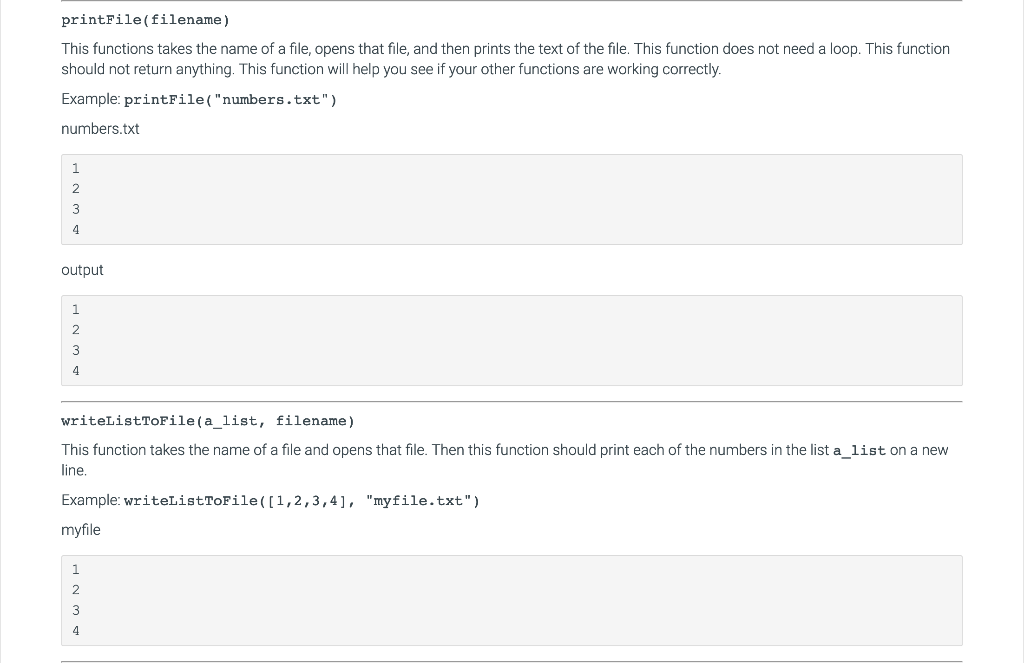
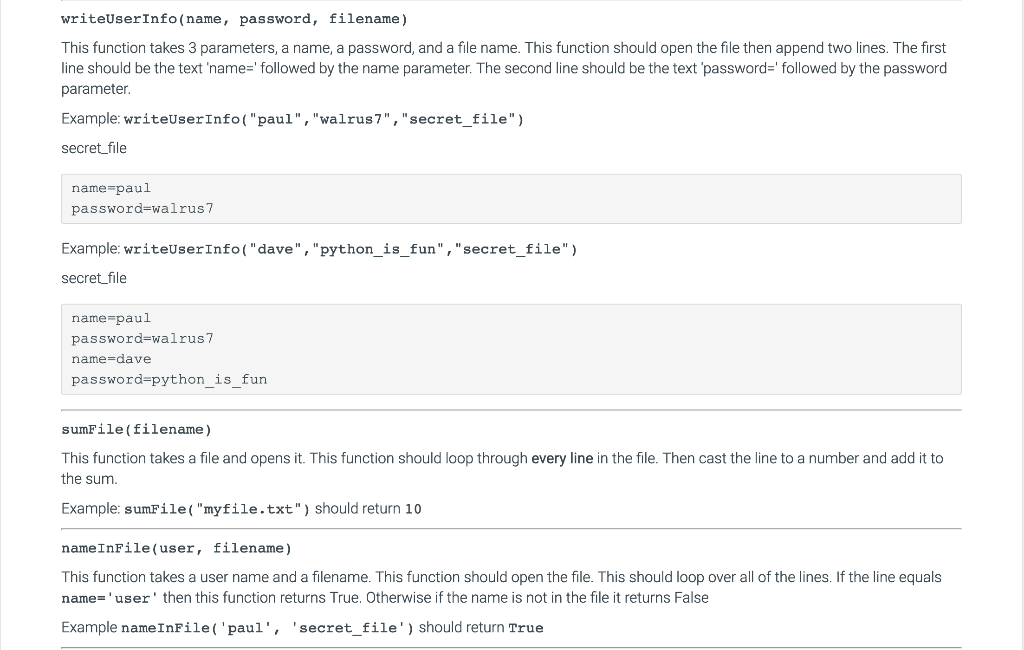
and here is my code:
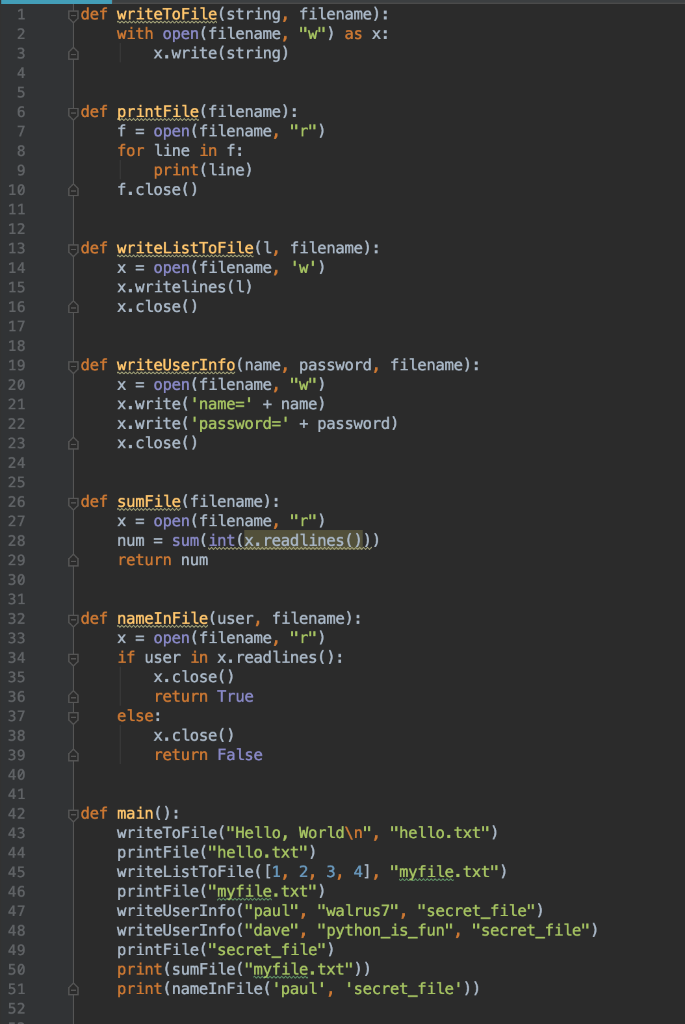
update: I have seen I did not close x in sumFile and I am still only getting a 2/10 on the grader. any help appreciated.
Lab-8 For today's lab you going to write six functions. Each function will perform reading and/or write to a file Note: In zybooks much like on your computers you can read and write files. Think of zybooks like a computer without any files in it. If you want to test your code that reads a file you first have to write a file to test. The following describes what each function should do: writeToFile(string, filename) This functions takes the name of a file, opens that file, and the writes the string to that file. This function does not need a loop. This function should not return anything. This function will help you see if your other functions are working correctly. Example writeToFile("Hello, World ", "hello.txt" first file Hello, World printFile(filename) This functions takes the name of a file, opens that file, and then prints the text of the file. This function does not need a loop. This function should not return anything. This function will help you see if your other functions are working correctly. Example: printFile("numbers.txt") numbers.txt output 2 writeListToFile(a_list, filename) This function takes the name of a file and opens that file. Then this function should print each of the numbers in the list a_list on a new ine. Example: writelistToFile([1,2,3,4], "myfile.txt" myfile 2 writeUserInfo (name, password, filename) This function takes 3 parameters, a name, a password, and a file name. This function should open the file then append two lines. The first line should be the text 'name-' followed by the name parameter. The second line should be the text password' followed by the password parameter. Example: writeUserInfo( "paul", "walrus7", "secret_file") secret_file name pau password-walrus7 Example: writeUserInfo( "dave", "python is fun", "secret file") secret file name pau password-walrus7 name-dave password-python is fun sumFile(filename) This function takes a file and opens it. This function should loop through every line in the file. Then cast the line to a number and add it to the sum Example: sumFile( "myfile.txt") should return 10 nameInFile (user, filename) This function takes a user name and a filename. This function should open the file. This should loop over all of the lines. If the line equals name-'user then this function returns True. Otherwise if the name is not in the file it returns False Example nameInFile 'paul, 'secret file') should return True def writeToFile(string, filename): with open (filename, "w") as x: 2 x.write(string) 4 6 def printFile(filename): f open (filename, "r" for line in f: 7 print(line) 10 f.close() 12 13 14 15 16 17 18 19 20 21 def writelistToFile(l, filename): xopen(filename, 'w') x.writelines ( ) x.close() def writeUserInfo(name, password, filename): xopen(filename, "w) x.write( name-'+name) x.write( 'passwordpassword) x.close() 23 24 25 26 27 28 29 def sumFile(filename): xopen(filename, "r") num = sum(int return num 31 32 odef nameInFile (user, filename): xopen(filename, "r") if user in x.readlines (): x.close() return True 35 else: 37 38 39 40 41 42 43 x.close) return False def main): 45 46 47 48 49 50 51 52 writeToFile("Hello, World ", "hello.txt") printFile("hello.txt") writeListToFile([1, 2, 3, 4], "myfile.txt" printFile("myfile.txt") writeUserInfo("paul", "walrus7", "secret_file") writeUserInfo("dave", "python_is_fun", "secret file") printFile("secret file") print(sumFile("myfile.txt")) print (nameInFile( 'paul', 'secret_file'))
Step by Step Solution
There are 3 Steps involved in it

Get step-by-step solutions from verified subject matter experts
 Study Help