







Question: I am making a form in visual studio using C# , I am having issues with my timer. I have an error that displays if
I am making a form in visual studio using C# , I am having issues with my timer. I have an error that displays if requirements are not meet and I need the lblError to disappear after two seconds but i do not know how to do that. this is what i have:
code:
using System; using System.Collections.Generic; using System.ComponentModel; using System.Data; using System.Drawing; using System.Linq; using System.Text; using System.Threading.Tasks; using System.Windows.Forms;
namespace program_1 { public partial class frmPassword : Form { public frmPassword() { InitializeComponent(); } private void InitializeMyControl() { // Set to no text. txtPassword.Text = ""; // The password character is an asterisk. txtPassword.PasswordChar = '*'; } private void ValidatePassword(string Password) { //validate length if (Password.Length
} // give error to user if password does not meet requirements such as letter, number, password1 if (bolLetter == false) { lblError.Text = "Password must contain a letter"; //select password and set focus txtPassword.SelectAll(); txtPassword.Focus(); } else if (bolNumber == false) { lblError.Text = "Password must contain a number"; //select password and set focus txtPassword.SelectAll(); txtPassword.Focus(); } else if(txtPassword.Text != "password1") { lblError.Text = "Wrong password, try again"; //select password ans set focus txtPassword.SelectAll(); txtPassword.Focus(); } else { //send user to new form if password is good frmHello HelloForm = new frmHello(); HelloForm.ShowDialog();
} } }
private void btnLogin_Click(object sender, EventArgs e) { //call method ValidatePassword(txtPassword.Text); }
private void txtPassword_TextChanged(object sender, EventArgs e) {
}
private void tmtLabel_Tick(object sender, EventArgs e) { // make error label disappear after two seconds if (lblError.Visible == true) { lblError.Visible = false; } else { lblError.Visible = false; tmtLabel.Enabled = false; } } } }
the form:
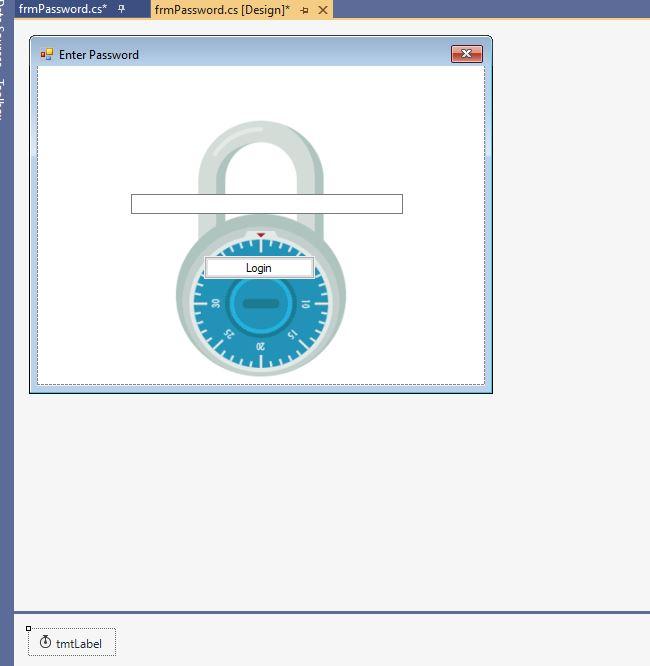
frmPassword.cs* frmPassword.cs (Design)* + x Enter Password Login 10 15 tmtLabel frmPassword.cs* frmPassword.cs (Design)* + x Enter Password Login 10 15 tmtLabel
Step by Step Solution
There are 3 Steps involved in it

Get step-by-step solutions from verified subject matter experts
 Study Help