







Question: I am not sure what else you are needing Create a Scenario Summary Report appropriately and reorder the worksheets so the Scenario Summary worksheet appears
I am not sure what else you are needing
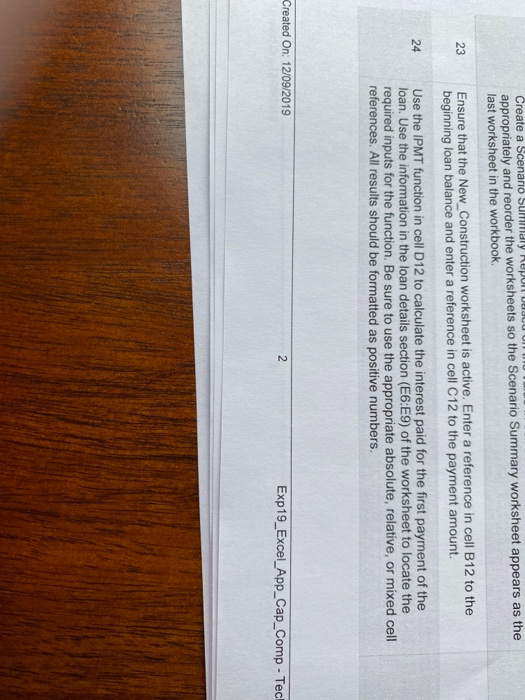
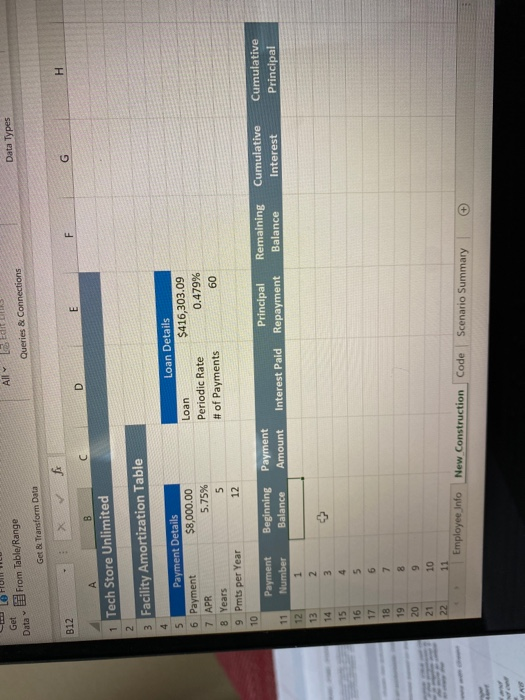
Create a Scenario Summary Report appropriately and reorder the worksheets so the Scenario Summary worksheet appears as the last worksheet in the workbook. 23 Ensure that the New_Construction worksheet is active Enter a reference in cell B12 to the beginning loan balance and enter a reference in cell C12 to the payment amount. 24 Use the IPMT function in cell D12 to calculate the interest paid for the first payment of the loan. Use the information in the loan details section (E6:E9) of the worksheet to locate the required inputs for the function. Be sure to use the appropriate absolute, relative, or mixed cell references. All results should be formatted as positive numbers. Created On: 12/09/2019 2 Exp19_Excel_App_Cap_Comp - Tech AN Get From Table/Range Data Types Queries & Connections Get & Transform Data X fi H B12 G D E A B 1 Tech Store Unlimited 2 3 Facility Amortization Table Cumulative Interest Cumulative Principal 4 Loan Details 5 Payment Details $8,000.00 6 Payment $416,303.09 Loan 7 APR 5.75% Periodic Rate 0.479% 8 Years 5 # of Payments 60 9 Pmts per Year 12 10 Payment Beginning Payment Principal Remaining 11 Number Balance Amount Interest Paid Repayment Balance 12 1 13 2 14 3 15 4 16 5 17 6 18 7 19 8 20 9 21 10 22 11 Employee Info New Construction Code Scenario Summary
Step by Step Solution
There are 3 Steps involved in it
1 Expert Approved Answer
Step: 1 Unlock

Question Has Been Solved by an Expert!
Get step-by-step solutions from verified subject matter experts
Step: 2 Unlock
Step: 3 Unlock
 Study Help