







Question: I am really need help for this 1. Use the MATLAB call picture = imread('scenery.jpg', 'jpg'); to read in an image file (placed on the
I am really need help for this
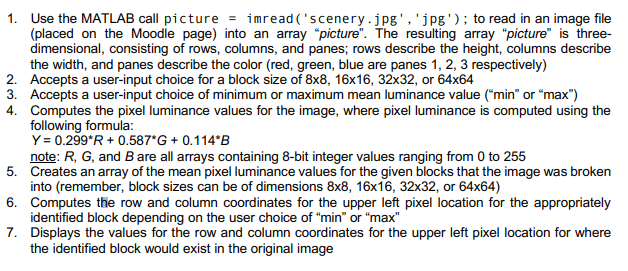
1. Use the MATLAB call picture = imread('scenery.jpg', 'jpg'); to read in an image file (placed on the Moodle page) into an array "picture". The resulting array "picture" is three- dimensional, consisting of rows, columns, and panes; rows describe the height, columns describe the width, and panes describe the color (red, green, blue are panes 1, 2, 3 respectively) 2. Accepts a user-input choice for a block size of 8x8, 16x16, 32x32, or 64x64 3. Accepts a user-input choice of minimum or maximum mean luminance value ("min" or "max") 4. Computes the pixel luminance values for the image, where pixel luminance is computed using the following formula: Y = 0.299*R +0.587*G+ 0.114*B note: R, G, and B are all arrays containing 8-bit integer values ranging from 0 to 255 5. Creates an array of the mean pixel luminance values for the given blocks that the image was broken into (remember, block sizes can be of dimensions 8x8, 16x16, 32x32, or 64x64) 6. Computes the row and column coordinates for the upper left pixel location for the appropriately identified block depending on the user choice of "min" or "max" 7. Displays the values for the row and column coordinates for the upper left pixel location for where the identified block would exist in the original image 1. Use the MATLAB call picture = imread('scenery.jpg', 'jpg'); to read in an image file (placed on the Moodle page) into an array "picture". The resulting array "picture" is three- dimensional, consisting of rows, columns, and panes; rows describe the height, columns describe the width, and panes describe the color (red, green, blue are panes 1, 2, 3 respectively) 2. Accepts a user-input choice for a block size of 8x8, 16x16, 32x32, or 64x64 3. Accepts a user-input choice of minimum or maximum mean luminance value ("min" or "max") 4. Computes the pixel luminance values for the image, where pixel luminance is computed using the following formula: Y = 0.299*R +0.587*G+ 0.114*B note: R, G, and B are all arrays containing 8-bit integer values ranging from 0 to 255 5. Creates an array of the mean pixel luminance values for the given blocks that the image was broken into (remember, block sizes can be of dimensions 8x8, 16x16, 32x32, or 64x64) 6. Computes the row and column coordinates for the upper left pixel location for the appropriately identified block depending on the user choice of "min" or "max" 7. Displays the values for the row and column coordinates for the upper left pixel location for where the identified block would exist in the original image
Step by Step Solution
There are 3 Steps involved in it

Get step-by-step solutions from verified subject matter experts
 Study Help