







Question: I am supposed to use the VLOOKUP function to solve the highlighted column and then copy and paste down. The function worked for some but
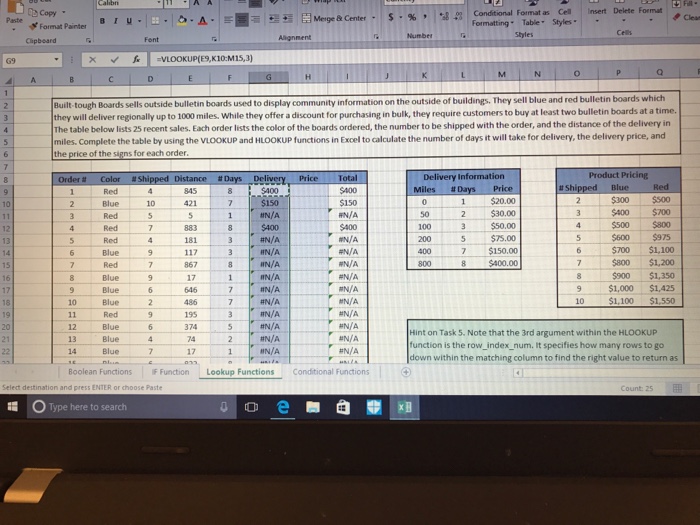
Conditional Format as Cell Insert Delete Format Formatting Table Styles b Copy Merge Cleas Format PainterIU Chpboard Paste Alignnent G9 xVLOOKUP(E9,K10:M15,3) outside bulletin boards used to display community information on the outside of buildings. They sell blue and red bulletin boards which hey will deliver regionally up to 1000 miles. While they offer a discount for purchasing in bulk, they require customers to buy at least two bulletin boards at a time The table below lists 25 recent sales. Each order lists the color of the boards ordered, the number to be shipped with the order, and the distance of the delivery in miles. Complete the table by using the VLOOKUP and HLOOKUP functions in Excel to calculate the number of days it will take for delivery, the delivery price, and the price of the signs for each order Delivery Information Product Pricing #Da $300 $500 3 $400 $700 $500 $800 $600 $975 $700 $1,100 $800 $1,200 $900 $1,350 9 $1,000 $1,425 10 $1,100 $1,550 1 $20.00 $150 FN/A $400 N/A $150 N/A 10421 $30.00 5 $75.00 IN/A IN/A IN/A --$150.00 $400.00 HN/A HN/A N/A N/A #AIA HN/A UN/A N/A 8 867 17 10 Blue 374 HN/A 13 14 Blue Blue Hint on Task 5. Note that the 3rd argument within the HLOOKUP function is the row_index_num. It specifies how many rows to go down within the matching column to find the right value to return as N/A Boolean Functions F Function Lookup Functions Conditional Functions Select destination and presS ENTER or choose Paste Type here to search
Step by Step Solution
There are 3 Steps involved in it

Get step-by-step solutions from verified subject matter experts
 Study Help