







Question: I am to create a multiplication table with this exact format, however any starting and end value can be typed in. This is the code
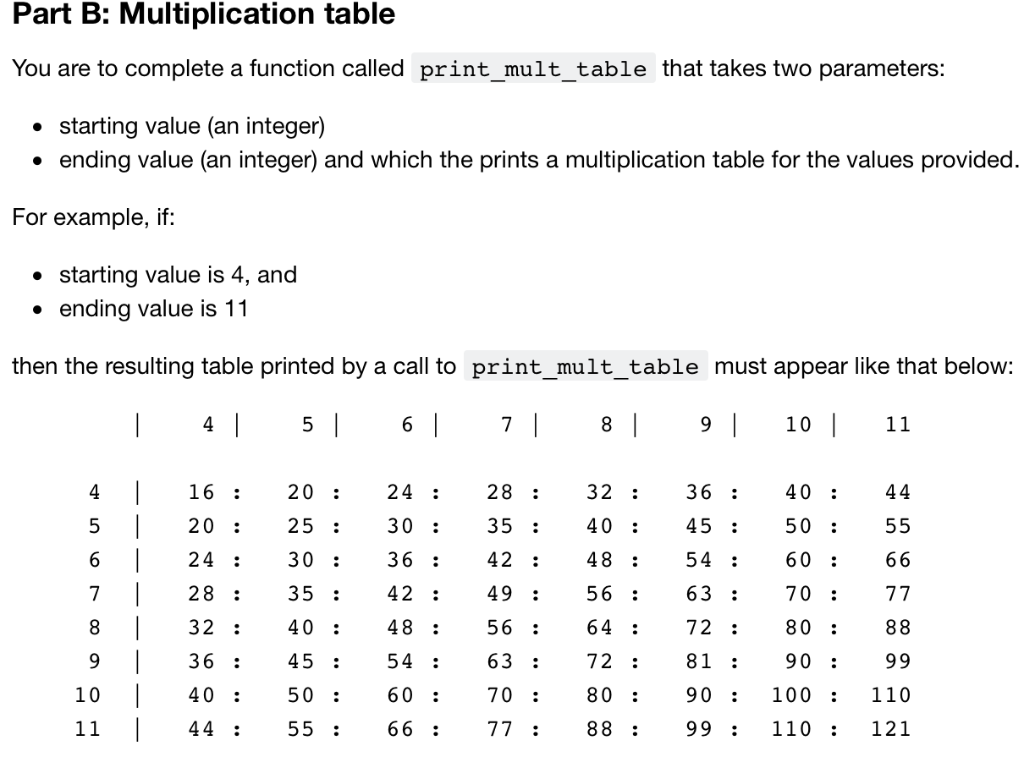 I am to create a multiplication table with this exact format, however any starting and end value can be typed in. This is the code I have now, but i cannot figure out how to make it display with this format. Please build off the code I already have:
def print_mult_table(start, end): if end - start > 14 or startend : print("Error") else: for i in range (start, end+1): print("|", i, end="\t") print() print(" ") for row in range(start, end+1): for column in range (start, end+1): print( row*column, end="\t") print(" ") def main(): start = int(input("Start of table ")) end = int(input("End of table ")) print_mult_table(start, end) main()
note: indentations might be off from copy pasting
Part B: Multiplication table You are to complete a function called print_mult_table that takes two parameters: starting value (an integer) . ending value (an integer) and which the prints a multiplication table for the values provided For example, if: * starting value is 4, and ending value is 11 then the resulting table printed by a call to print mult_table must appear like that below: 7 10 4 16:20 : 24 :28 :32:3640:44 5 20:25 : 30:35 :40:45:50:55 5460 66 7 28 35: 42: 49: 56 : 63 :70 : 77 8 32 4048 56 : 64: 72 : 8088 9 36 45 54 63 : 72: 81: 90 99 10 40: 50 :60 :70:8090100:110 11 4455 :66 :77:8899110:121 6 24 30: 3642: 48:5
Step by Step Solution
There are 3 Steps involved in it

Get step-by-step solutions from verified subject matter experts
 Study Help