







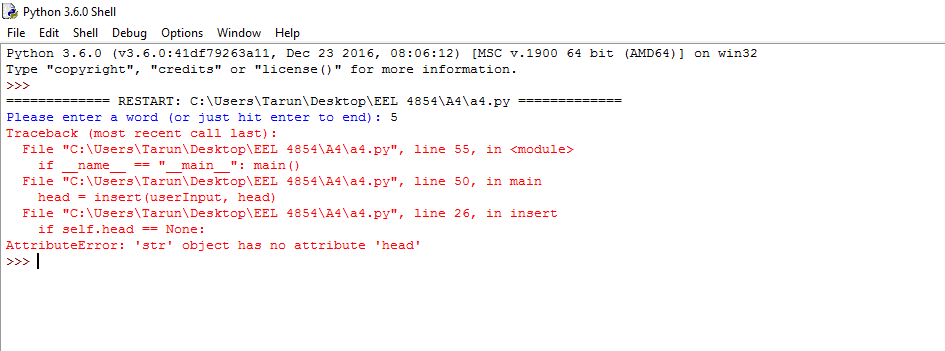
Question: I am trying ro run this code and Getting error in attach(below) pic here. Was supposed to define the Three Fucntion as Below. Define a
I am trying ro run this code and Getting error in attach(below) pic here. Was supposed to define the Three Fucntion as Below.
Define a function length that expects a singly linked structure (the head of the structure) as an argument. The function returns the number of items (nodes) in the structure.
Define a function printStructure that expects a linked structure as an argument. The function prints each item in the structure. The function does not return a value.
Define a function insert that inserts an item into a singly linked structure in the correct position, so that the structure is always kept in ascending order (alphabetical). The function expects two arguments: the item and the linked structure (which may be empty). The function returns the modified linked structure.
File a4.py
""" File: a4.py Define a length function. Define a printStructure function. Define an insert function. Test the above functions and the Node class. """
from node import Node def length(head): """Returns the number of items in the linked structure referred to by head.""" probe = head count = 0 if head.next is None: return None else: if head.next.value == n: count += 1 countInt(head.next, n, count) return count
def insert(self, item): new_node = Node(item)
if self.head == None: self.head = new_node if self.tail != None: self.tail.next = new_node self.tail = new_node return item
def printStructure(self): """Prints the items in the structure referred to by head.""" node = self.head while node != None: print (node.data) node = node.next
def main(): """Gets words from the user and inserts in the structure referred to by head."""
head = None userInput = input('Please enter a word (or just hit enter to end): ') while userInput != '': head = insert(userInput, head) userInput = input('Please enter a word (or just hit enter to end): ') print('The structure contains', length(head), 'items:') printStructure(head)
if __name__ == "__main__": main()
File: Node.py
""" File: node.py
Node classes for one-way linked structures and two-way linked structures. """
class Node(object):
def __init__(self, data, next = None): """Instantiates a Node with default next of None""" self.data = data self.next = next
Sample output 1: >>> RESTART: C:\a4.py Please enter a word (or just hit enter to end): bottle Please enter a word (or just hit enter to end): a Please enter a word (or just hit enter to end): water Please enter a word (or just hit enter to end): of Please enter a word (or just hit enter to end): The structure contains 4 items: a bottle of water
Sample output 2 (note: items are strings, so lexicographical order is ok): >>> RESTART: C:\a4.py Please enter a word (or just hit enter to end): 5 Please enter a word (or just hit enter to end): 10 Please enter a word (or just hit enter to end): 20 Please enter a word (or just hit enter to end): 15 Please enter a word (or just hit enter to end): 1 Please enter a word (or just hit enter to end): 8 Please enter a word (or just hit enter to end): The structure contains 6 items: 1 10 15 20 5 8
U Python 3.6.0 hel File Edit Shell Debug Options Window Help Python 3. 6.0 (v 3. 6. 0:3ldf79263all, Dec 23 2016 08:0 12) MSC v.1900 63 bit (AMD63) on Win32 Type copyright credits or "license for more information. RESTART C: Users \Tarun Desktop EEL 3854\A4\a 4.py Please enter a word (or just hit enter to end) 5 Traceback (most recent call last) File C:\Users\Tarun Desktop EEL 4854\A4\a4.py lin 55, in
Step by Step Solution
There are 3 Steps involved in it

Get step-by-step solutions from verified subject matter experts
 Study Help