







Question: I am trying to create this c# program using windows form application and trying to see how it is implemented. The design of the Student
I am trying to create this c# program using windows form application and trying to see how it is implemented.
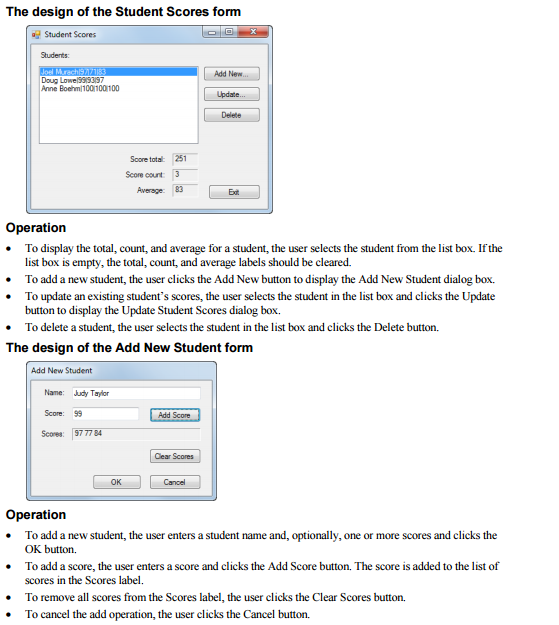
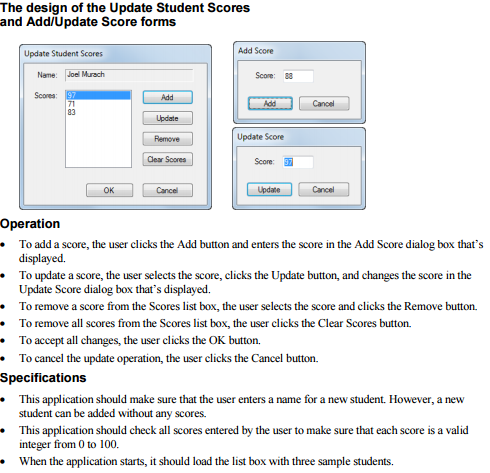
The design of the Student Scores form a Student Scores Add New. Doug Lowe ISSS3IS7 Anne Boehml 100100100 Score total 251 score count 3 Operation To display the total, count, and average for a student, the user selects the student from the list box Ifthe list box is empty, the total, count, and average labels should be cleared. To add a new student, the user clicks the Add New button to display the Add New Student dialog box. To update an existing student's scores, the user selects the student in the list box and clicks the Update button to display the Update Student Scores dialog box. To delete a student, the user selects the student in the list box and clicks the Delete button. The design of the Add New Student form Add New Student Name: udy Taylor Add Score 9777 84 Gear Scores OK Cancel Operation To add a new student, the user entersastudent name and, optionally, one or more scores and clicks the OK button. To add a score, the user enters a score and clicks the Add Score button. The score is added to the list of scores in the Scores label. To remove all scores from the Scores label, the user clicks the Clear Scores button. To cancel the add operation, the user clicks the Cancel button. The design of the Student Scores form a Student Scores Add New. Doug Lowe ISSS3IS7 Anne Boehml 100100100 Score total 251 score count 3 Operation To display the total, count, and average for a student, the user selects the student from the list box Ifthe list box is empty, the total, count, and average labels should be cleared. To add a new student, the user clicks the Add New button to display the Add New Student dialog box. To update an existing student's scores, the user selects the student in the list box and clicks the Update button to display the Update Student Scores dialog box. To delete a student, the user selects the student in the list box and clicks the Delete button. The design of the Add New Student form Add New Student Name: udy Taylor Add Score 9777 84 Gear Scores OK Cancel Operation To add a new student, the user entersastudent name and, optionally, one or more scores and clicks the OK button. To add a score, the user enters a score and clicks the Add Score button. The score is added to the list of scores in the Scores label. To remove all scores from the Scores label, the user clicks the Clear Scores button. To cancel the add operation, the user clicks the Cancel button
Step by Step Solution
There are 3 Steps involved in it

Get step-by-step solutions from verified subject matter experts
 Study Help