







Question: I am trying to findout why I am getting errors and what these errors mean. I am also not sure I am using input with
I am trying to findout why I am getting errors and what these errors mean. I am also not sure I am using input with other program as well.
.exe when its run
Assembler Simulator
1. Display Menu
2. Read code from file
3. Display errors
4. Execute program
5. Display memory contents
6. Re-Enter code
7. Display All Memory
8. Exit Program
Enter option: 2
Enter File Name: Program1.asm
found file
Metro State University Assembler Simulator
1. Display Menu
2. Read code from file
3. Display errors
4. Execute program
5. Display memory contents
6. Re-Enter code
7. Display All Memory
8. Exit Program
Enter option: 4
Syntax errors
Assembler Simulator
1. Display Menu
2. Read code from file
3. Display errors
4. Execute program
5. Display memory contents
6. Re-Enter code
7. Display All Memory
8. Exit Program
Enter option: 3
Number of errors: 12
Line #: 4 Invalid Op Code
Line #: 7 Invalid Op Code
Line #: 42 Invalid Op Code
Line #: 60 Invalid Op Code
Line #: 67 Invalid Op Code
Line #: 73 Invalid Op Code
Line #: 74 Invalid Op Code
Line #: 89 Invalid Op Code
Line #: 128 Invalid Op Code
Line #: 129 Invalid Op Code
Line #: 130 Invalid Op Code
Line #: 141 Need STP Op Code
Assembler Simulator
1. Display Menu
2. Read code from file
3. Display errors
4. Execute program
5. Display memory contents
6. Re-Enter code
7. Display All Memory
8. Exit Program
Enter option:
Directions
- Write an Assembler program that accepts an integer from the user
- The program displays the Factorial of the number
- Submit a title page with your information and Program 1 as the title
- Paste the Assembler program on page 1 (text, no bitmap)
- Note: Factorial: 5! = 5 * 4 * 3 * 2 * 1 = 120.
- Run the program in the Assembler simulator and capture the screen showing the input and output received
- Run the program twice with two different numbers between 1 and 10
what i have so far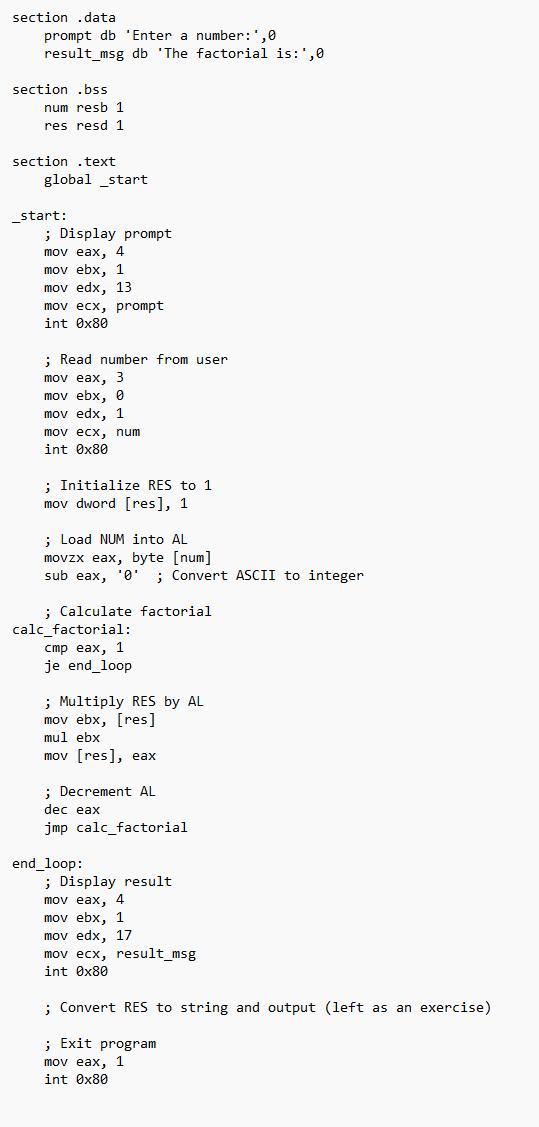
section .data prompt db 'Enter a number: ',0 result_msg db 'The factorial is: ',0 section .bss num resb 1 res resd 1 section .text global start _start: ; Display prompt mov eax, 4 mov ebx, 1 mov edx, 13 mov ecx, prompt int 0x80 ; Read number from user mov eax, 3 mov ebx, 0 mov edx, 1 mov ecx, num int 0x80 ; Initialize RES to 1 mov dword [res], 1 ; Load NUM into AL movzx eax, byte [num] sub eax, '0' ; Convert ASCII to integer ; Calculate factorial calc factorial: cmp eax, 1 je end_loop ; Multiply RES by AL mov ebx, [res] mul ebx mov [res], eax ; Decrement AL dec eax jmp calc_factorial end_loop: ;Display result mov eax, 4 mov ebx, 1 mov edx, 17 mov ecx, result_msg int 0x80 ;Convert RES to string and output (left as an exercise) ; Exit program mov eax, 1 int 0x80
Step by Step Solution
There are 3 Steps involved in it

Get step-by-step solutions from verified subject matter experts
 Study Help