







Question: I am using hbs files to render data from mongodb. However, the data is not rendering on my page. Can someone help put this together?
 I am using hbs files to render data from mongodb. However, the data is not rendering on my page. Can someone help put this together? Please do not include handwritten notes. It is very difficult to read hand written notes. or responses. Please Please Please. If you need more information please let me know what you need. I do not understand when someone says more information needed or clarity please.
Data File for mongodb
[{"_id":"607efb41d09465095043f73d","firstname":"Maurene","lastname":"Beddis","user":"mbeddis"},{"_id":"607efb41d09465095043f73e","firstname":"Naomi","lastname":"Tolcher","user":"ntolcher"},{"_id":"607efb41d09465095043f73f","firstname":"Henrieta","lastname":"Sare","user":"hsare"},{"_id":"607efb41d09465095043f740","firstname":"Daria","lastname":"Thripp","user":"dthripp"},{"_id":"607efb41d09465095043f741","firstname":"Harman","lastname":"Youdell","user":"hyoudell"},{"_id":"607efb41d09465095043f742","firstname":"Maggee","lastname":"Dewes","user":"mdewes"},{"_id":"607efb41d09465095043f743","firstname":"Rosie","lastname":"Wardale","user":"rwardale"},{"_id":"607efb41d09465095043f744","firstname":"Loella","lastname":"Fleet","user":"lfleet"},{"_id":"607efb41d09465095043f745","firstname":"Daloris","lastname":"Chattell","user":"dchattell"}]index . js
const express = require("express")
const app = express();
const mongo = require('mongodb').MongoClient;
const assert = require('assert');
const url = 'mongodb : // localhost: 27017 / test';
var exphbs = require('express-handlebars');
app.set('view engine', 'hbs');
app.engine('hbs', exphbs({
layoutsDir: __dirname + './ views / layouts',
partialsDir: __dirname + '. / views / partials /',
extname: 'hbs',
defaultLayout: 'index',
}));
const port = 8900;
app.listen(port);
console.log(`Listening to server: http : // localhost : ${port}`)
app.use(express.static(__dirname + "/ public"));
app.get('/ api / users', function (req, res) {
mongo.connect(url, { useNewUrlParser: true }, function (err, database) {
const db = database.db('test');
db.collection('users')
.find().toArray(function (err, result) {
if (err) {
throw err;
}
console.log('Document inserted successfully.');
res.json(result);
database.close();
});
});
});
//wild card middleware method for GET request to catch any URL endpoints
app.get('*', function (req, res) {
res.sendFile('./ public / Hello . html', { root: __dirname });
});
//console.log(result);
//res.render('users', {data:result, layout:true})
//database.close();
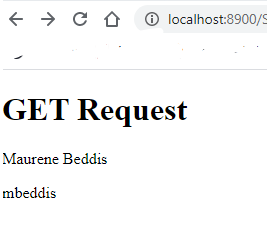
browser response should be
GET Request
Maurene Beddis
mbeddis
+ + CO localhost:8900/5 GET Request Maurene Beddis mbeddis
Step by Step Solution
There are 3 Steps involved in it

Get step-by-step solutions from verified subject matter experts
 Study Help