







Question: I am working on a website. I have several dropdown selects on my form as well as a value you can type in. I am
I am working on a website. I have several dropdown selects on my form as well as a value you can type in. I am trying to fill out the destination directory based on the choices selected from the previous dropdowns. As for example I have shown my choices in Development, North America, 12, ADAS and JSON creating a destination directory path of C:/DEV/NA/12/ADAS/JSON. I was wondering how to pass each of these values into a string from the select and then display it as the Destination Directory on the screen. This is the site so far and the code. How do I get the Destination directorty to display my selected choices separated with slashes?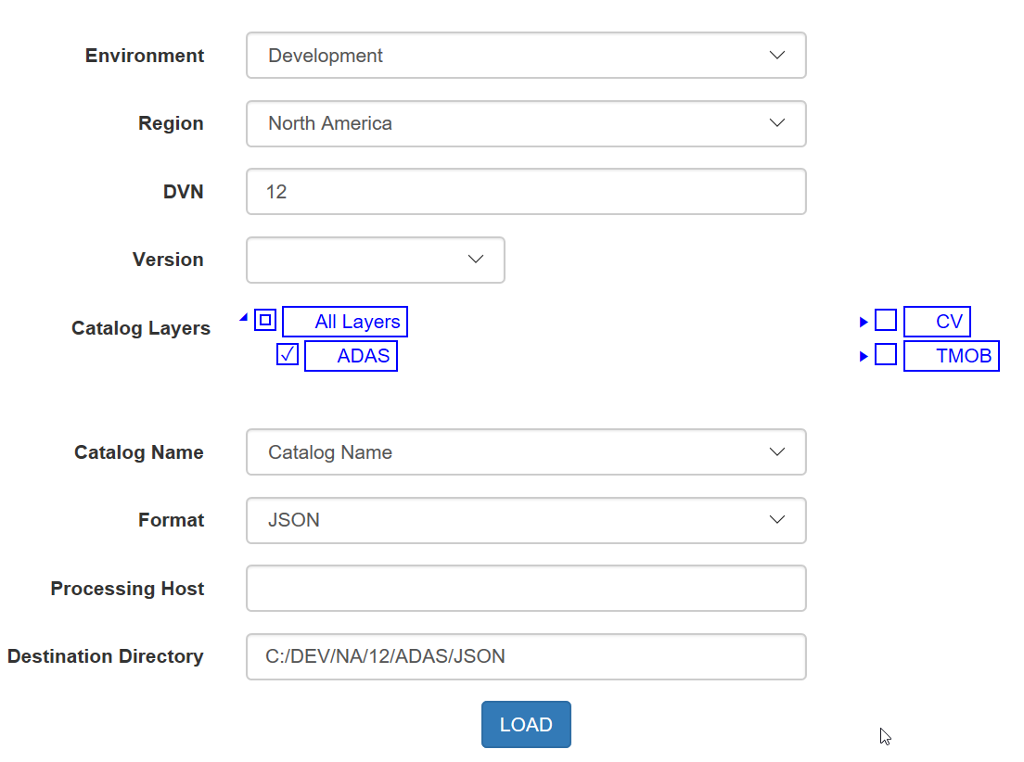
check: onCheck,
dataSource: [{ id: 1, text: "All Layers", expanded: false, spriteCssClass: "rootfolder", items: [ { id: 2, text: "ADAS", expanded: false, spriteCssClass: "folder", items: [ ] }, { id: 6, text: "CV", expanded: false, spriteCssClass: "folder", items: [ { id: 7, text: "CoreMap-ComputedValue", spriteCssClass: "image" } ] }, { id: 9, text: "TMOB", expanded: false, spriteCssClass: "folder", items: [ { id: 10, text: "INFO", spriteCssClass: "pdf" }, { id: 11, text: "Admin", spriteCssClass: "pdf" }, { id: 12, text: "Country", spriteCssClass: "pdf" }, { id: 13, text: "Domain", spriteCssClass: "pdf" }, { id: 14, text: "DomainCombo", spriteCssClass: "pdf" }, { id: 15, text: "Zone", spriteCssClass: "pdf"}, { id: 16, text: "Postal Area", spriteCssClass: "pdf" }, { id: 17, text: "Topology", spriteCssClass: "pdf" }, { id: 18, text: "Road", spriteCssClass: "pdf" }, { id: 19, text: "CRF", spriteCssClass: "pdf" }, { id: 20, text: "Address", spriteCssClass: "pdf" }, { id: 21, text: "Carto", spriteCssClass: "pdf" }, { id: 22, text: "PoiCarto", spriteCssClass: "pdf"}, { id: 23, text: "PointAddress", spriteCssClass: "pdf"}, { id: 24, text: "Poi", spriteCssClass: "pdf"}, { id: 25, text: "RailwayCrossing", spriteCssClass: "pdf"}, { id: 26, text: "Sign", spriteCssClass: "pdf"}, { id: 27, text: "ViaArea", spriteCssClass: "pdf"}, { id: 28, text: "VirtualConnection", spriteCssClass: "pdf"}, { id: 29, text: "DistanceMarkerFeaturePoint", spriteCssClass: "pdf"}, { id: 30, text: "NaturalGuidance", spriteCssClass: "pdf"}, { id: 31, text: "PremiumContentMetadata", spriteCssClass: "pdf"}, { id: 32, text: "StreetType", spriteCssClass: "pdf"}, { id: 33, text: "Annotation", spriteCssClass: "pdf"}, ] } ] }] });
// function that gathers IDs of checked nodes function checkedNodeIds(nodes, checkedNodes) { for (var i = 0; i
if (nodes[i].hasChildren) { checkedNodeIds(nodes[i].children.view(), checkedNodes); } } }
// show checked node IDs on datasource change function onCheck() { var checkedNodes = [], treeView = $("#treeview").data("kendoTreeView"), message;
checkedNodeIds(treeView.dataSource.view(), checkedNodes);
if (checkedNodes.length > 0) { message = "IDs of checked nodes: " + checkedNodes.join(","); } else { message = "No nodes checked."; }
$("#result").html(message); }
Step by Step Solution
There are 3 Steps involved in it

Get step-by-step solutions from verified subject matter experts
 Study Help