







Question: I cannot figure out how to do this if someone could just tell me what formula to do and how to do it I can't
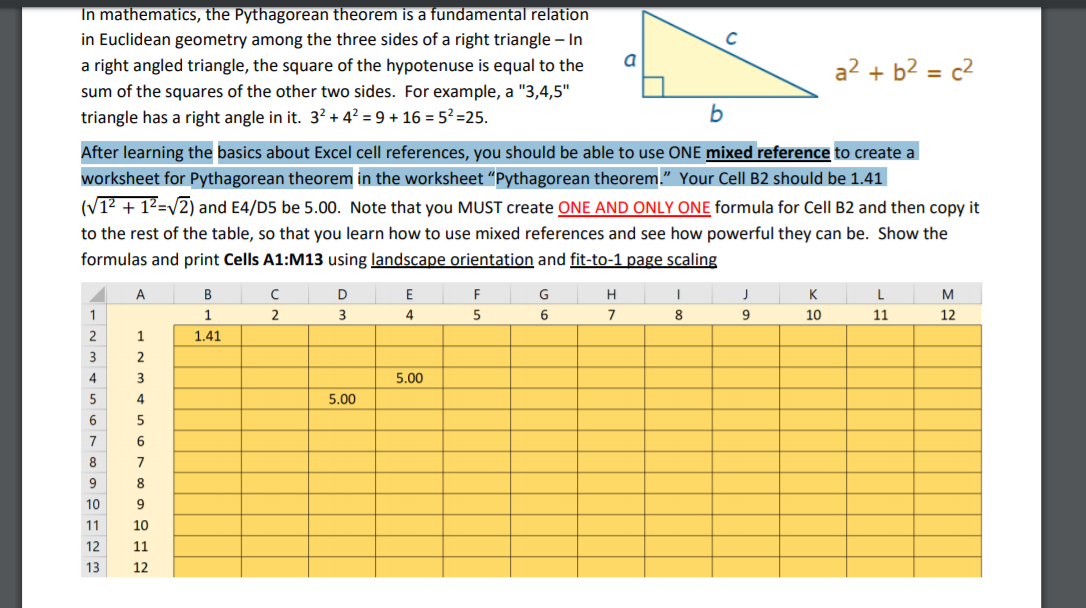 I cannot figure out how to do this if someone could just tell me what formula to do and how to do it I can't just know the numbers to input I actually have to show formula and copy it down. thanks
a2 + b2 = c2 In mathematics, the Pythagorean theorem is a fundamental relation in Euclidean geometry among the three sides of a right triangle - In a right angled triangle, the square of the hypotenuse is equal to the sum of the squares of the other two sides. For example, a "3,4,5" triangle has a right angle in it. 32 +42 = 9 + 16 = 52 =25. After learning the basics about Excel cell references, you should be able to use ONE mixed reference to create a worksheet for Pythagorean theorem in the worksheet "Pythagorean theorem." Your Cell B2 should be 1.41 (V12 + 12 = 2) and E4/D5 be 5.00. Note that you MUST create ONE AND ONLY ONE formula for Cell B2 and then copy it to the rest of the table, so that you learn how to use mixed references and see how powerful they can be. Show the formulas and print Cells A1:M13 using landscape orientation and fit-to-1 page scaling A B C D E F G H I J K L M 1 2 3 4 5 6 7 8 9 10 11 12 1.41 5.00 5.00
Step by Step Solution
There are 3 Steps involved in it

Get step-by-step solutions from verified subject matter experts
 Study Help