







Question: I can't get the program to work keep getting error code / Import Core Java packages import java.awt.*; import java.awt.event.*; public class Draw extends Frame
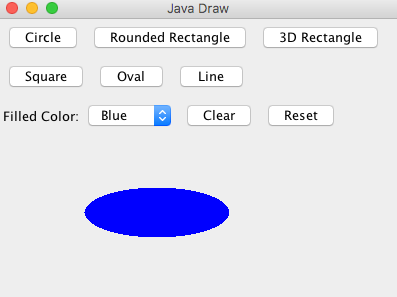 I can't get the program to work keep getting error code
/ Import Core Java packages import java.awt.*; import java.awt.event.*;
public class Draw extends Frame implements ActionListener, ItemListener {
// Initial Frame size static final int WIDTH = 400; // frame width static final int HEIGHT = 300; // frame height
// Color choices static final String COLOR_NAMES[] = {"None", "Red", "Blue", "Green"}; static final Color COLORS[] = {null, Color.red, Color.blue, Color.green};
// Button control Button circle; Button roundRec; Button threeDRec;
// Color choice box Choice colorChoice;
// the canvas DrawCanvas canvas;
/** * Constructor */ public Draw() { super("Java Draw"); setLayout(new BorderLayout());
// create panel for controls Panel topPanel = new Panel(new GridLayout(2, 1)); add(topPanel, BorderLayout.NORTH);
// create button control Panel buttonPanel = new Panel(new FlowLayout(FlowLayout.LEFT)); topPanel.add(buttonPanel);
circle = new Button("Circle"); buttonPanel.add(circle); roundRec = new Button("Rounded Rectangle"); buttonPanel.add(roundRec); threeDRec = new Button("3D Rectangle"); buttonPanel.add(threeDRec);
// add button listener circle.addActionListener(this); roundRec.addActionListener(this); threeDRec.addActionListener(this);
// create panel for color choices Panel colorPanel = new Panel(new FlowLayout(FlowLayout.LEFT)); topPanel.add(colorPanel); Label label = new Label("Filled Color:"); colorPanel.add(label); colorChoice = new Choice(); for(int i=0; i colorChoice.add(COLOR_NAMES[i]); } colorPanel.add(colorChoice); colorChoice.addItemListener(this);
// create the canvas canvas = new DrawCanvas(); add(canvas, BorderLayout.CENTER); } // end of constructor
/** * Implementing ActionListener */ public void actionPerformed(ActionEvent event) { if(event.getSource() == circle) { // circle button canvas.setShape(DrawCanvas.CIRCLE); } else if(event.getSource() == roundRec) { // rounded rectangle button canvas.setShape(DrawCanvas.ROUNDED_RECTANGLE); } else if(event.getSource() == threeDRec) { // 3D rectangle button canvas.setShape(DrawCanvas.RECTANGLE_3D); } }
/** * Implementing ItemListener */ public void itemStateChanged(ItemEvent event) { Color color = COLORS[colorChoice.getSelectedIndex()]; canvas.setFilledColor(color); }
/** * the main method */ public static void main(String[] argv) { // Create a frame Draw frame = new Draw(); frame.setSize(WIDTH, HEIGHT); frame.setLocation(150, 100);
// add window closing listener frame.addWindowListener(new WindowAdapter() { public void windowClosing(WindowEvent event) { System.exit(0); } });
// Show the frame frame.setVisible(true); } }
---------------------------------------------------------------------------------------------
// Import Core Java packages import java.awt.*; import java.awt.event.*;
public class DrawCanvas extends Canvas implements MouseListener, MouseMotionListener {
// Constants for shapes public static final int CIRCLE = 1; public static final int ROUNDED_RECTANGLE = 2; public static final int RECTANGLE_3D = 3;
// Coordinates of points to draw private int x1, y1, x2, y2;
// shape to draw private int shape = CIRCLE; /** * Method to set the shape */ public void setShape(int shape) { this.shape = shape; }
// filled color private Color filledColor = null; /** * Method to set filled color */ public void setFilledColor(Color color) { filledColor = color; }
/** * Constructor */ public DrawCanvas() { addMouseListener(this); addMouseMotionListener(this); } // end of constructor
/** * painting the component */ public void paint(Graphics g) {
// the drawing area int x, y, width, height;
// determine the upper-left corner of bounding rectangle x = Math.min(x1, x2); y = Math.min(y1, y2);
// determine the width and height of bounding rectangle width = Math.abs(x1 - x2); height = Math.abs(y1 - y2);
if(filledColor != null) g.setColor(filledColor); switch (shape) { case ROUNDED_RECTANGLE : if(filledColor == null) g.drawRoundRect(x, y, width, height, width/4, height/4); else g.fillRoundRect(x, y, width, height, width/4, height/4); break; case CIRCLE : int diameter = Math.max(width, height); if(filledColor == null) g.drawOval(x, y, diameter, diameter); else g.fillOval(x, y, diameter, diameter); break; case RECTANGLE_3D : if(filledColor == null) g.draw3DRect(x, y, width, height, true); else g.fill3DRect(x, y, width, height, true); break; } }
/** * Implementing MouseListener */ public void mousePressed(MouseEvent event) { x1 = event.getX(); y1 = event.getY(); }
public void mouseReleased(MouseEvent event) { x2 = event.getX(); y2 = event.getY(); repaint(); }
public void mouseClicked(MouseEvent e) {} public void mouseEntered(MouseEvent e) {} public void mouseExited(MouseEvent e) {}
/** * Implementing MouseMotionListener */ public void mouseDragged(MouseEvent event) { x2 = event.getX(); y2 = event.getY(); repaint(); }
public void mouseMoved(MouseEvent e) {} }
Java Draw Circle Rounded Rectangle 3D Rectangle Square Oval Line Filled Color: Blue Clear Reset
Step by Step Solution
There are 3 Steps involved in it

Get step-by-step solutions from verified subject matter experts
 Study Help