







Question: I can't seem to do the codes for this problem 4. Can somebody help me, Please? Thanks Test Cases: >>studentNames 'liYin'Jce'Jim'1 studentNames > glaasLevelFunction(optimist',12,8) harning:
I can't seem to do the codes for this problem 4. Can somebody help me, Please? Thanks
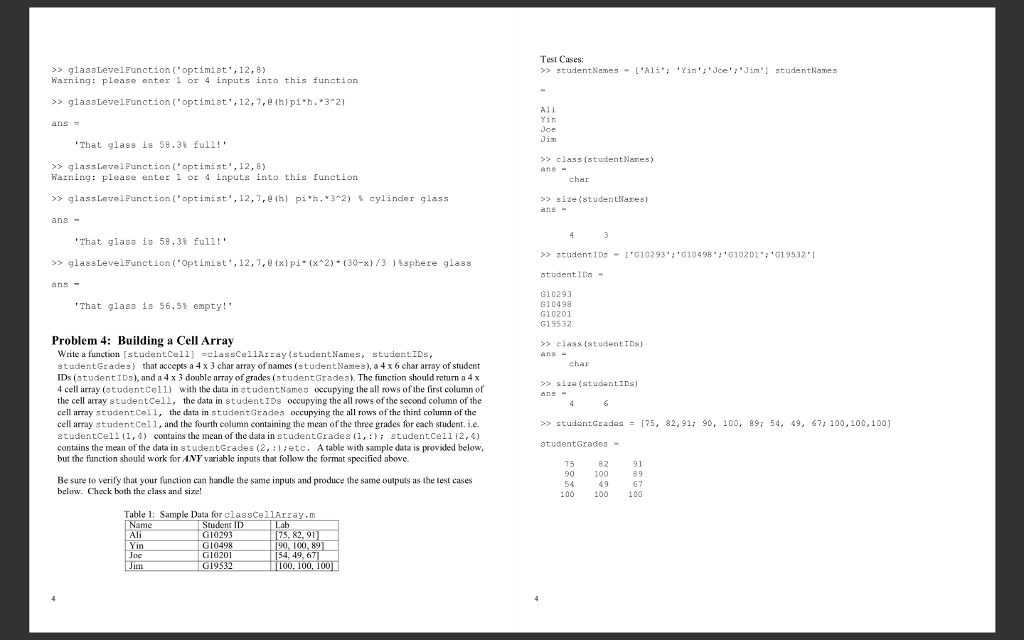
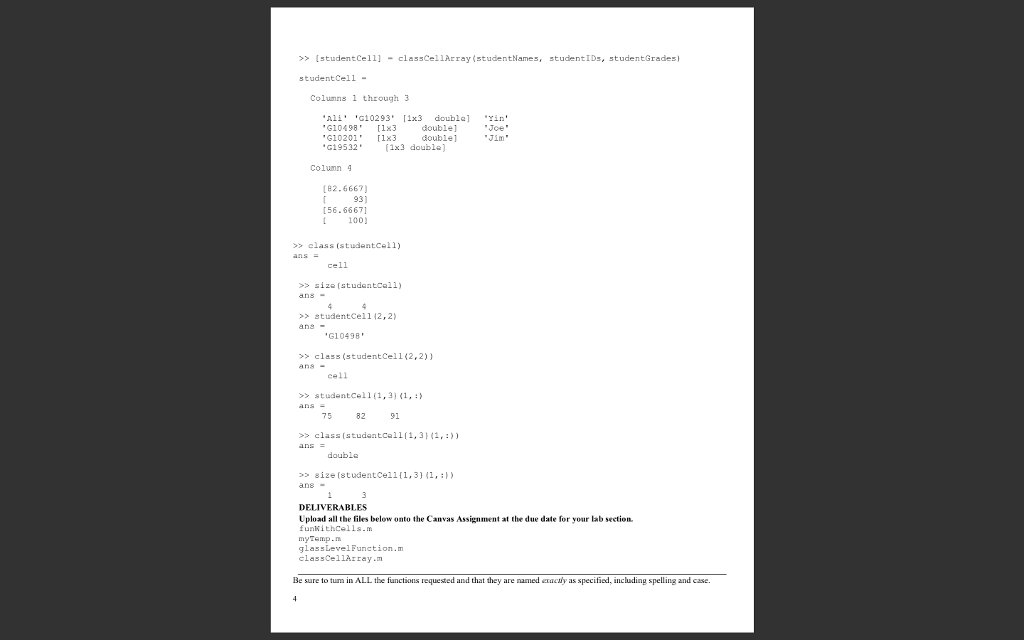
Test Cases: >>studentNames 'liYin'Jce'Jim'1 studentNames > glaasLevelFunction("optimist',12,8) harning: please enter l or 4 inputs into this function > glaasLevelFunction( optimist',12,7,ehlpi h.*32) i Yin Joe 'That glass is 58.38 full!' > class (studentNanes >>glassLevelPunction("optimist',12,B) Waning: please enter 1 ox 4 inputs into this funetion char >> glassLevelFunction('optimist. ,12,7, e ih) pi*h. * 3"2) cylinder glass size (studentNanes 'That glass is 58.3% full!' >> student ID5-'G10293 'G10498 G10201: 619532* >> glas sLevelFunction ( "Optimist., 12,1,@{x1p"(x^2)*(30-)/3 )\sphere glass studentIDs- ans G10293 G10498 G10201 G19532 'That glass is 56.5% empty! Problem 4: Building a Cell Array >> class (student IDs Write a function studentCel1 -classCellArray (studentNames, studentIDs studentGrades) that accepts a 4 x 3 char array of names (studentNames), a 4 x 6 char array of student IDs (studentIDs), and a 4 x 3 double array of grades (studentGrades). The function should return a 4 x 4 cell array (studentcell) with the data in studentNames occupying the all rows of the first column of the cell array studentCell, the data in studentIDs occupying the all rows of the second column of the char >> sza(student!Ds] array studentCell, the data in studentGrad cell array studentCel1, and the fourth column containing the mean of the three grades for each student. i.e. studentCell (1,4) contains the mean of the data in studentGrades (1,studentCell (2, 4) contains the mean of the data in studentGrades (2,etc. A table with sample data is provided below, but the function should work for ANY variable inputs that follow the format specified above. es occupying the all rows of the third column of the >> studentGrades [75, 82,91; 90, 100, 89; 54, 49, 67; 100, 100, 1001 = atudentGrades 5 Be sure to verify that your function can handle the same inputs and produce the same outputs as the test cases below. Check both the class and size 82 100 49 100 89 67 100 54 100 Table 1 le Data for classCellArray.m [90, 100, 89 54, 49, 6 T00. I Joe
Step by Step Solution
There are 3 Steps involved in it

Get step-by-step solutions from verified subject matter experts
 Study Help