



Question: I copied the table into Microsoft Excel and tried to do what each question was asking but it kept giving me errors. Any help? Please
I copied the table into Microsoft Excel and tried to do what each question was asking but it kept giving me errors. Any help?
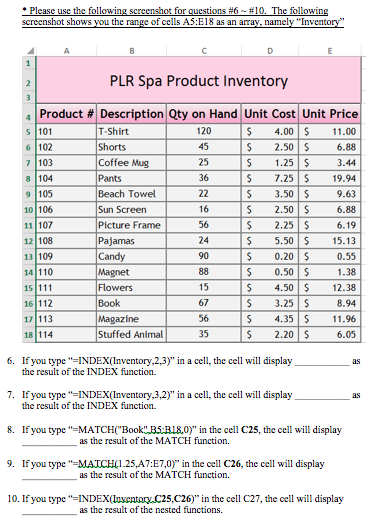
Please use the followin screenshot for estions #6 The followin screenshot shows you the range of cells A5:E18 as an array namely "Inventory" PLR Spa Product Inventory 4 Product A Description Qty on Hand Unit Cost Unit Price s 101 T-Shirt 120 IS 4.00 11.00 45 IS 2.50 S 6.88 6 102 Shorts 7 103 Coffee Mug 25 1.25 S 3.44 8104 Pants 36 IS 7.25 19.94 9 105 Beach Towel 22 IS .50 S 9.63 10 106 Sun Screen 16 IS 2.50 S 6.88 11 107 Picture Framed 56 IS 2.25 6.19 12108 Pajamas 24 S 5.50 S 15-13 13 109 Candy 90 IS 0.20 0.55 Magnet 4.50 S 12.38 15 111 Flowers 15 16 112 Book 67 3.25 8.94 17 Magazine 56 S S 4.35 11.96 18 114 Stuffed Animal 35 2.20 3 605 6. If you type INDEX(Inventory,2,3) in a cell, the cell will display the result of the INDEX function. 7. If you type INDEX(Inventory,3,2) in a cell, the cell will display the result of the INDEX function. 8. If you type MATCH( Book B5:B18, 0) in the cell C25, the cell will display as the result of the MATCH function. 9. If you type -25, A7:E7,0) in the cell C26, the cell will display as the result of the MATCH function. 10. If you type INDExamARpton.C25,C26) n the cell C27, the cell will display as the result of the nested functions
Step by Step Solution
There are 3 Steps involved in it

Get step-by-step solutions from verified subject matter experts