







Question: I could really use some help finishing this question I the code must be a GUI and I can only figure out how to do
I could really use some help finishing this question
I the code must be a GUI and I can only figure out how to do it as a console application
The code must be in C# and must be a basic as possible because I am a beginner
I have a maximum value entered to show highest number out of the 10 when sorted, I don't know how I should properly set it up to show the second number that is largest out of the set.
---------------------------------------------------------------------------
Use GUI for input and output. (Find the Two Largest Number) The process of finding the maximum value (i.e., the largest of a group of values) is used frequently in computer applications. For example, an app that determines the winner of a sales contest would input the number of units sold by each salesperson. The salesperson who sells the most units wins the contest. Suggestion: first Write pseudocode, then a C# app that takes a user inputs: a series of 10 integers, then determines and displays the largest integer.
Here is my code below
using System; using System.Collections.Generic; using System.ComponentModel; using System.Data; using System.Drawing; using System.Linq; using System.Text; using System.Threading.Tasks; using System.Windows.Forms;
namespace A1_E2 { public partial class LargestNumbers : Form { private object ex;
private void btnCalculate_Click(object sender, EventArgs e) { int max = Int32.MaxValue; int min = Int32.MinValue;
try { List
if (iBoxVal > max) { max = iBoxVal; }
}
if (max != Int32.MaxValue) { txtLargeNum.Text = max.ToString(); } else { MessageBox.Show("Please enter a valid number."); } } } catch (FormatException fx) { Console.WriteLine("btnCalculate_Click()Format Exception Handled:" + fx); MessageBox.Show("Please enter only numbers."); } catch(Exception ex) { Console.WriteLine("btnCalculate_Click()Exception Handled:" + ex); MessageBox.Show(ex.Message); } } private List
} return list; }
private void btnExit_Click(object sender, EventArgs e) { this.Close(); } } }
Naming of text boxes
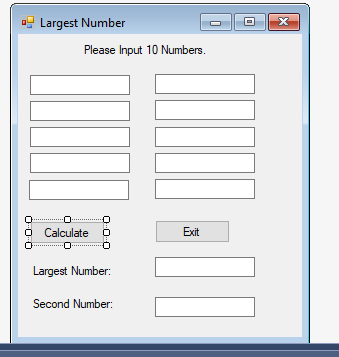 private System.Windows.Forms.Label label1; private System.Windows.Forms.TextBox textBox1; private System.Windows.Forms.TextBox textBox2; private System.Windows.Forms.TextBox textBox3; private System.Windows.Forms.TextBox textBox4; private System.Windows.Forms.TextBox textBox5; private System.Windows.Forms.TextBox textBox6; private System.Windows.Forms.TextBox textBox7; private System.Windows.Forms.TextBox textBox8; private System.Windows.Forms.TextBox textBox9; private System.Windows.Forms.TextBox textBox10; private System.Windows.Forms.Button btnCalculate; private System.Windows.Forms.Button btnExit; private System.Windows.Forms.Label label2;
Largest Number Please Input 10 Numbers Calculate Exit Largest Number: Second Number
Step by Step Solution
There are 3 Steps involved in it

Get step-by-step solutions from verified subject matter experts
 Study Help