







Question: I could use some help coding in VBA. I am trying to look up a car id from a different excel worksheet when a button
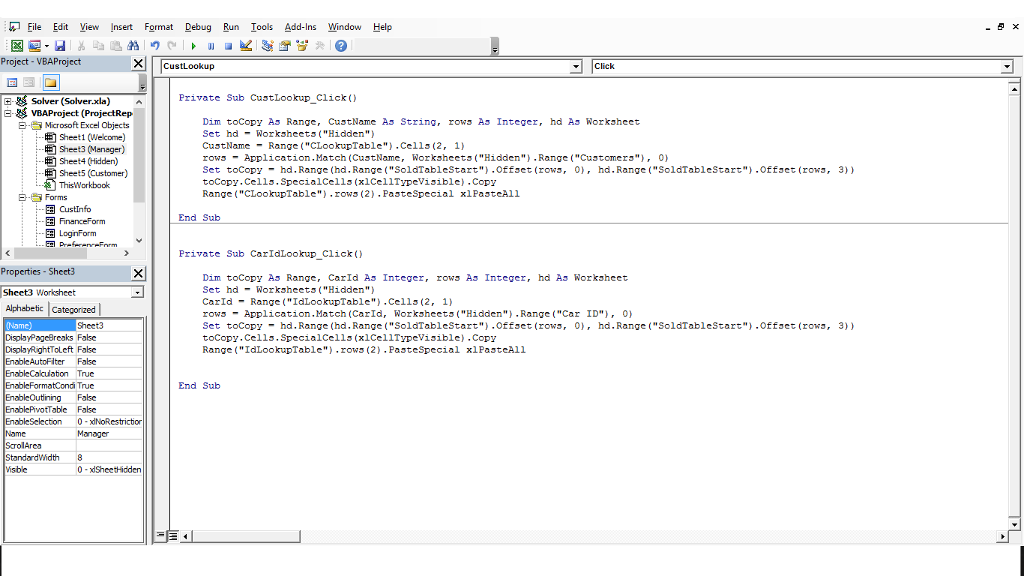
I could use some help coding in VBA. I am trying to look up a car id from a different excel worksheet when a button is pressed, sift through a column and match the ID (if found) and then tell the user "Car Sold" or "Car is available"
File Edit View Insert Format Debug Run Tools Add-In Window Help Project VBAProject Xl CustLook up Click Private Sub CustLookup Click C-R Solver (solver.xla) a E-R VBAProject (ProjectRep Dim tocopy As Range, Cust Name As String rows As Integer had As Worksheet EH-ey Microsoft Excel objects Set hd Worksheets Hidden sheet1 (Welcome) CustName Range CLookupTable Cella (2, 1) Sheet3 (Manager) rows Application Match (CustName, Worksheets Hidden Range ("Customers"), 0) HE sheet4 (Hidden) Set tocopy hd.Range (hd. Range SoldTable Start Offset (rowa 0), hd.Range SoldTable Start ffaet (rowa, 3)) Sheet5 (Customer) tocopy Cells. SpecialCells ype Visible Copy This Workbook Range CLookupTable rows (2 Paste Special xlPaateAll E -e Forms EE CustInfo End Sub LoginForm Private Sub Car IdLookup Click Properties Sheet Dim tocopy As Range, Car As Integer, rows As Integer hd As Worksheet Id Set hd Worksheets Hidden Sheet Worksheet Car Id Range IdLookupTable Cella (2, 1) Alphabetic categor zed rows Application Match (CarId Worksheets Hidden Range Car ID 00 Sheet3 Set tocopy hd.Range (hd. Range SoldTable Start Offset (rowa 0), hd.Range SoldTable Start ffaet (rowa, 3)) DisplayPage Breaks False tocopy Cells. SpecialCells ype Visible Copy DisplayRightToLeft False Range IdLookupTable rows (2 Paste Special oklPaateA ll Enable AutoFiter False Enable Calculation Enable FormatCond True End Sub EnableOutiining False EnablePIvofTable False Enable Selection 0 -dNoRestriction Name Manager ScrolArea StandardWidth Visible 0 -dSheetHidden
Step by Step Solution
There are 3 Steps involved in it

Get step-by-step solutions from verified subject matter experts
 Study Help