





Question: i couldn't answer these question could you please help me. SITXINVO04 Assessment 2-Project [Compatibility Mode] - Microsoft Word (Product Activation Failed) Mailings Review View AaB

i couldn't answer these question could you please help me.
i couldn't answer these question could you please
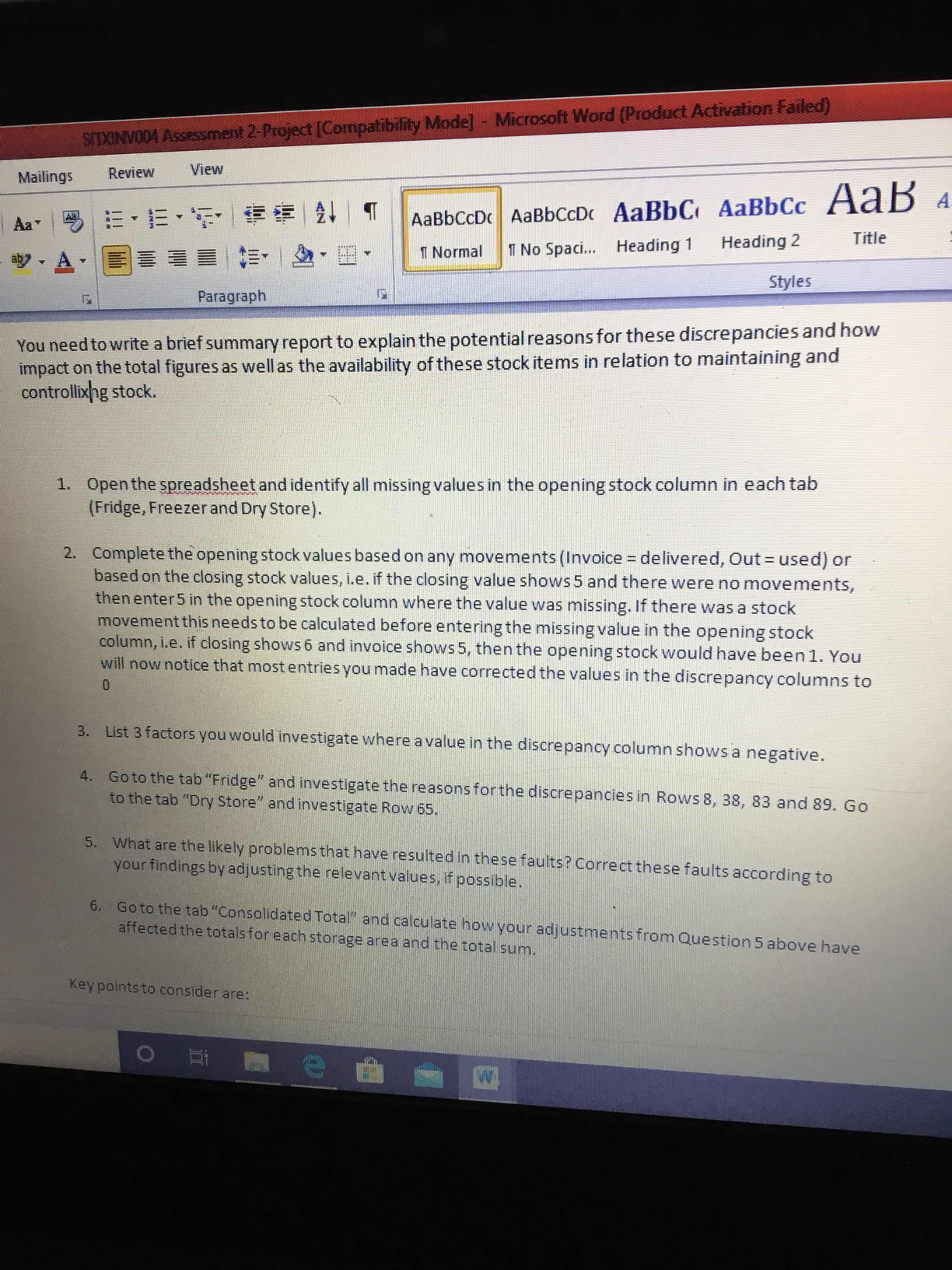
SITXINVO04 Assessment 2-Project [Compatibility Mode] - Microsoft Word (Product Activation Failed) Mailings Review View AaB Aa AaBbCCD 1 Normal 1 No Spaci... Heading 1 Heading 2 Title Styles Paragraph You need to write a brief summary report to explain the potential reasons for these discrepancies and how impact on the total figures as well as the availability of these stock items in relation to maintaining and controlling stock. 1. Open the spreadsheet and identify all missing values in the opening stock column in each tab (Fridge, Freezer and Dry Store). 2. Complete the opening stock values based on any movements (Invoice = delivered, Out = used) or based on the closing stock values, i.e. if the closing value shows 5 and there were no movements, then enter 5 in the opening stock column where the value was missing. If there was a stock movement this needs to be calculated before entering the missing value in the opening stock column, i.e. if closing shows 6 and invoice shows 5, then the opening stock would have been 1. You will now notice that most entries you made have corrected the values in the discrepancy columns to 3. List 3 factors you would investigate where a value in the discrepancy column shows a negative. 4 . Go to the tab "Fridge" and investigate the reasons for the discrepancies in Rows 8, 38, 83 and 89. Go to the tab "Dry Store" and investigate Row 65. 5. What are the likely problems that have resulted in these faults? Correct these faults according to your findings by adjusting the relevant values, if possible. 6. Go to the tab "Consolidated Total" and calculate how your adjustments from Question 5 above have affected the totals for each storage area and the total sum. Key points to consider are: O

Step by Step Solution

There are 3 Steps involved in it

1 Expert Approved Answer
Step: 1 Unlock blur-text-image

Question Has Been Solved by an Expert!

Get step-by-step solutions from verified subject matter experts

Step: 2 Unlock
Step: 3 Unlock

Students Have Also Explored These Related General Management Questions!