







Question: I couldnt do remove all the rows in the image and replace it with the rows from the transposed copy. Please complete the code below.
I couldnt do "remove all the rows in the image and replace it with the rows from the transposed copy". Please complete the code below.
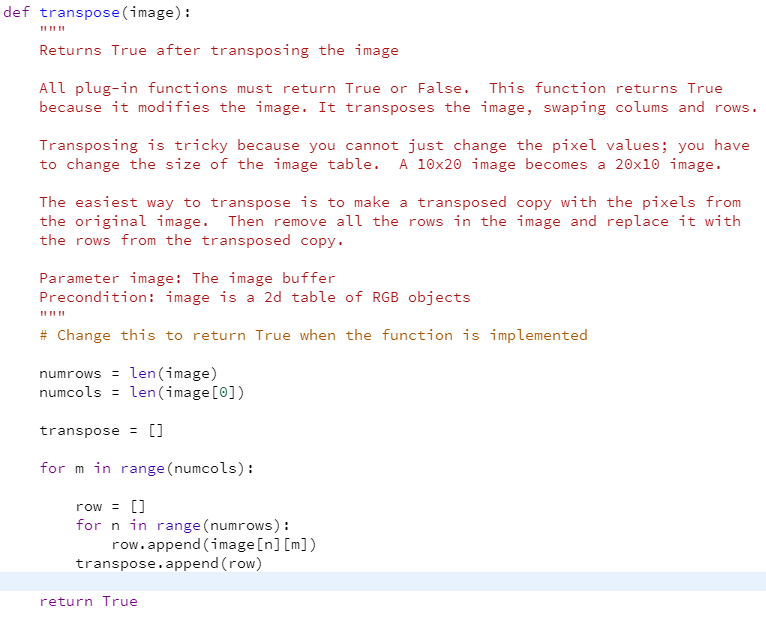
def transpose(image): Returns True after transposing the image All plug-in functions must return True or False. This function returns True because it modifies the image. It transposes the image, swaping colums and rows. Transposing is tricky because you cannot just change the pixel values; you have to change the size of the image table. A 10x20 image becomes a 20x10 image. The easiest way to transpose is to make a transposed copy with the pixels from the original image. Then remove all the rows in the image and replace it with the rows from the transposed copy. Parameter image: The image buffer Precondition: image is a 2d table of RGB objects # Change this to return True when the function is implemented numrows = len(image) numcols = len(image[0]) transpose = [] for min range (numcols): row = [] for n in range (numrows) : row.append(image[n] [m]) transpose.append(row) return True
Step by Step Solution
There are 3 Steps involved in it

Get step-by-step solutions from verified subject matter experts
 Study Help