







Question: I. Create a Point3D Class Create a class to represent a point in Three-Dimensional space. This class will have private int instance variables x, y,
I. Create a Point3D Class Create a class to represent a point in Three-Dimensional space. This class will have private int instance variables x, y, and z, to store the coordinates of the point, a constructor, an overridden toString() method to return the coordinates as a String, and get methods that return the values of each of the instance variables. II. Define an Abstract Class to Represent a 3-D Shape Your Shape3D class must meet these specifications: 1. has a private instance variable of class Point3D (aka: a member object) that stores the center of the shape For maximum credit, this member object should be created in the Shape3D constructor. I.e., the implementation of the center must be hidden from the client code (the test class) and also from all subclasses. (See CompositionDemo.java)
2. overrides toString() to return a string containing the coordinates of the center (hint: call the toString() method of the Point3D class) 3. has a concrete method that computes and returns the distance of the center of the shape from the origin (i.e., point 0,0,0) 4. has abstract methods that compute and return the surface area and the volume of a shape 5. implements Javas Comparable interface so that Shape objects are ordered by volume, ascending
III. Derive Concrete Subclasses for Sphere, Parallelepiped, Cylinder, and Cone Shapes 1. The constructor for each of these classes takes parameters for the x, y, and z coordinates of the center. In addition, the Sphere constructor takes the radius, the Parallelepiped constructor the length, width, and height, the Cone constructor the height and radius, and the Cylinder constructor the radius and height 2. Since these are concrete classes, each must implement the methods that compute/return the surface area and the volume 3. Each class will also override toString to return a string containing the class name, coordinates of the center, and the other data values (radius, length, width, etc.)
IV. Write a Driver Class to Test Your Shape Hierarchy 1. Create one object of each concrete class using the data given below - and store them in an array of Shapes. The data can be hardwired into the code, no need for user input.
2. Using a loop, traverse the array and print the following information for each object the actual class of the shape (Sphere, Cone, etc), all the input data, and the surface area and volume. 3. Sort the array in ascending order by volume. This must be done via a call to a sort method of the Arrays class. 4. Using a loop, print ONLY the class name and volume for each object in the sorted array. 5. Sort the array again, but this time in descending order by the distance from the origin. This must be done via a call to a sort method of the Arrays class. Hint: create a class that implements the Comparator interface. Remember that when you implement the compare() method, you get to say what the natural order of the objects of your class is. 6. Using a loop, print ONLY the class name and distance from the origin for each object in the sorted array.
V. Test Data to be Used Sphere: Center at (2,-7,5), radius of 15 Cone: Center at (-5,3,-1), radius 11, height 14 Cylinder: Center at (3,-5,5), radius 10, height 13 Parallelepiped: Center at (7,3,9), length 37, width 9, height 12
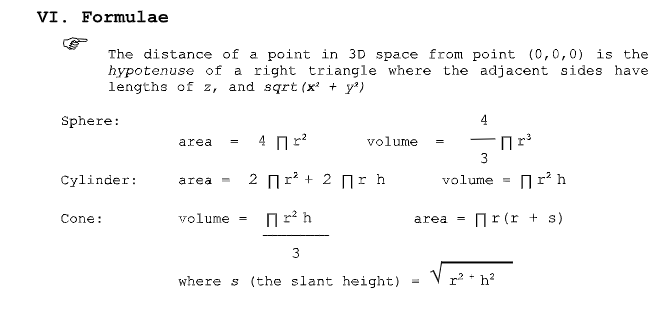
VI. Formulae The distance of a point in 3D space from point (0,0,0) is the hypotenuse of a right triangle where the adjacent sides have lengths of z, and sqrt (x* + y') Sphere: 41r2 volume-r area cylinder: area - 2 r2 + 2 r h volume- r2h Cone: volume = area = r (r + s) where s (the slant height) - Vrh VI. Formulae The distance of a point in 3D space from point (0,0,0) is the hypotenuse of a right triangle where the adjacent sides have lengths of z, and sqrt (x* + y') Sphere: 41r2 volume-r area cylinder: area - 2 r2 + 2 r h volume- r2h Cone: volume = area = r (r + s) where s (the slant height) - Vrh
Step by Step Solution
There are 3 Steps involved in it

Get step-by-step solutions from verified subject matter experts
 Study Help