







Question: I do not know how to do the menu. Please help me!!! public class Loan implements Serializable { private int loanID; private double annualInterestRate; private
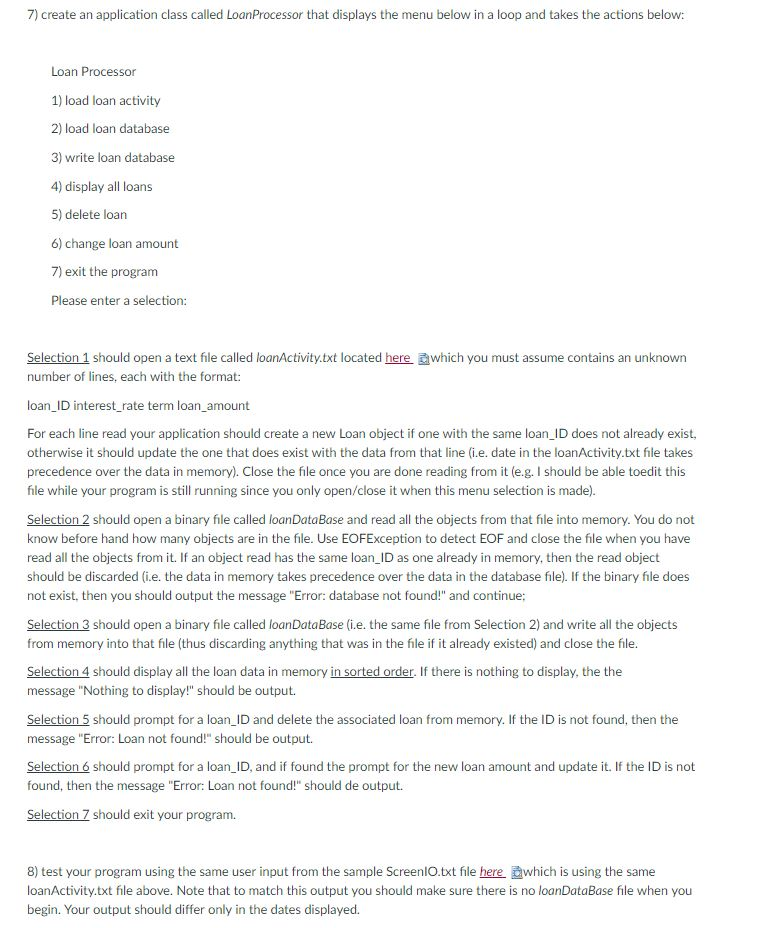
I do not know how to do the menu. Please help me!!!
public class Loan implements Serializable { private int loanID; private double annualInterestRate; private int numberOfYears; private double loanAmount; private java.util.Date loanDate;
/** Default constructor */ public Loan() { this(-1, 2.5, 1, 1000); } public Loan(double annualInterestRate, int numberOfYears, double loanAmount) { if(annualInterestRate
// Construct a loan with specified annual interest rate, number of years and loan amount public Loan(int loanID, double annualInterestRate, int numberOfYears, double loanAmount ) { this.loanID = loanID; this.annualInterestRate = annualInterestRate; this.numberOfYears = numberOfYears; this.loanAmount = loanAmount; loanDate = new java.util.Date(); }
//Return loanID public int getLoanID(){ return loanID; } //set a new loanId public void setLoanID(int loanID){ this.loanID = loanID; } // Return annualInterestRate public double getAnnualInterestRate() { return annualInterestRate; }
// Set a new annualInterestRate public void setAnnualInterestRate(double annualInterestRate) { if(annualInterestRate
//Return numberOfYears public int getNumberOfYears() { return numberOfYears; }
// Set a new numberOfYears public void setNumberOfYears(int numberOfYears) { if(numberOfYears
// Return loanAmount public double getLoanAmount() { return loanAmount; }
// Set a newloanAmount public void setLoanAmount(double loanAmount) { if(loanAmount
//Find monthly payment public double getMonthlyPayment() { double monthlyInterestRate = annualInterestRate / 1200; double monthlyPayment = loanAmount * monthlyInterestRate / (1 - (Math.pow(1 / (1 + monthlyInterestRate), numberOfYears * 12))); return monthlyPayment; }
// Find total payment public double getTotalPayment() { double totalPayment = getMonthlyPayment() * numberOfYears * 12; return totalPayment; }
// Return loan date public java.util.Date getLoanDate() { return loanDate; } @Override public String toString(){ return "LoanID: "+ loanID + " Annual Interest rate: "+ String.format("%.2f",annualInterestRate) +"%" + " Term: "+ numberOfYears+ " Loan Amount: $" + String.format("%.2f",loanAmount) +" Monthly Payment: $"+String.format("%.2f",getMonthlyPayment())+" Organization Date: "+ loanDate+" "; } public static void main(String [] argv) { Loan loan1 = new Loan(); Loan loan2 = new Loan(123,7.5,30,100000); Loan loan3 = new Loan(222,5.5,40,0); System.out.println(loan1); System.out.println(loan2); System.out.println(loan3); ArrayList
if( getMonthlyPayment()
else if( getMonthlyPayment() > o.getMonthlyPayment()) return 1;
else return 0; } }
7) create an application class called LoanProcessor that displays the menu below in a loop and takes the actions below: Loan Processor 1) load loan activity 2) load loan database 3) write loan database 4) display all loans 5) delete loan 6) change loan amount 7) exit the program Please enter a selection: Selection 1 should open a text file called loanActivity.txt located here Ewhich you must assume contains an unknown number of lines, each with the format: loan ID interest rate term loan amount For each line read your application should create a new Loan object if one with the same loan ID does not already exist, otherwise it should update the one that does exist with the data from that line (i.e. date in the loanActivity.txt file takes precedence over the data in memory). Close the file once you are done reading from it (e.g. I should be able toedit this file while your program is still running since you only open/close it when this menu selection is made) Selection 2 should open a binary file called loanDataBase and read all the objects from that file into memory. You do not know before hand how many objects are in the file. Use EOFException to detect EOF and close the file when you have read all the objects from it. If an object read has the same loanID as one already in memory, then the read object should be discarded (i.e. the data in memory takes precedence over the data in the database file). If the binary file does not exist, then you should output the message "Error: database not found!" and continue: Selection 3 should open a binary file called loanDataBase (i.e. the same file from Selection 2) and write all the objects from memory into that file (thus discarding anything that was in the file if it already existed) and close the file. Selection 4 should display all the loan data in memory in sorted order. If there is nothing to display, the the message "Nothing to display!" should be output. Selection 5 should prompt for a loan_ID and delete the associated loan from memory. If the ID is not found, then the message "Error: Loan not found! should be output. Selection 6 should prompt for a loan_ID, and if found the prompt for the new loan amount and update it. If the ID is not found, then the message "Error: Loan not found!" should de output. Selection Z should exit your program. 8) test your program using the same user input from the sample ScreenlO.txt file here which is using the same loanActivity.txt file above. Note that to match this output you should make sure there is no loanDataBase file when you begin. Your output should differ only in the dates displayed
Step by Step Solution
There are 3 Steps involved in it

Get step-by-step solutions from verified subject matter experts
 Study Help