Question: I DO NOT LIKE TO CHEAT OR COPY SO IF SOMEONE WOULD PLEASE GIVE ASSISTANCE OFF MY PROGRAM NOT A SOLUTION PROGRAM ALREADY POSTED. The
I DO NOT LIKE TO CHEAT OR COPY SO IF SOMEONE WOULD PLEASE GIVE ASSISTANCE OFF MY PROGRAM NOT A SOLUTION PROGRAM ALREADY POSTED.
The purpose of this assignment is to give you some practice with creating your own classes. This program serves as the basis for all of the other programming assignments in this class and your future Computer Science classes.
Instructions
Construct a class named Square that has a floating-point data member named side. The class should have a zero-argument constructor that initializes this data member to 0. It should have member functions named calcPerimeter() and calcArea() that calculate the perimeter and area of a square respectively, a member function setSide() to set the side of the square, a member function getSide() to return the side, and a member function showData() that displays the squares side, perimeter, and area. The formula for the area of a square is Area = side * side. The formula for the perimeter of a square is Perimeter = 4 * side.
The class should use appropriate protection levels for the member data and functions. It should also follow principles of minimalization: that is, no member data should be part of a class unless it is needed by most member functions of the object. A general rule of thumb is that if you can easily calculate it, dont store it.
Use your class in a program that creates an instance of a Square (utilizing the zero-argument constructor), prompts a user for a side, calls the setSide() function to set the squares side, and then calls showData() to display the squares side, perimeter, and area. Your program should allow the user to enter new square dimensions until the user enters -1. Be sure to include appropriate error checking. Does it make sense to enter abc as the side of a square? No. Therefore, you should ensure that the user enters numeric data for the side. Negative numbers (other than the -1 to exit) should also be prevented.
Style:
- Your lab should be constructed such that separate files are used: Square.h (your class declaration file), Square.cpp (your class implementation file), and SquareDriver.cpp (the file that contains main() and any other functions that are not part of the class).
MY ATTEMPT:
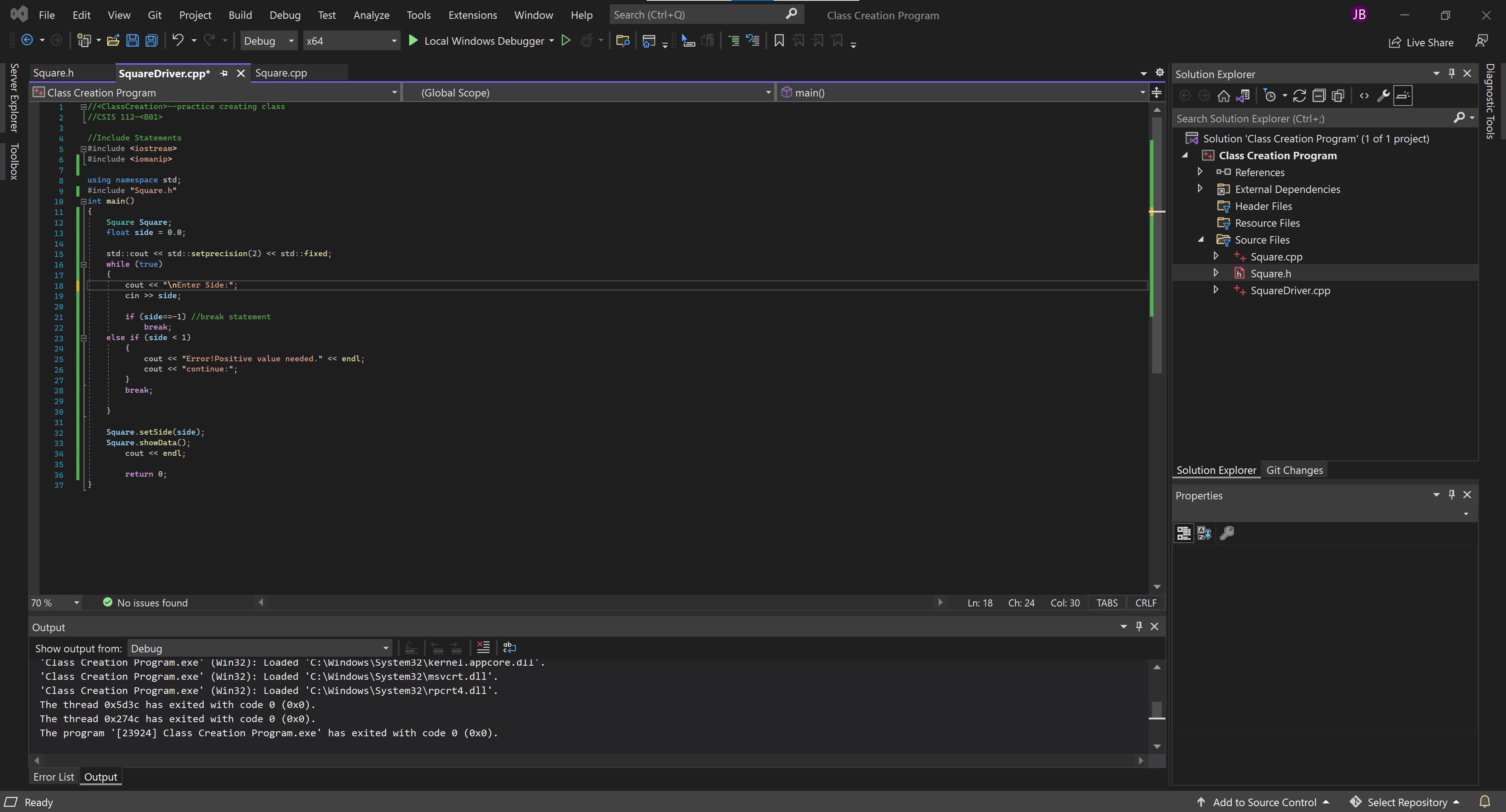
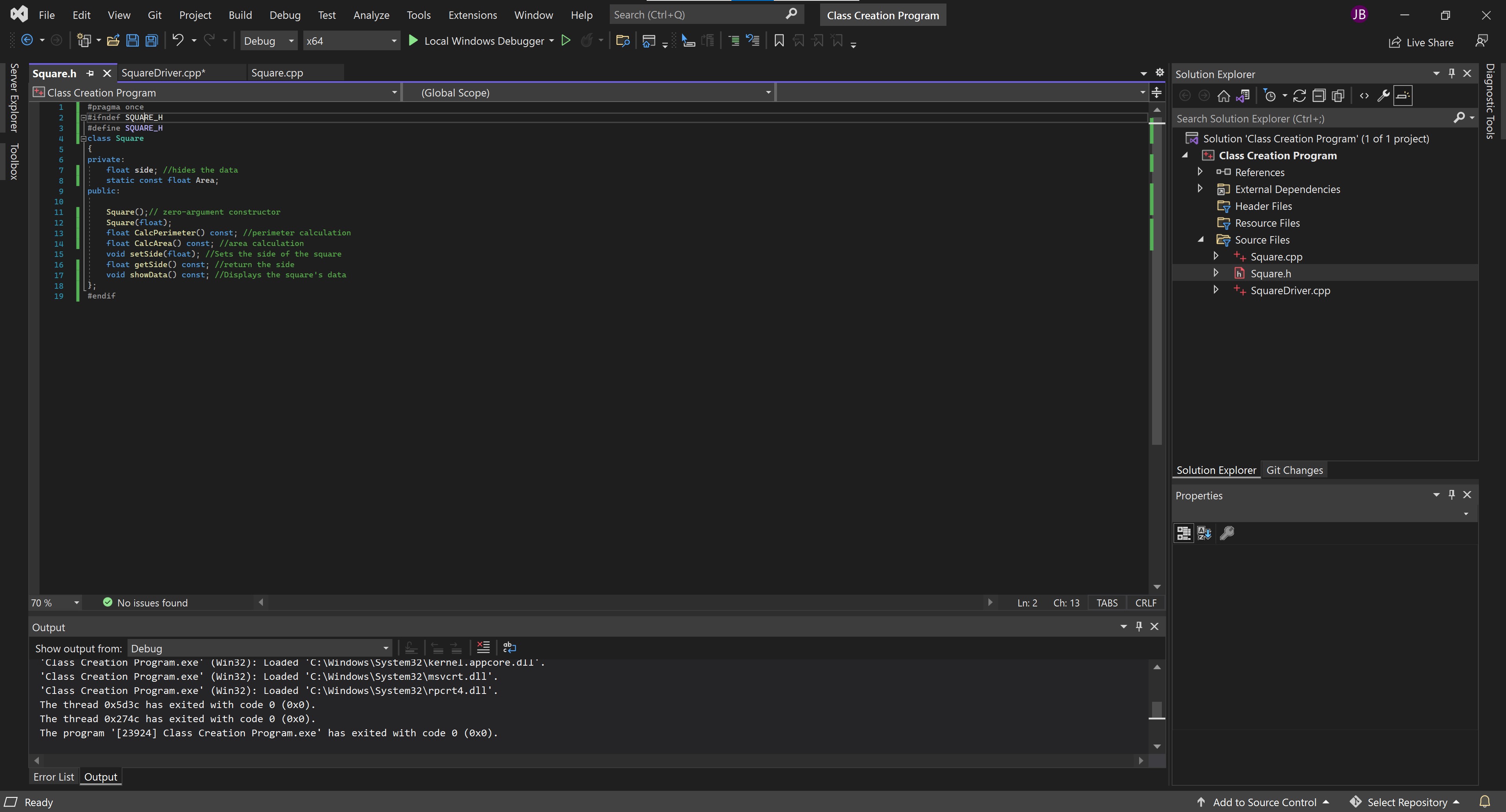
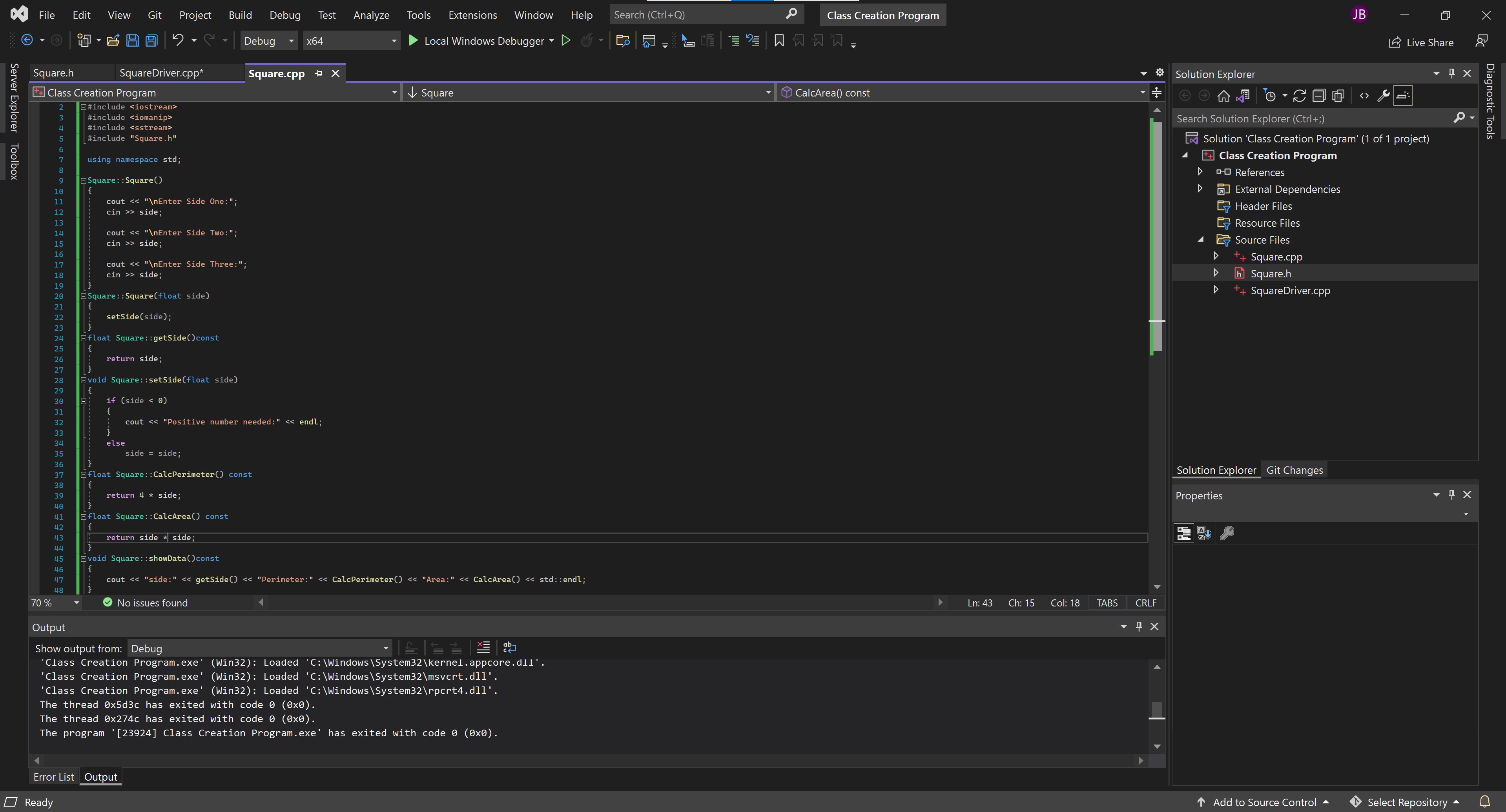
File Edit View Git Project Build Debug Test Analyze Tools Extensions Window Help Search (Ctrl+Q) O Class Creation Program JB 9 Debug x64 Local Windows Debugger - D G Do na a Live Share o Solution Explorer X Square.h Square Driver.cpp* X Square.cpp *+ Class Creation Program 1 q//--practice creating class |//CSIS 112- (Global Scope) main() I Soo b. Server Explorer Toolbox Diagnostic Tools 2 3 4. D 5 6 //Include Statements #include #include 7 8 using namespace std; #include "Square.h" Gint main() { Square Square; float side = 0.0; Search Solution Explorer (Ctrl+;) Solution 'Class Creation Program (1 of 1 project) ++ Class Creation Program 00 References External Dependencies [ Header Files [ Resource Files Source Files ++ Square.cpp h Square.h + Square Driver.cpp std::cout > side; 9 10 11 12 13 14 15 16 17 18 19 20 21 22 23 24 25 26 27 28 29 30 31 32 33 34 35 36 37 if (side==-1) //break statement break; else if (side b. Server Explorer Toolbox Diagnostic Tools 0 6 Square.h + X Square Driver.cpp* Square.cpp ++ Class Creation Program 1 #pragma once 2 #ifndef SQUARE_H 3 #define SQUARE_H 4 class Square 5 { private: 7 float side; //hides the data static const float Area; public: 10 11 Square();// zero-argument constructor 12 Square(float); 13 float CalcPerimeter() const; //perimeter calculation 14 float CalcArea() const; //area calculation 15 void setSide(float); //Sets the side of the square 16 float getSide() const; //return the side 17 void showData() const; //Displays the square's data 18 19 #endif 8 9 Search Solution Explorer (Ctrl+;) Solution 'Class Creation Program (1 of 1 project) ++ Class Creation Program 00 References External Dependencies [ Header Files [ Resource Files Source Files ++ Square.cpp h Square.h + Square Driver.cpp Solution Explorer Git Changes Properties 4 x , ZV + 70 % No issues found Ln: 2 Ch: 13 TABS CRLF 4 x Output Show output from: Debug | = = *Class Creation Program.exe' (Win32): Loaded "C:\Windows\System32\kernel.appcore.dll'. 'Class Creation Program.exe' (Win32): Loaded 'C:\Windows\System32\msvcrt.dll'. 'Class Creation Program.exe' (Win32): Loaded 'C:\Windows\System32 pcrt4.dll'. The thread Ox5d3c has exited with code o (Oxo). The thread ox274c has exited with code (Oxo). The program '[23924] Class Creation Program.exe' has exited with code o (Oxo). Error List Output O Ready Add to Source Control Select Repository File Build Debug Test Analyze Tools Extensions Window Help Search (Ctrl+Q) e Class Creation Program JB Edit View Git Project 6 - 8 9 X loc Debug x64 Local Windows Debugger - D G Do Live Share Square.cpptx o Solution Explorer X Square CalcArea() const I Soo b. Server Explorer Toolbox Square.h Square Driver.cpp* ++ Class Creation Program 2 #include 3 #include #include 5 #include "Square.h" 6 7 using namespace std; Diagnostic Tools 4 La 8 9 Square:: Square() { cout > side; Search Solution Explorer (Ctrl+;) Solution 'Class Creation Program (1 of 1 project) ++ Class Creation Program 00 References External Dependencies [ Header Files [ Resource Files Source Files ++ Square.cpp h Square.h + Square Driver.cpp cout > side; cout > side; Square::Square(float side) { setSide(side); gfloat Square::getSide() const { return side; 10 11 12 13 14 15 16 17 18 19 20 21 22 23 24 25 26 27 28 29 30 31 32 33 34 35 36 37 38 39 40 41 42 43 44 45 46 47 48 Ovoid Square::setSide(float side) { if (side









 Study Help