Question: I dont get what the question is asking for when you need to use the ActionCommand class and to implement the stack for the UndoRedo
I dont get what the question is asking for when you need to use the ActionCommand class and to implement the stack for the UndoRedo class.
[JAVA] Make a manager for a slideshow that can allow a user to add move, swap, remove pictures from the stack and be able to print it.
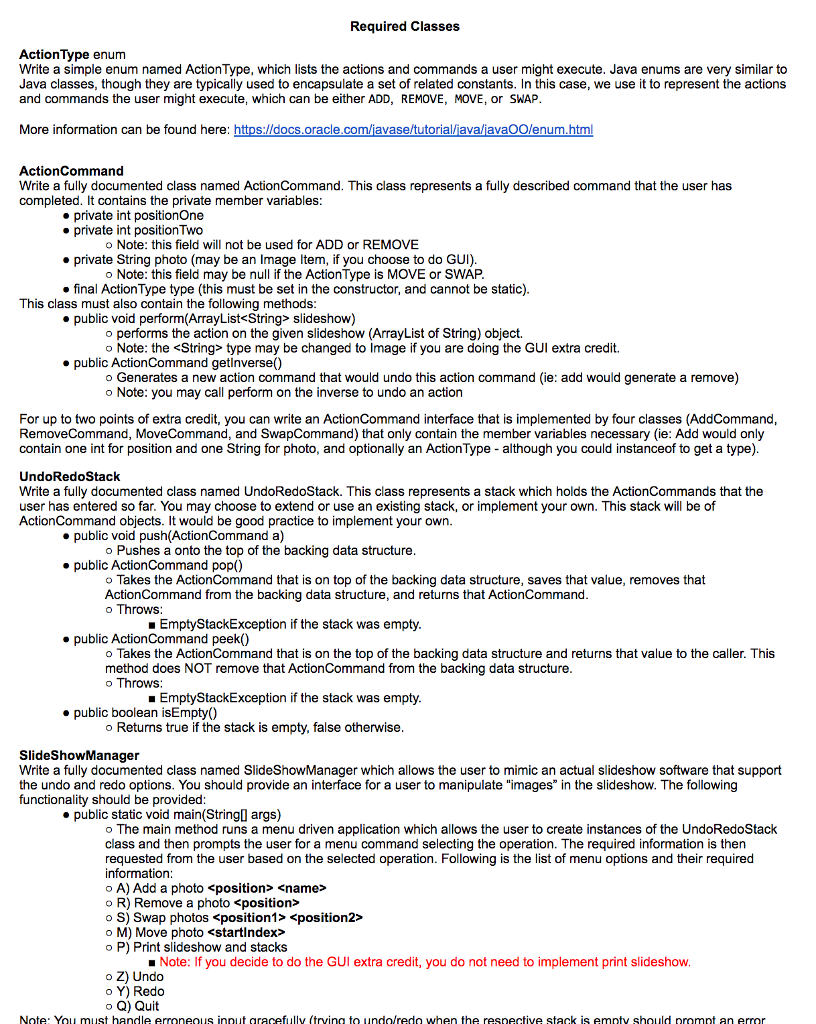
OUTPUT:
![UndoRedo class. [JAVA] Make a manager for a slideshow that can allow](https://dsd5zvtm8ll6.cloudfront.net/si.experts.images/questions/2024/09/66f45680be211_96066f456801b9de.jpg)
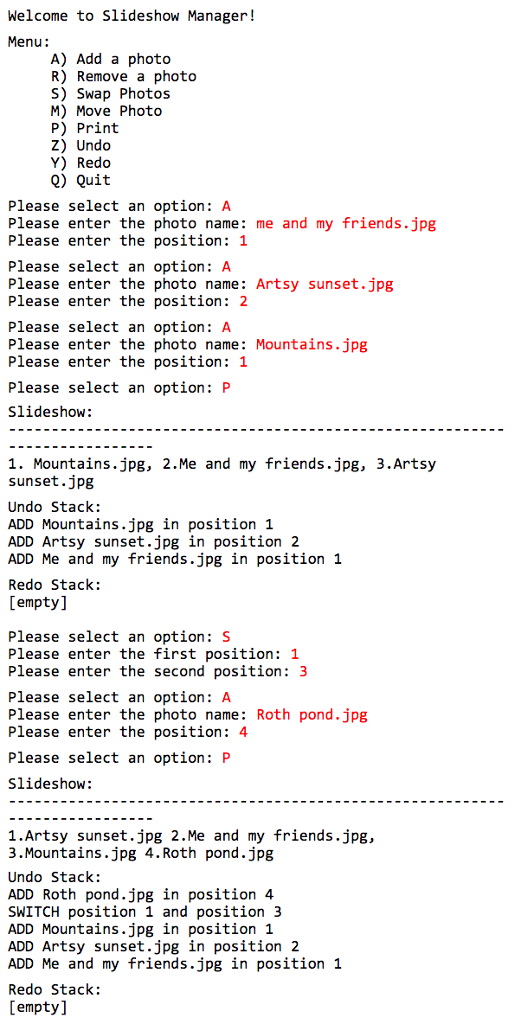
Required Classes Action Type enum Write a simple enum named Action Type, which lists the actions and commands a user might execute. Java enums are very similar to Java classes, though they are typically used to encapsulate a set of related constants. In this case, we use it to represent the action and commands the user might execu e, which can be either ADD, REMOVE, MOVE, or SWAP com/i More information can be found here: https ActionCommand Write a fully documented class named ActionCommand. This class represents a fully described command that the user has completed. It contains the private member variables private int positionOne private int positionTwo Note: this field wi not be used for ADD or REMOVE private String photo (may be an im age item, if you choose to do GUI) o Note: this field may be null if the ActionType is MovE or SWAP final ActionType type (this must be set in the constructor, and cannot be static This class must also contain the following methods public void perform(ArrayList slideshow) performs the action on the given slideshow (ArrayList of String) object. Note: the String type may be changed to Image if you are doing the GUI extra credit. public ActionCommand getInverse() o Generates a new action command that would undo this action command (ie: add would generate a remove Note: you may call perform on the inverse to undo an action For up to two points of extra credit, you can write an ActionCommand interface that is implemented by four classes (AddCommand RemoveCommand, MoveCommand, and SwapCommand) that only contain the member variables necessary (ie: Add would only contain one int for position and one String for photo, and optionally an Action Type although you could instanceoff to get a type). UndoRedostack Write a fully documented class named UndoRedostack. This class represents a stack which holds the ActionCommands that the user has entered so far. You may choose to extend or use an existing stack, or implement your own. This stack will be of ActionCommand objects. It would be good practice to implement your own public void push (ActionCommand a) Pushes a onto the top of the backing data structure public ActionCommand pop0 Takes the ActionCommand that is on top of the backing data structure, saves that value, removes tha Action Command from the backing data structure, and returns that ActionCommand o Throws n if the stack was empty. EmptyStackExceptio public ActionCommand peek o Takes the ActionCommand that is on the top of the backing data structure and returns that value to the calle r. This method does NOT remove that ActionCommand from the backing data structure Throws Empty Stack Exceptio n if the stack was empty. public boolean isEmpty Returns true if the stack is empty, false otherwise SlideShowManager Write a fully documented class named SlideShowManager which allows the user to mimic an actual slideshow software that support the undo and redo options. You should provide an interface for a user to manipulate "images" in the slideshow. The following functionality should be provided public static void main (StringO args The main method runs a menu driven application which allows the user to create instances of the UndoRedoStack class and then prompts the user for a menu command s the operation. The required information is then requested from the user based on the selected operation. Following is the list of menu options and their required nformation A) Add a photo R) Remove a photo position S) Swap photos o M) Move photo









 Study Help